23
ENGLISH
○○○○○○○○○
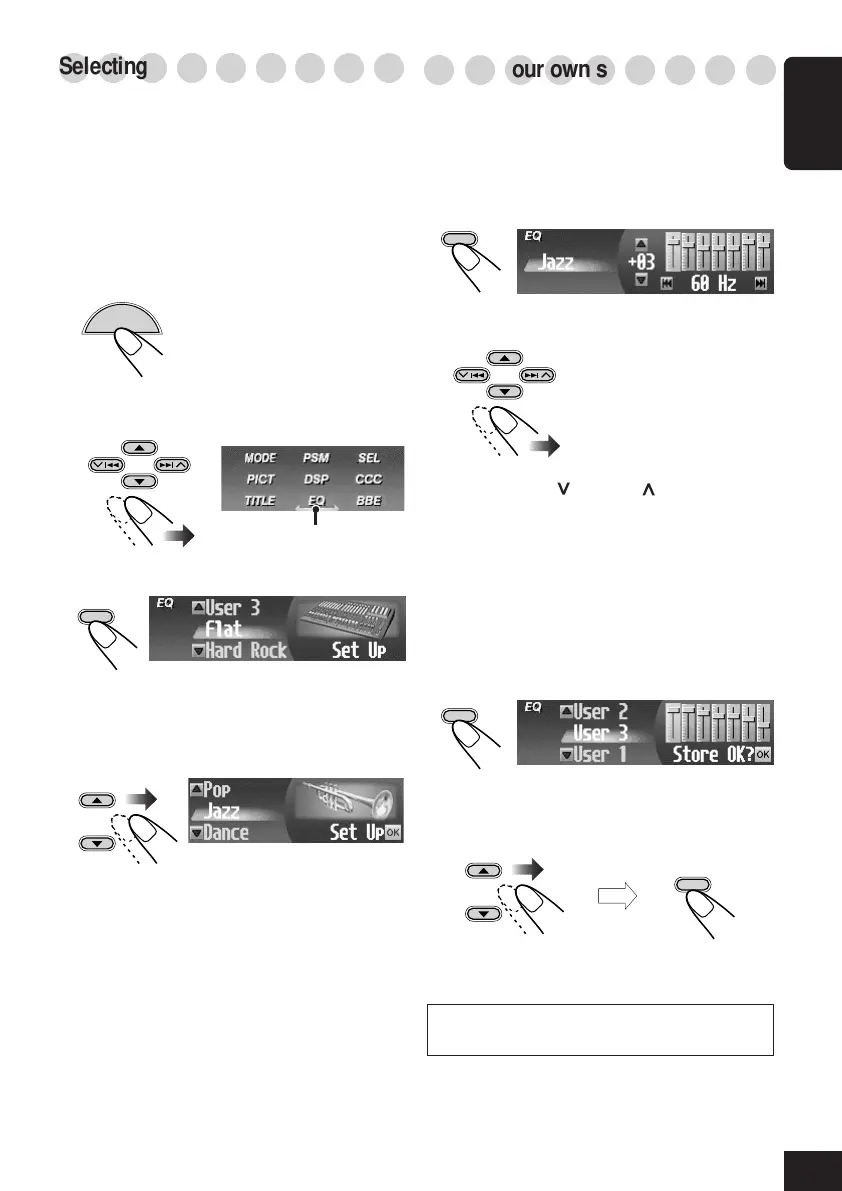
Selecting preset sound modes—EQ
You can select a sound mode suitable to the
music genre.
Available sound modes:
• Hard Rock / R&B / Pop / Jazz / Dance /
Country / Reggae / Classic
• User 1 / User 2 / User 3
• Flat (To cancel the sound mode)
1
While playing any source...
The Main Menu appears on
the display.
2
Move the cursor to “EQ” on the Main
Menu.
3
Enter the EQ (equalizer) Menu.
The currently selected mode appears
(highlighted).
4
Select (highlight) one of the preset EQ
modes.
To exit from the Menu operation, press
MENU again.
○○○○○○○○○
Storing your own sound modes
You can adjust the sound modes and store your
own adjustments in memory.
1
Repeat steps
1
to
4
on the left column to
select a sound mode you want to adjust,
then...
2
Make adjustments as you like.
1) Press 4 ( ) or ¢ ( ) to select the
frequency band—60Hz, 150Hz, 400Hz,
1kHz, 2.4kHz, 6kHz, 12kHz.
2) Press 5 (up) or ∞ (down) to adjust the
level of the selected band within the
range of –05 to +05.
3) Repeat steps 1) and 2) to adjust the other
frequency bands.
3
Finish adjustment.
4
Select (highlight) one of the user sound
modes (User 1, User 2, or User 3) you
want to store into.
“Memory” appears for a while.
For details about the preset settings of each sound
mode, see page 47.
EX.: When “Jazz” is selected.
OK
BAND
OK
BAND
MENU
OK
BAND
then
Cursor
OK
BAND
20-23_KD-SHX705[U]f.p65 4/1/04, 3:22 PM23



 To Next Page
 Loading...










