38
ENGLISH
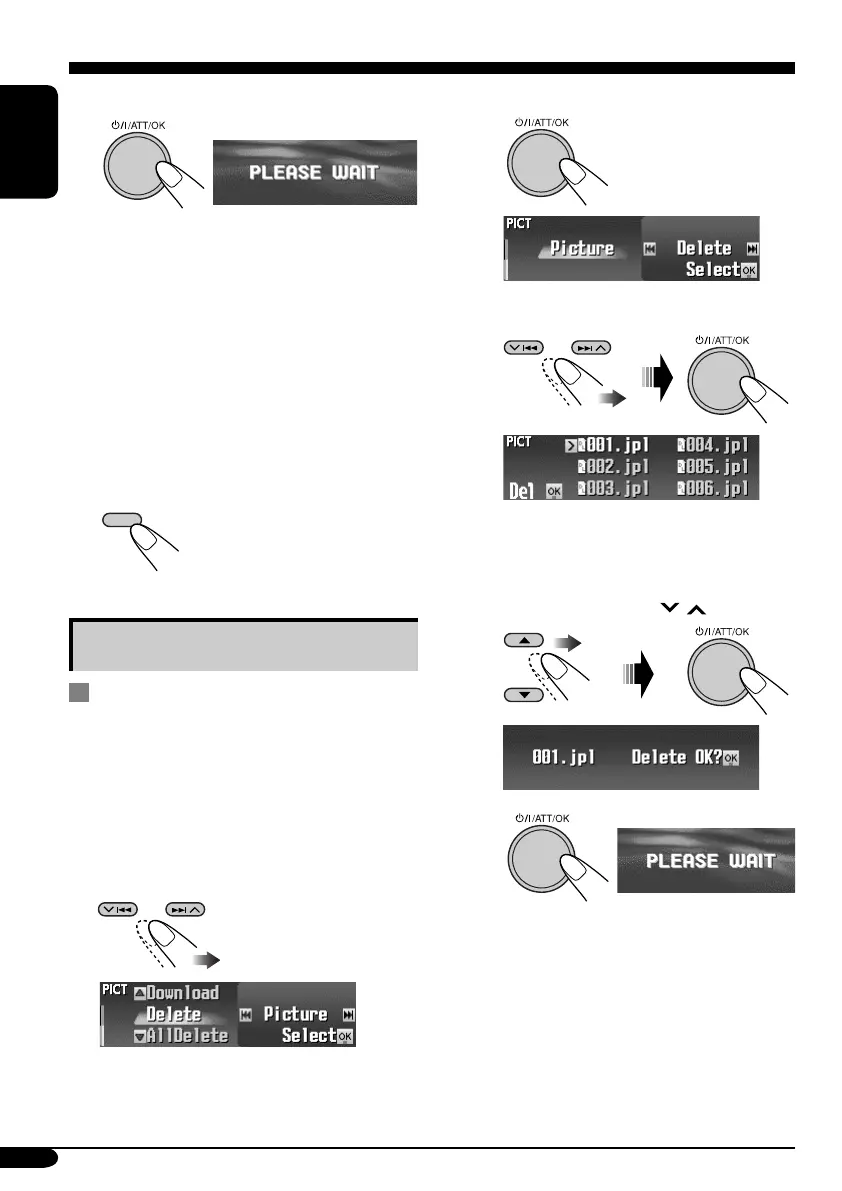
5 Download the file.
• To cancel downloading, press DISP.
• When download is complete, the File List
appears again.
6 • To download more pictures from
the same folder, repeat steps 4 and
5.
• To download more pictures from
another folder, press BACK. Then,
repeat steps 3 to 5.
7 Finish the procedure.
Deleting the fi les
Deleting the stored pictures and
animations
1
Follow steps ~ to @ on page 36.
• In step !, select the picture size.
• Then in step @, select “Delete.”
2 Select the file type—either “Picture”
or “Movie.”
Ex.: When “Picture” is selected
3 • To delete the stored pictures
1
2
Select “Delete.”
The File List appears.
3
Select a file.
• You can move the other lists by
pressing 4/¢ (
/ ).
4
• When a file is deleted, the File List
appears again.
5
Repeat steps 3 and 4 to delete
more pictures.
DISP
EN36-40_KD-SHX851[EX_EU]f.indd 38EN36-40_KD-SHX851[EX_EU]f.indd 38 05.4.8 8:50:43 PM05.4.8 8:50:43 PM


 To Next Page
 Loading...










