45
ENGLISH
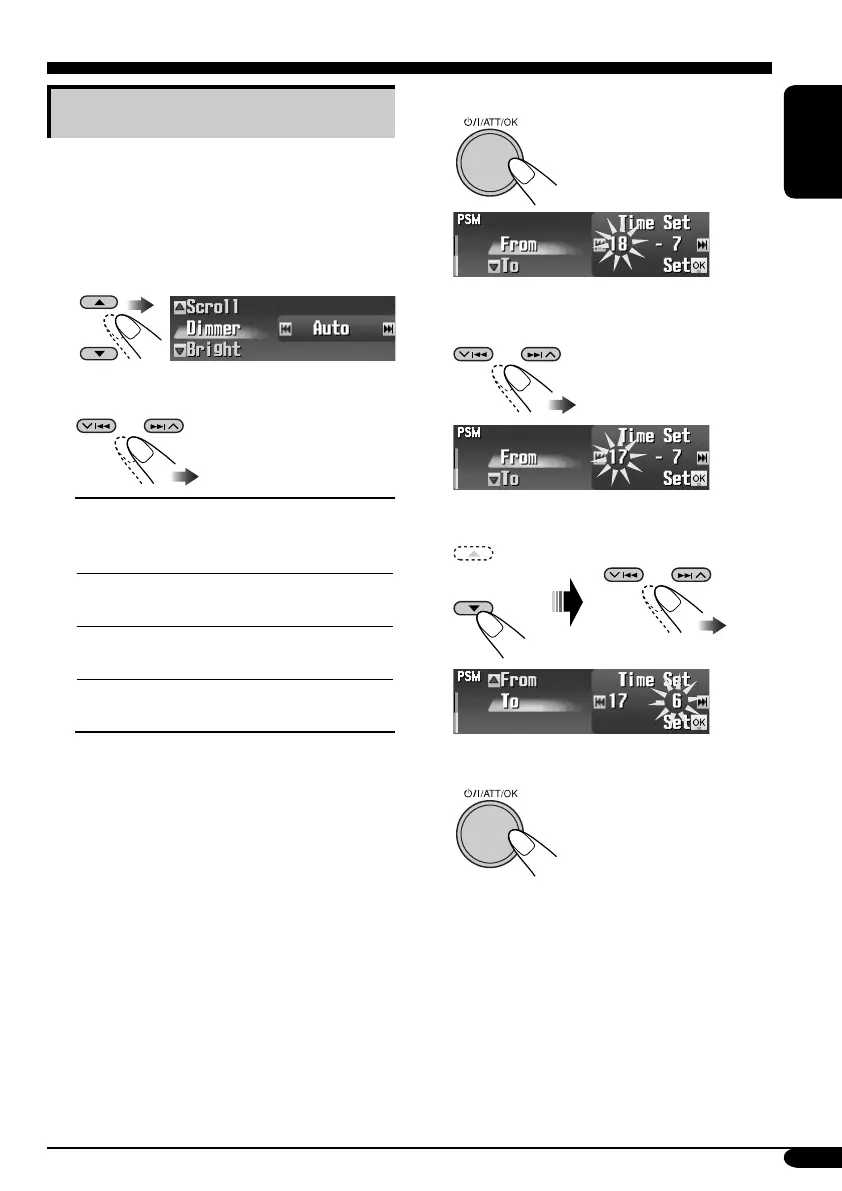
4 Enter the Time Set screen.
5 Adjust the dimmer time.
1 Set the dimmer start time.
2 Set the dimmer end time.
6 Finish the procedure.
Selecting the dimmer mode
You can dim the display at night or as you set
the timer.
1 Enter the PSM menu (see page
5).
2 Select “Dimmer.”
3 Select a setting.
Auto:
Dims the display when you
turn on the headlights.
\ Go to step 6.
Time Set:
Sets the timer for dimmer.
\ Go to step 4.
Off:
Cancels.
\ Go to step 6.
On:
Always dims the display.
\ Go to step 6.
EN41-48_KD-SHX851[EX_EU]f.indd 45EN41-48_KD-SHX851[EX_EU]f.indd 45 05.4.8 8:51:12 PM05.4.8 8:51:12 PM


 To Next Page
 Loading...










