21
ENGLISH
○○○○○○○○○
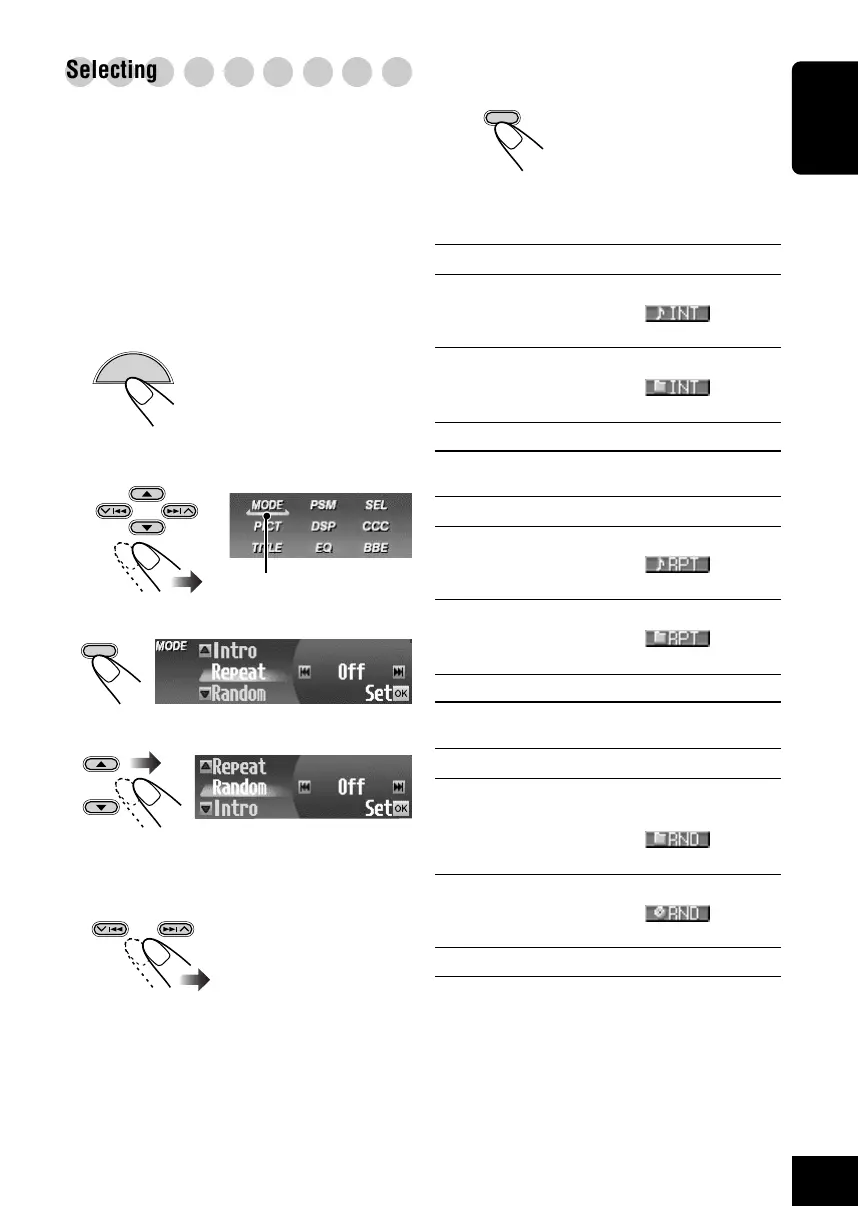
Selecting playback modes—MODE
You can use only one of the following playback
modes at a time.
• Intro Scan: You can play back the first 15
seconds of each track sequentially.
• Repeat Play: You can repeat playback.
• Random Play: You can play back tracks at
random.
To use the playback modes
1
While playing a disc...
The Main Menu appears on
the display.
2
Move the cursor to “MODE” on the
Main Menu.
3
Enter the Disc MODE Menu.
4
Select one of the playback modes.
5
Select the setting you want.
• For details, see the
tables that follows.
EX.: When “Random” (Random Play) is
selected.
MENU
OK
BAND
6
Finish the setting.
• Intro Scan modes
Mode Plays the beginnings of
Track : All tracks of the disc.
• While playing,
lights
up.
Folder* : First tracks of all folders.
• While playing,
lights
up.
Off : Cancels Intro Play.
• Repeat Play modes
Mode Plays repeatedly
Track : Current track.
• While playing,
lights
up.
Folder* : All tracks of the current folder.
• While playing,
lights
up.
Off : Cancels Repeat Play.
• Random Play modes
Mode Plays randomly
Folder* : All tracks of the current folder, then
moves to the next folder and so on.
• While playing, lights
up.
Disc : All tracks on the disc.
• While playing,
lights
up.
Off : Cancels Random Play.
* “Folder” can be selected for MP3 and WMA
discs only.
OK
BAND
Cursor
18-22_KD-SHX900[J]f.p65 04.6.1, 8:30 PM21



 To Next Page
 Loading...








