23
ENGLISH
Cursor
Sound Adjustments
—Daily Use
○○○○○○○○
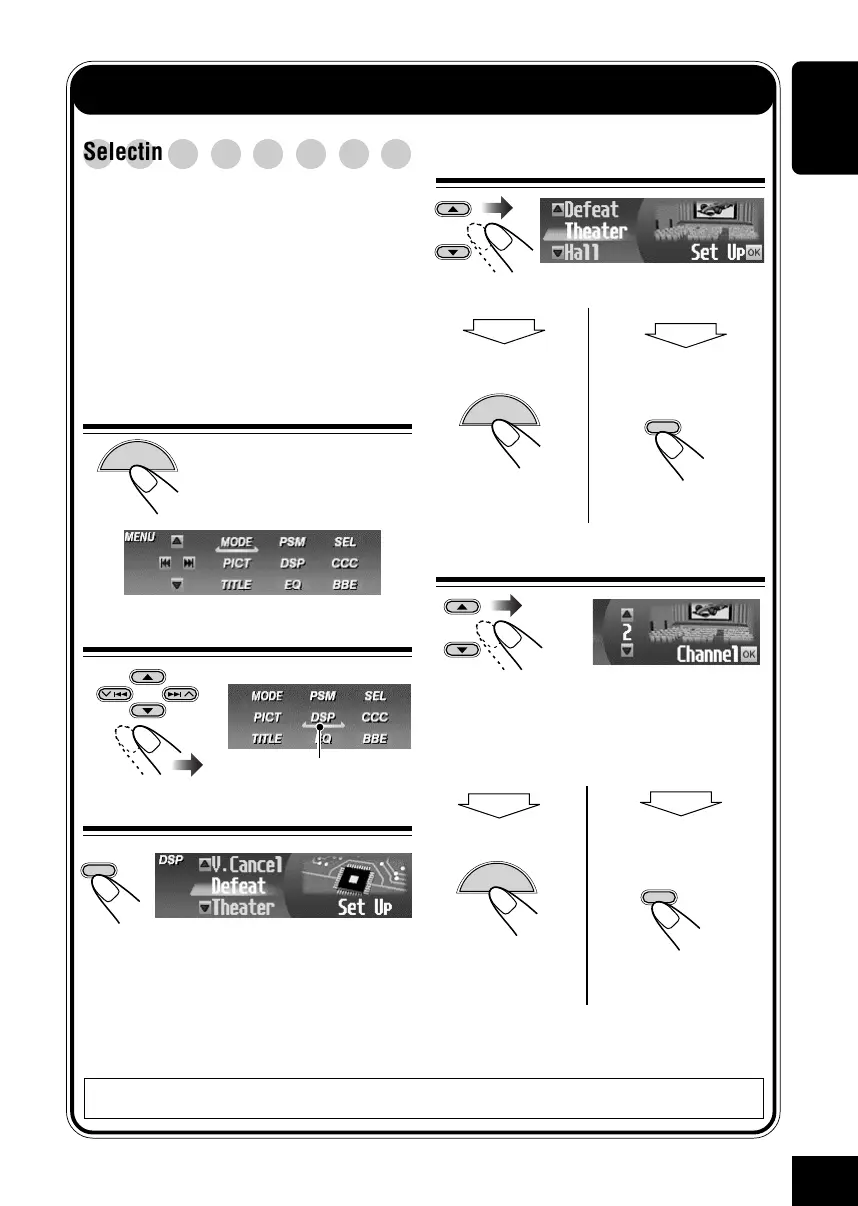
Selecting the DSP modes—DSP
You can create a more acoustic sound field
such as in a theater, hall, etc.
Available DSP modes:
• Theater / Hall / Club / Dome / Studio
• V.Cancel (Voice Cancel: Reduces the
vocal sounds. Good for mastering your
favorite songs—Karaoke.)
• Defeat (To cancel the DSP mode)
1
While playing any source...
The Main Menu appears on
the display.
2
Move the cursor to “DSP”
3
Enter the DSP Menu
then
MENU
To finish
then
OK
BAND
To make further
settings
\ See page 24.
then
MENU
then
OK
BAND
4
Select one of the DSP modes
5
Adjust the effect level (1 – 3)
The selected DSP effect level is valid for all
DSP modes except “V.Cancel.”
• As the number increases, the effect level
becomes stronger.
EX.: When “Theater” is selected.
To finish
To adjust the effect
level
\ Go to step
5
.
To cancel the DSP modes, select “Defeat” in step
3
.
MENU
The currently selected mode appears
(highlighted).
OK
BAND
23-26_KD-SHX900[J]f.p65 04.6.1, 8:30 PM23



 To Next Page
 Loading...








