22
Data Size: B6L (182 mm x 128 mm)
Book Size: B6L (182 mm x 128 mm)
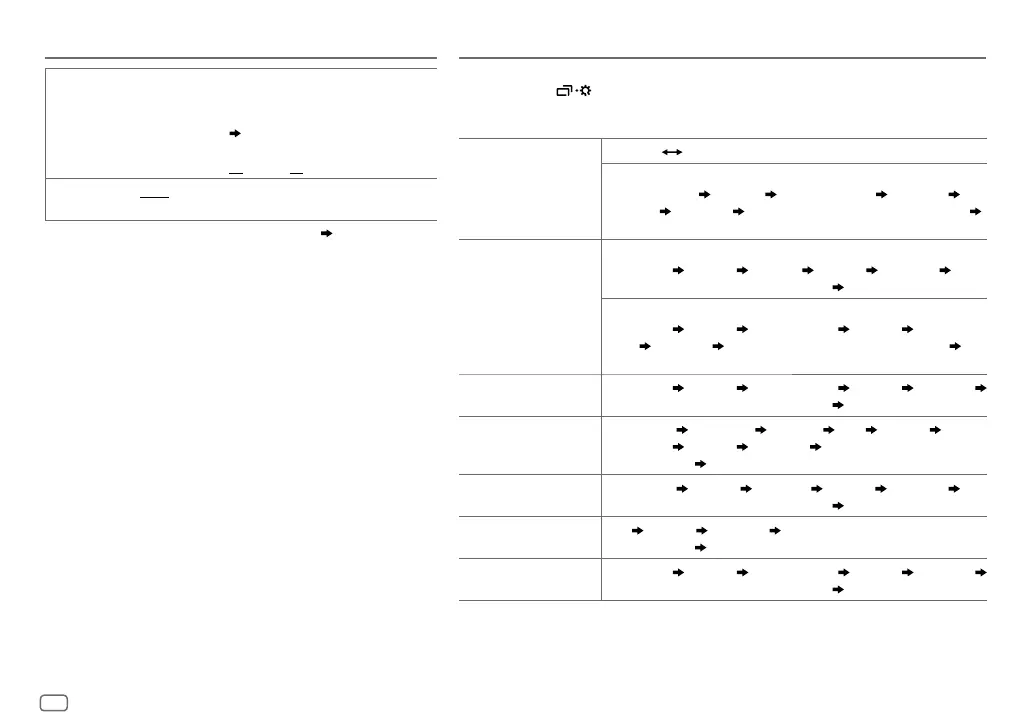
BRIGHTNESS
Set the button and display brightness for day and night
separately.
1
DAY
/
NIGHT
:Select day or night.
2
Select a zone.
( 21)
3
Set the brightness level (
00
to
31
).
(Default:
DAY
:
31
;
NIGHT
:
15
)
SCROLL
*
2
ONCE
:Scrolls the display information once.;
AUTO
:Repeats
scrolling at 5-second intervals.;
OFF
:Cancels.
*
1
The illumination control wire connection is required.
( 30)
*
2
Some characters or symbols will not be shown correctly (or will be blanked).
DISPLAY SETTINGS REFERENCES
Change the display information
Each time you press , the display information changes.
• If the information is unavailable or not recorded, “NO TEXT”, “NO NAME”, or other information (eg. station
name) appears.
FM
or
AM
Frequency Day/Clock
(For FM Radio Broadcast Data System stations only)
Station name (PS) Frequency Program type (PTY)
Radiotext+
Day/Clock
Level meter Level meter with brightness synchronisation
*
(back to the beginning)
CD
or
USB (For CD-DA)
Playing time Day/Clock Disc name
Track title Level meter
Level meter with brightness synchronisation
*
(backtothebeginning)
(For MP3/WMA/AAC/WAV/FLAC files)
Playing time Day/Clock Album title/Artist Track title
Folder/file
name
Level meter Level meter with brightness synchronisation
*
(back to the beginning)
USB-IPOD
or
ANDROID
Playing time Day/Clock Album title/Artist Track title Level meter
Level meter with brightness synchronisation
*
(back to the beginning)
PANDORA
Station name
Shared/Radio
Album title
Artist Track title
Playing time
Day/Clock Level meter Level meter with brightness
synchronisation
*
(back to the beginning)
IHEARTRADIO
Station name Track title Track Artist Day/Clock Level meter
Level meter with brightness synchronisation
*
(back to the beginning)
AUX
AUX Day/Clock Level meter Level meter with brightness
synchronisation
*
(back to the beginning)
BT AUDIO
Playing time Day/Clock Album title/Artist Track title Level meter
Level meter with brightness synchronisation
*
(back to the beginning)
* The brightness of the button illumination changes and synchronises with the sound level.
JS_JVC_KD_SR82BT_K_EN_1.indd 22JS_JVC_KD_SR82BT_K_EN_1.indd 22 11/1/2016 9:03:52 AM11/1/2016 9:03:52 AM


 To Next Page