EasyManua.ls Logo

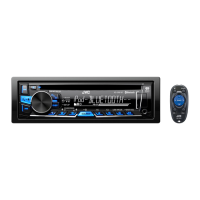
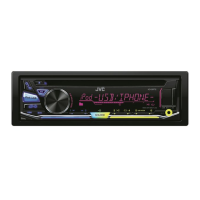
JVC KD-SR72 - User Manual

JVC KD-SR72
64 pages
Print Icon
To Next Page IconTo Next Page
Loading...
Data Size: B6L (182 mm x 128 mm)
Book Size: B6L (182 mm x 128 mm)
ENGLISH
FRANÇAIS
ESPAÑOL
B5A-1265-00 [K]
KD-SR72
CD RECEIVER
INSTRUCTION MANUAL
RÉCEPTEUR CD
MANUEL D’INSTRUCTIONS
RECEPTOR CON CD
MANUAL DE INSTRUCCIONES
For customer Use:
Enter below the Model No. and Serial No. which are
located on the top or bottom of the cabinet. Retain this
information for future reference.
Model No.
Serial No.
JS_JVC_KD_SR72_K_C.indd 1JS_JVC_KD_SR72_K_C.indd 1 5/1/2016 2:14:58 PM5/1/2016 2:14:58 PM

Questions and Answers

  • K
    Kari GlassSep 23, 2025
    Why are correct characters not displayed on my JVC KD-SR72 Car Receiver?
    • J
      johngonzalezSep 23, 2025
      This unit can only display uppercase letters, numbers, and a limited number of symbols. Depending on the display language you have selected, some characters may not be displayed correctly.
  • B
    Benjamin MaloneAug 25, 2025
    What to do if the disc cannot be ejected from my JVC KD-SR72 Car Receiver?
    • E
      elizabeth44Aug 25, 2025
      If your JVC Car Receiver disc cannot be ejected, press and hold the eject button to forcibly eject the disc. Be careful not to drop the disc when it is ejected.
  • A
    Ashley RiveraAug 25, 2025
    What to do if “CANNOT PLAY” flashes on my JVC KD-SR72 Car Receiver?
    • S
      susandouglasAug 26, 2025
      If “CANNOT PLAY” flashes and/or the connected device cannot be detected on your JVC Car Receiver, verify that the connected device is compatible with the unit and that the files are in supported formats. Also, try reattaching the device.
  • D
    David HartAug 26, 2025
    What to do if “PLEASE” and “EJECT” appear alternately on my JVC KD-SR72?
    • A
      Angela JenningsAug 27, 2025
      If “PLEASE” and “EJECT” appear alternately on your JVC Car Receiver, press the eject button, then insert the disc correctly.
  • D
    Dr. Andrew MercadoAug 27, 2025
    What does “UPGRADE APP” mean on my JVC Car Receiver?
    • L
      Lance ScottAug 27, 2025
      If “UPGRADE APP” appears on your JVC Car Receiver, make sure you have installed the latest version of the Pandora application on your device.
  • D
    Donna StewartSep 14, 2025
    What does “NO SKIPS” mean on my JVC KD-SR72?
    • M
      Mary BenjaminSep 14, 2025
      If “NO SKIPS” appears on your JVC Car Receiver, retry after deleting unnecessary stations from your device.
  • P
    pcomptonSep 12, 2025
    Why is the elapsed playing time incorrect on my JVC Car Receiver?
    • C
      Crystal HortonSep 12, 2025
      If the elapsed playing time is not correct on your JVC Car Receiver, this depends on the recording process earlier.
  • T
    Tammy ClarkSep 13, 2025
    What does “NOT SUPPORT” mean when track skips on my JVC Car Receiver?
    • J
      jerrybentleySep 13, 2025
      If “NOT SUPPORT” appears and the track skips on your JVC Car Receiver, check whether the track is a playable format.
  • C
    Christine MolinaSep 4, 2025
    What does “CONNECT ERR” mean on JVC Car Receiver?
    • D
      Dawn LloydSep 5, 2025
      If “CONNECT ERR” appears on your JVC Car Receiver, it indicates that the communication is unstable.
  • D
    deckerautumnSep 2, 2025
    What does “MISWIRING CHECK” mean on my JVC KD-SR72 Car Receiver?
    • R
      Rickey GrantSep 2, 2025
      If “MISWIRING CHECK” appears on your JVC Car Receiver, turn the power off, then check to be sure the terminals WIRING THEN PWR ON of the speaker wires are insulated properly. Turn the power on again.

Summary

Important Usage Guidelines

Safety Precautions

Covers warnings, cautions, general safety, and remote control handling for safe operation.

How to Read This Manual

Explains how operations are explained, language used, and references.

Basic Operations and Controls

Unit Controls

Overview of the faceplate and remote control layout and functions.

System Operations

Guide to resetting the unit and performing basic operations like power and volume.

Getting Started and Initial Setup

Initial Setup

Steps to cancel demonstration mode, set the clock, and configure basic settings.

Radio Tuning and Reception

Station Tuning

How to search for and select radio stations.

Memory and Presets

Storing and selecting favorite radio stations.

Radio Timer

Setting the unit to turn on the radio at a specific time.

Advanced Radio Features

Advanced Radio Features

SSM, IF BAND, MONO, AREA, PTY SEARCH for enhanced radio reception.

Connecting External Audio Sources

Portable Audio and Bluetooth

Connecting portable audio players and Bluetooth devices for audio playback.

Media Playback Setup

Device Connection

Connecting USB, iPod/iPhone, and Android devices.

Playback Controls

Managing playback features like repeat, shuffle, and track selection.

Media Playback Control and Features

Control Modes and Navigation

Selecting control modes and navigating media files and folders.

Audiobook Playback Speed

Adjusting playback speed for audiobooks on iPod/iPhone.

Pandora Music Service

Setup and Listening

Installing the Pandora app and starting music playback.

Station Management

Creating, saving, searching, and bookmarking Pandora stations.

iHeartRadio Music Service

Setup and Listening

Installing the iHeart Link app and starting music playback.

Station Search

Searching for stations and skipping cities alphabetically.

Audio Settings and Equalization

Equalizer Presets

Selecting and customizing sound equalizer presets.

Custom Sound Settings

Adjusting sound levels using EASY EQ and PRO EQ for personalized audio.

Audio Enhancements and Speaker Configuration

Audio Enhancements

Adjusting Bass Boost, Loudness, Subwoofer output, and digital track expansion.

Speaker and System Settings

Configuring speaker output and telephone muting.

Display Settings and Illumination

Speaker Output Configuration

Setting speaker output based on connection type (lineout or speaker leads).

Illumination Control

Adjusting display dimmer and brightness for day and night.

Display Customization and Maintenance

Display Options

Controlling information scrolling and color customization for display zones.

References and Disc Handling

Maintenance and Disc Handling

Cleaning the unit, connector, and proper handling of discs.

Media Compatibility and Service Information

Media Compatibility

Details on playable files, USB devices, iPod/iPhone, and Android compatibility.

Service Information

Information on Pandora and iHeartRadio services and their limitations.

Display Information and Troubleshooting Overview

Display Information Changes

How to cycle through display information for various sources.

Troubleshooting Common Issues

General and Radio Issues

Solutions for common problems like no sound, wiring errors, and poor radio reception.

Troubleshooting Media and Application Errors

Media Playback Issues

Troubleshooting for CD, USB, iPod, and Android playback problems.

Application Connectivity Issues

Solutions for Pandora and iHeartRadio connection and error messages.

Troubleshooting Specific Errors and Support

iHeartRadio Specific Errors

Solutions for specific iHeartRadio errors and general troubleshooting advice.

Technical Specifications: Tuner and CD Player

Tuner and CD Player Specs

Technical details for the radio tuner and CD player components.

Technical Specifications: Connectivity and Audio

USB, Auxiliary, and Audio Specs

Technical details for USB, auxiliary inputs, and audio output capabilities.

General Specifications

Overall unit specifications including voltage, current, dimensions, and weight.

Installation and Mounting Procedures

Mounting Procedures

Steps for installing the unit in-dash or without a mounting sleeve.

Unit Removal and Basic Installation

How to remove the unit and the basic installation procedure overview.

Wiring Connections and Installation Parts

Wiring Connections

Detailed guide for connecting the unit's wiring harness to the vehicle's electrical system.

Installation Parts List

List of components included for installation.

Safety, Compliance, and Disposal Information

Safety Warnings and Precautions

Laser product safety, hazardous radiation exposure, and general cautions.

FCC Compliance

FCC warnings and notes regarding radio frequency energy and interference.

Environmental Disposal Information

Guidelines for disposing of electrical equipment and batteries responsibly.

JVC KD-SR72 Specifications

General IconGeneral
Max Power Output50W x 4
RMS Power22W x 4
MP3 PlaybackYes
WMA PlaybackYes
Display TypeLCD
Pre-Output Voltage2.5V
Frequency Response20Hz - 20kHz
Channels4
Rotary Encoder VolumeYes
Detachable Face SecurityYes
Wireless Remote ControlYes
Tuner TypeAM/FM
USB PortYes
MP3 Bitrate32kbps - 320kbps
WMA Bitrate32-192kbps
AM Frequency Range530kHz - 1700kHz
AUX InputYes
Preset EQYes

Related product manuals