ENGLISH
29
Data Size: B6L (182 mm x 128 mm)
Book Size: B6L (182 mm x 128 mm)
INSTALLATION / CONNECTION
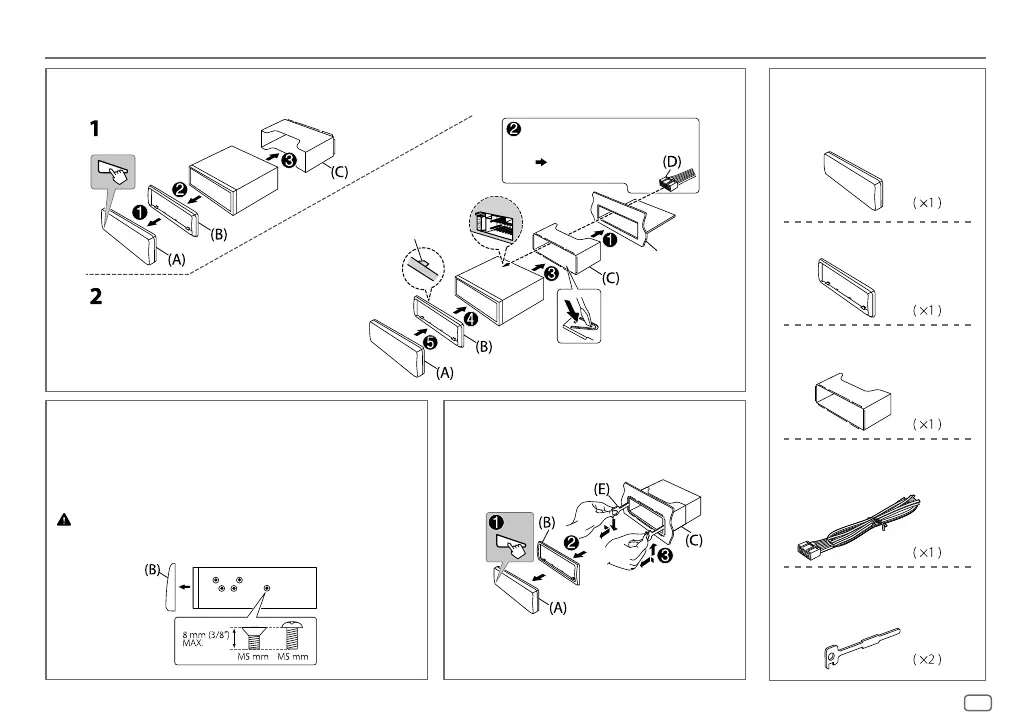
Installing the unit (in-dash mounting)
Do the required wiring.
(
30)
Bend the appropriate tabs to hold
the sleeve firmly in place.
Hook on the top side
Orientate the trim plate as
illustrated before fitting.
Dashboard of
your car
Part list for installation
(A)
Faceplate
(C)
Mounting sleeve
(B)
Trim plate
(D)
Wiring harness
(E)
Extraction key
How to remove the unitWhen installing without the mounting sleeve
1
Remove the mounting sleeve and trim plate from
the unit.
2 Align the holes in the unit (on both sides) with the
vehicle mounting bracket and secure the unit with
screws (commercially available).
Use only the specified screws. Using wrong screws might damage
the unit.
JS_JVC_KD_SR82BT_K_EN_1.indd 29JS_JVC_KD_SR82BT_K_EN_1.indd 29 11/1/2016 9:03:56 AM11/1/2016 9:03:56 AM



 To Next Page