ENGLISH
16
Data Size: B6L (182 mm x 128 mm)
Book Size: B6L (182 mm x 128 mm)
The connectivity result flashes on the display.
“PAIRING OK” and/or “HANDS-FREE OK”
*
1
and/
or “AUD.STREAM OK”
*
2
and/or “PBAP OK”
*
3
:
Compatible
*
1
Compatible with Hands-Free Profile (HFP)
*
2
Compatible with Advanced Audio Distribution Profile (A2DP)
*
3
Compatible with Phonebook Access profile (PBAP)
After 30 seconds, “PAIRING DELETED” appears to
indicate that pairing has been deleted, and the
unit exits check mode.
• To cancel, press and hold
to turn off
the power, then turn on the power again.
BLUETOOTH®
BLUETOOTH — Audio
Audio player via Bluetooth
1
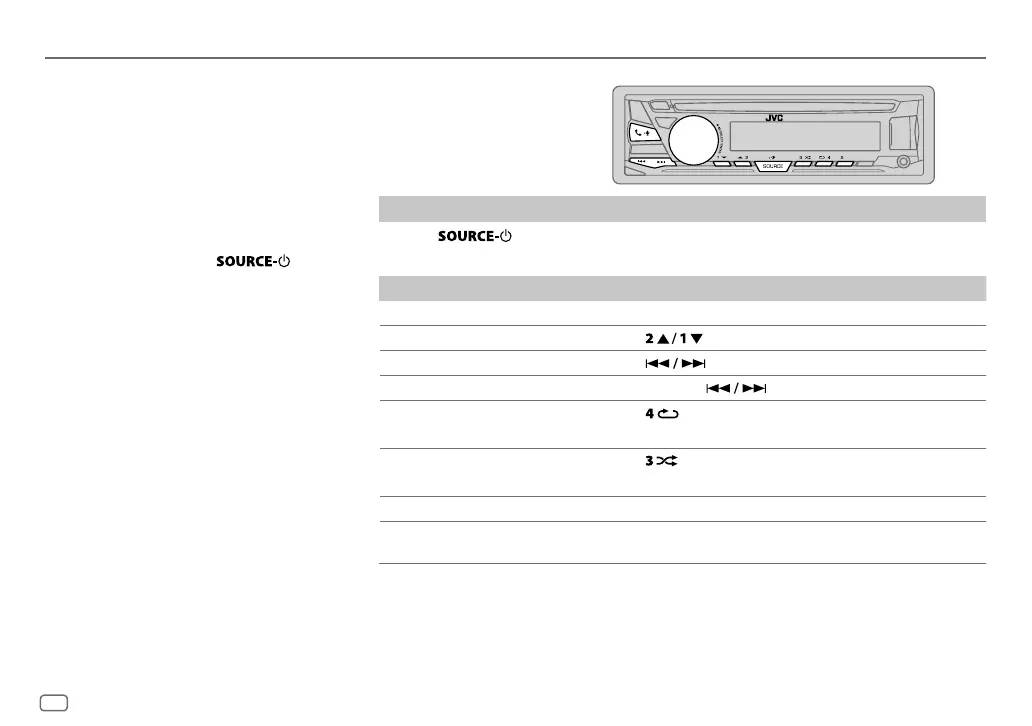
Press repeatedly to select BTAUDIO.
2 Operate the Bluetooth audio player to start playback.
To On the faceplate
Playback/pause Press the volume knob.
Select group or folder Press
.
Reverse skip/Forward skip Press
.
Reverse/Fast-forward Press and hold
.
Repeat play Press
repeatedly.
TRACK REPEAT
,
ALL REPEAT
,
REPEAT OFF
Random play
Press
repeatedly.
GROUP RANDOM
,
ALL RANDOM
,
RANDOM OFF
Select a file from a folder/list Refer to “Select a file from a folder/list” on page 8.
Switch between connected
Bluetooth audio devices
Press 5.
*
*
Pressing the “Play” key on the connected device itself also causes switching of sound output from the device.
Operations and display indications may differ according to their availability on the connected
device.
While in BT AUDIO source, you can
connect to five Bluetooth audio
devices and switch between these
five devices.
JS_JVC_KD_SR83BT_K_EN_1.indd 16JS_JVC_KD_SR83BT_K_EN_1.indd 16 12/23/2016 12:14:31 PM12/23/2016 12:14:31 PM


 To Next Page