ENGLISH
27
Data Size: B6L (182 mm x 128 mm)
Book Size: B6L (182 mm x 128 mm)
REFERENCES
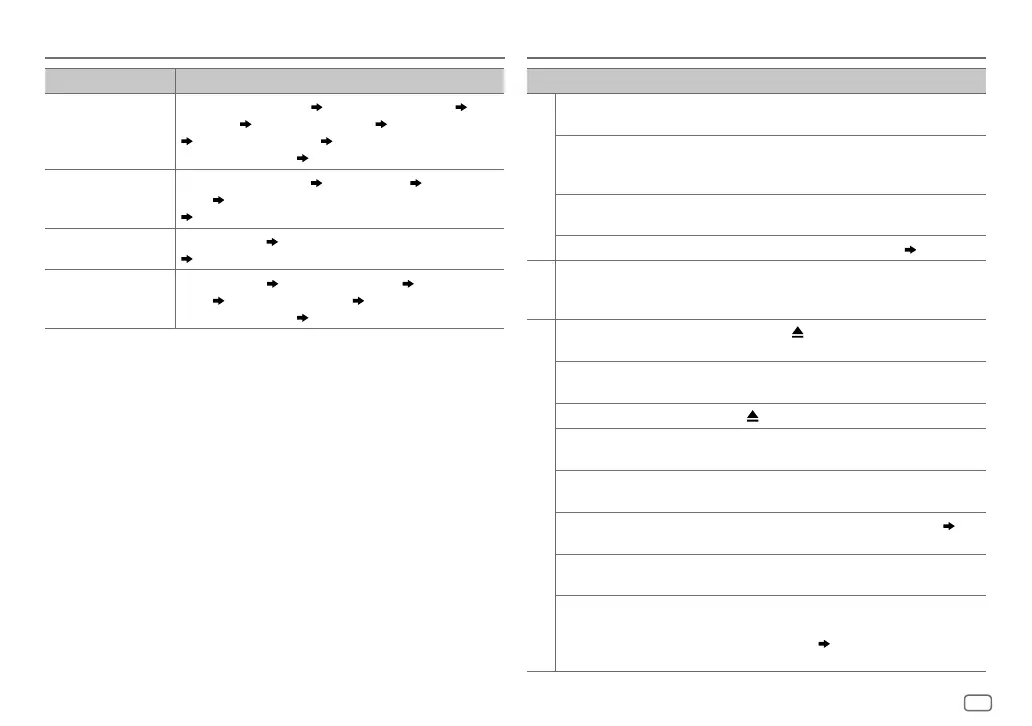
Source name Display information
PANDORA/
PANDORA BT
Station name (Date/Clock) Shared/Radio (Date/Clock) Song
title (Artist)
Song title (Album name) Song title (Date/Clock)
Playing time (Date/Clock) Station name (Date/Clock) with
music synchronisation
*
(back to the beginning)
IHEARTRADIO
Station name (Date/Clock) Song title (Artist) Song title (Date/
Clock)
Station name (Date/Clock) with music synchronisation
*
(back to the beginning)
AUX
AUX (Date/Clock) AUX (Date/Clock) with music synchronisation
*
(back to the beginning)
BT AUDIO
Song title (Artist) Song title (Album name) Song title (Date/
Clock)
Playing time (Date/Clock) Song title (Artist) with
music synchronisation
*
(back to the beginning)
*
The brightness of the button illumination changes and synchronises with the music.
TROUBLESHOOTING
Symptom Remedy
General
Sound cannot be heard. • Adjust the volume to the optimum level.
• Check the cords and connections.
“MISWIRING CHECK WIRING
THEN PWR ON” appears.
Turn the power off, then check to be sure the terminals
of the speaker wires are insulated properly. Turn the
power on again.
“PROTECTING SEND
SERVICE” appears.
Send the unit to the nearest service center.
Source cannot be selected. Check the
[SOURCE SELECT]
setting.
( 4)
Radio
• Radio reception is poor.
• Static noise while
listening to the radio.
Connect the antenna firmly.
CD/USB/iPod
Disc cannot be ejected.
Press and hold
to forcibly eject the disc. Be careful
not to drop the disc when it is ejected.
“IN DISC” appears. Make sure nothing is blocking the loading slot when
you eject the disc.
“PLEASE EJECT” appears.
Press
, then insert the disc correctly.
Playback order is not as
intended.
The playback order is determined by the file name
(USB) or the order in which files were recorded (disc).
Elapsed playing time is not
correct.
This depends on the recording process earlier.
“NOT SUPPORT” appears
and track skips.
Check whether the track is a playable format.
( 25)
“READING” keeps flashing. • Do not use too many hierarchical levels and folders.
• Reload the disc or reattach the USB device.
“UNSUPPORTED DEVICE”
appears.
• Check whether the connected device is compatible
with this unit and ensure the file systems are in
supported formats.
( 25)
• Reattach the device.
JS_JVC_KD_SR83BT_K_EN_1.indd 27JS_JVC_KD_SR83BT_K_EN_1.indd 27 12/23/2016 12:15:04 PM12/23/2016 12:15:04 PM


 To Next Page