ENGLISH
30
Data Size: B6L (182 mm x 128 mm)
Book Size: B6L (182 mm x 128 mm)
Warning
• The unit can only be used with a 12V DC power supply, negative ground.
• Disconnect the battery’s negative terminal before wiring and mounting.
• Do not connect Battery wire (yellow) and Ignition wire (red) to the car chassis or
Ground wire (black) to prevent a short circuit.
• Insulate unconnected wires with vinyl tape to prevent a short circuit.
• Be sure to ground this unit to the car’s chassis again after installation.
Caution
• For safety’s sake, leave wiring and mounting to professionals. Consult the car
audio dealer.
• Install this unit in the console of your vehicle. Do not touch the metal parts of this
unit during and shortly after use of the unit. Metal parts such as the heat sink and
enclosure become hot.
• Do not connect the
wires of speakers to the car chassis or Ground wire (black),
or connect them in parallel.
• Connect speakers with a maximum power of more than 50W. If the maximum
power of the speakers is lower than 50W, change the
[AMP GAIN]
setting to
avoid damaging the speakers.
( 20)
• Mount the unit at an angle of less than 30º.
• If your vehicle wiring harness does not have the ignition terminal, connect Ignition
wire (red) to the terminal on the vehicle’s fuse box which provides 12 V DC power
supply and is turned on and off by the ignition key.
• Keep all cables away from heat dissipate metal parts.
• After the unit is installed, check whether the brake lamps, blinkers, wipers, etc. on
the car are working properly.
• If the fuse blows, first make sure the wires are not touching car’s chassis, then
replace the old fuse with one that has the same rating.
Basic procedure
1
Remove the key from the ignition switch, then disconnect the terminal
of the car battery.
2
Connect the wires properly.
See Wiring connection.
( 31)
3
Install the unit to your car.
See Installing the unit (in-dash mounting).
4
Connect the terminal of the car battery.
5
Press to turn on the power.
6
Detach the faceplate and reset the unit.
( 3)
INSTALLATION/CONNECTION
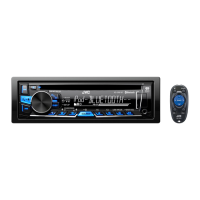
How to remove the unit
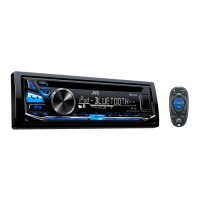
When installing without the mounting sleeve
1
Remove the mounting sleeve and trim plate from the unit.
2
Align the holes in the unit (on both sides) with the
vehicle mounting bracket and secure the unit with
screws (commercially available).
Use only the specified screws. Using wrong screws might
damage the unit.
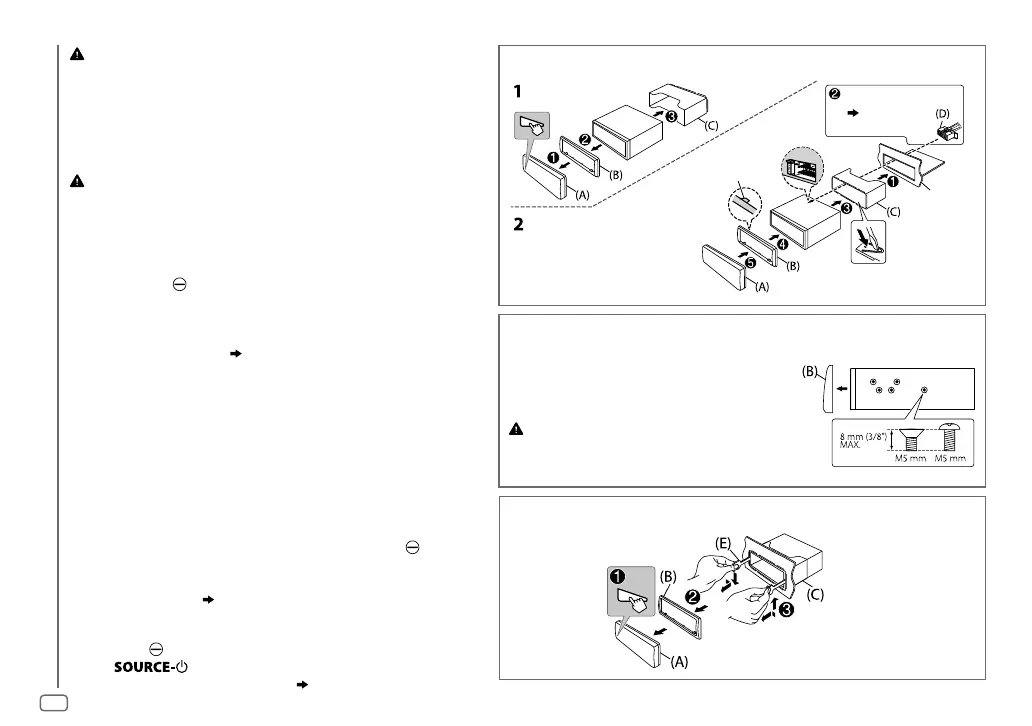
Installing the unit (in-dash mounting)
Hook on the top side
Orientate the trim
plate as illustrated
before fitting.
Do the required wiring.
(
31)
Dashboard of
your car
Bend the appropriate tabs to hold
the sleeve firmly in place.
JS_JVC_KD_SR83BT_K_EN_1.indd 30JS_JVC_KD_SR83BT_K_EN_1.indd 30 12/23/2016 12:15:18 PM12/23/2016 12:15:18 PM



 To Next Page