EasyManua.ls Logo

JVC KD-V6 - Page 6

JVC KD-V6
25 pages
Print Icon
To Next Page IconTo Next Page
To Previous Page IconTo Previous Page
Loading...
3.
Removing
the
front
plate
from
the
P.C.
board
1)
Widen
the
hooks
@
holding
the
digital
peak
(CALL)
switch
P.C.
board
to
remove
it.
2)
Widen
the
hooks
holding
the
counter
reset
switch
P.C.
board
to
remove
it.
3)
Remove
the
mechanism
control
switch
connector
from
the
main
P.C.
board.
4)
Remove
the
screw
Q)
holding
the
ground
plug
to
the
right
chassis.
4.
Peak
Indicator
P.C.
Board
Pull
forward
to
remove
the
P.C.
board.
5.
Switch
P.C.
board
assembly
1)
Slightly
lift
the
knobs
of
memory/auto
repeat/counter
switch
(to
remove
from
the
stoppers)
and
draw
the
switch
assembly
backward.
(Perform
this
with
the
switches
up.)
2)
Remove
the
MPX
filter/Dolby
NR
switch
etc.
assem-
bly
in
the
same
way
as
1).
3)
Remove
the
parallel
wire
from
the
connectors
on
the
P.C.
board.
(When
the
digital
indicators
are
removed.)
6.
Timer
switch
P.C.
board
assembly
1)
Remove
the
knob.
2)
Slide
the
timer
bracket
to
the
right
to
remove
it.
3)
Remove
the
two
screws
holding
the
timer
switch.
8.
Headphones
jack
Press
down
to
remove
it.
8.
LED
indicators
(GSOURCE/TAPE)
Widen
the
two
hooks
7)
holding
the
indicator
P.C.
board
to
remove
it.
9.
Front
panel
(Mold
parts
are
used
inside.)
1)
Remove
the
five
hooks
holding
the
volume
P.C.
board.
(Widen
enough
to
remove
fully.)
2)
Remove
the
two
screws
a3)
holding
the
panel
from
both
sides.
3)
Pull
out
the
panel
(with
the
mechanism
assembly).
10.
Mechanism
control
switch
board
and
earphone
jack
1)
Remove
the
two
hooks
holding
the
switch
board.
2)
Open
and
remove
the
hooks
(15)
holding
the
jack.
11.
Oil
damper
Disengage
the
hook
holding
the
damper
and
remove
with
upper
side
widen.
12.
Main
P.C.
board
1)
Remove
the
screw
46)
holding
the
main
board.
2)
Remove
the
screw
47)
holding
the
pin
jack.
3)
Remove
the
screw
(18)
holding
the
heat-sink.
4)
Remove
the
screw
holding
the
rear
panel
and
disengage
the
power
cord
stopper.
5)
Pull
the
main
board
backward.
|
KD-V6A/B/C/E/J/U
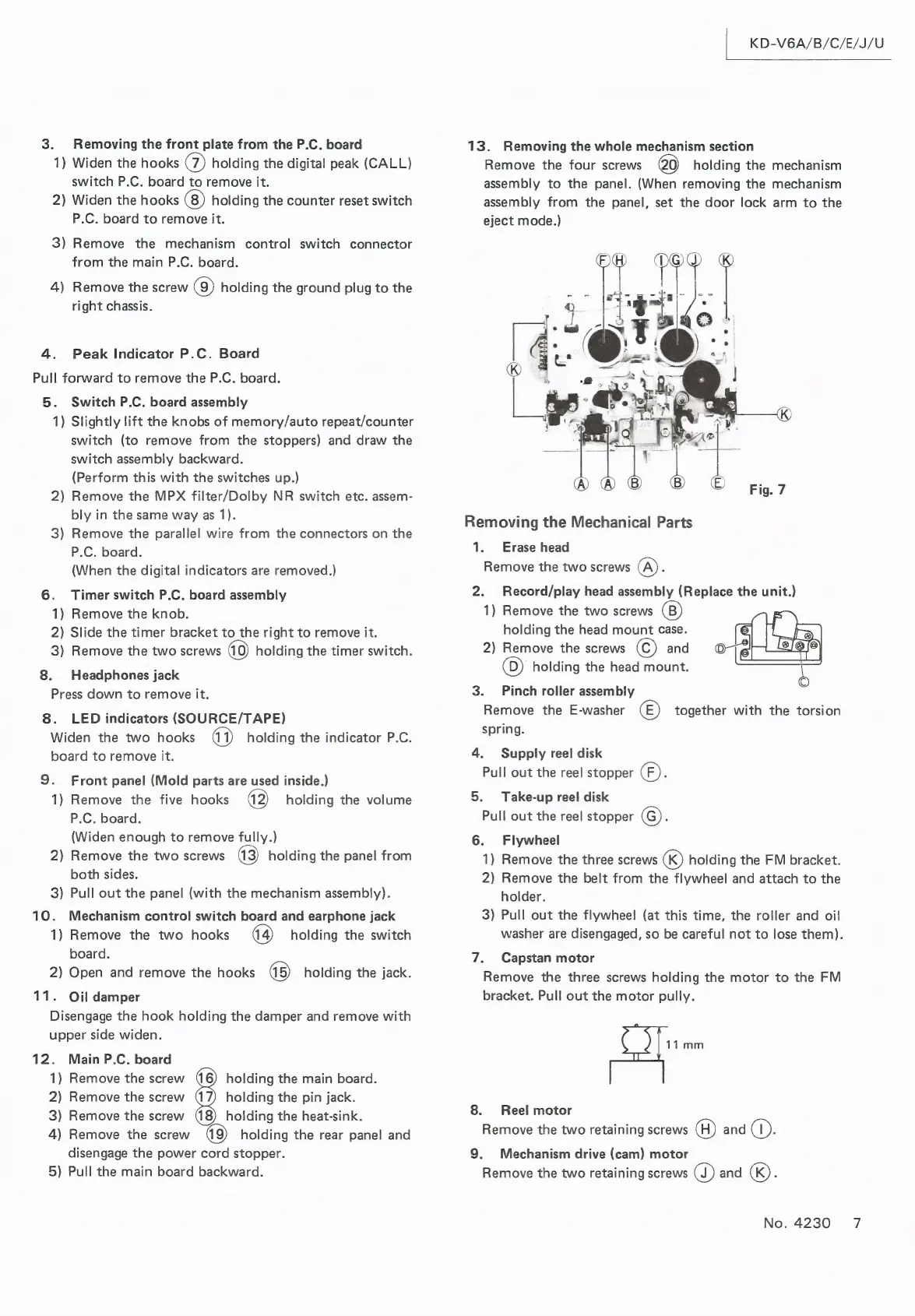
13.
Removing
the
whole
mechanism
section
Remove
the
four
screws
20)
holding
the
mechanism
assembly
to
the
panel.
(When
removing
the
mechanism
assembly
from
the
panel,
set
the
door
lock
arm
to
the
eject
mode.)
Removing
the
Mechanical
Parts
1.
Erase
head
Remove
the
two
screws
(A)
5
2.
Record/play
head
assembly
(Replace
the
unit.)
1)
Remove
the
two
screws
holding
the
head
mount
case.
2)
Remove
the
screws
©)
and
(D)
holding
the
head
mount.
3.
Pinch
roller
assembly
Remove
the
E-washer
(©)
together
with
the
torsion
spring.
4.
Supply
reel
disk
Pull
out
the
reel
stopper
(F).
5.
Take-up
reel
disk
Pull
out
the
reel
stopper
©.
6.
Flywheel
1)
Remove
the
three
screws
«)
holding
the
FM
bracket.
2)
Remove
the
belt
from
the
flywheel
and
attach
to
the
holder.
3)
Pull
out
the
flywheel
(at
this
time,
the
roller
and
oil
washer
are
disengaged,
so
be
careful
not
to
lose
them).
7.
Capstan
motor
Remove
the
three
screws
holding
the
motor
to
the
FM
bracket.
Pull
out
the
motor
pully.
11mm
8.
Reel
motor
Remove
the
two
retaining
screws
(H)
and
GC:
9.
Mechanism
drive
(cam)
motor
Remove
the
two
retaining
screws
GQ)
and
«).
No.
4230
7

Related product manuals