EasyManua.ls Logo

JVC KD-V6 - Page 5

JVC KD-V6
25 pages
Print Icon
To Next Page IconTo Next Page
To Previous Page IconTo Previous Page
Loading...
KD-V6A/B/C/E/J/U
|
Removal
of
the
main
parts
Front
panel
inside
Timer
switch
Bracket
installation
Input
Level
knob
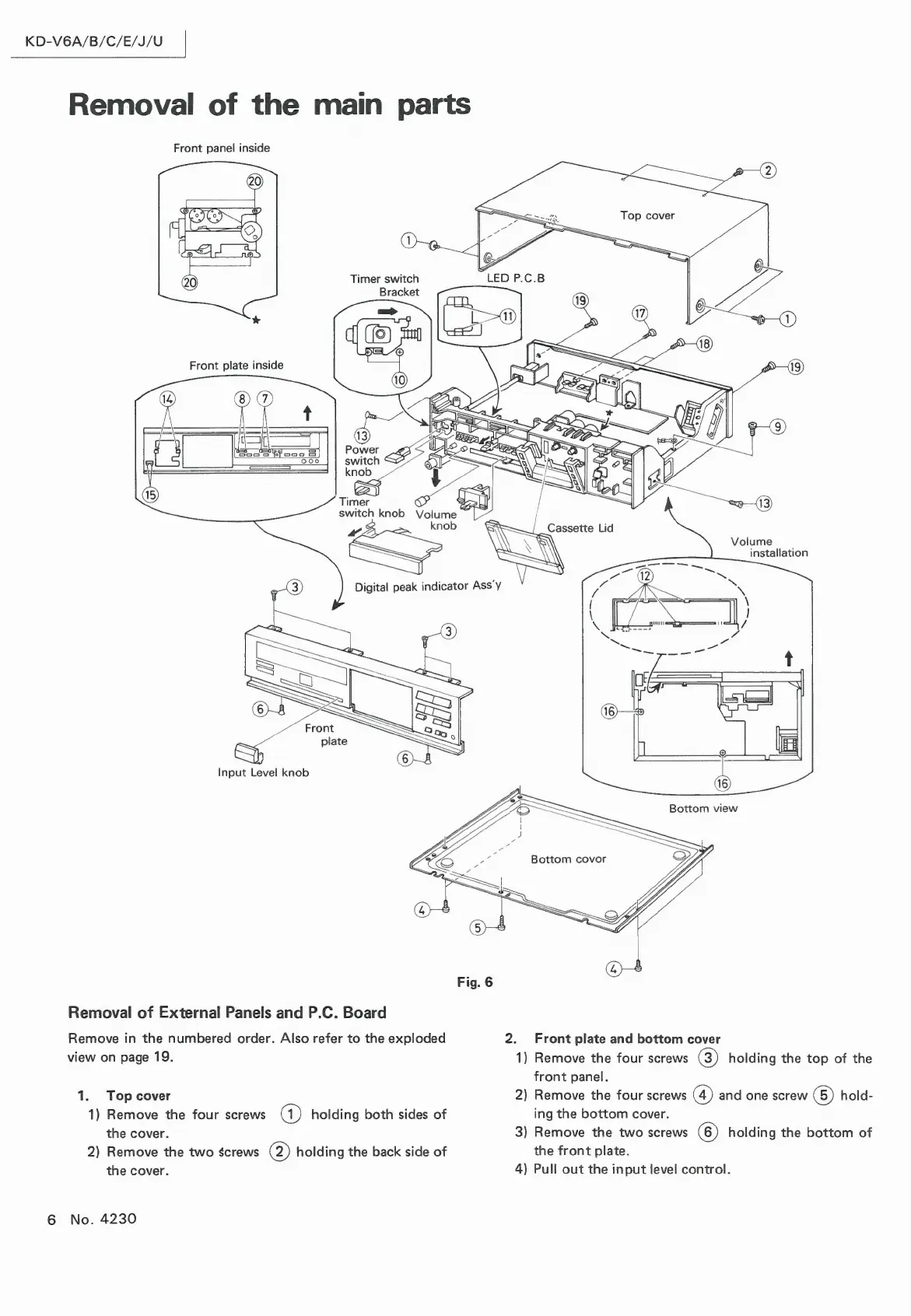
Removal
of
External
Panels
and
P.C.
Board
Remove
in
the
numbered
order.
Also
refer
to
the
exploded
2.
Front
plate
and
bottom
cover
view
on
page
19.
1)
Remove
the
four
screws
@)
holding
the
top
of
the
front
panel.
1.
Top
cover
2)
Remove
the
four
screws
(4)
and
one
screw
6)
hold-
1)
Remove
the
four
screws
@)
holding
both
sides
of
ing
the
bottom
cover.
the
cover.
3)
Remove
the
two
screws
(6)
holding
the
bottom
of
2)
Remove
the
two
screws
(2)
holding
the
back
side
of
the
front
plate.
the
cover.
4)
Pull
out
the
input
level
control.
6
No.
4230

Related product manuals