EasyManua.ls Logo

JVC KD-V6 - Page 8

JVC KD-V6
25 pages
Print Icon
To Next Page IconTo Next Page
To Previous Page IconTo Previous Page
Loading...
(4)
marked
©
is
a
special
nut
for
playback
azimuth
adjustment.
(5)
marked
X
is
a
special
nut
for
the
record
head
height
adjustment.
(6)
marked
X
is
a
special
nut
for
the
record
head
tilt
adjustment.
(7)
marked
O
is
a
special
nut
for
the
record
head
azimuth
adjustment.
3.
Adjusting
methods
Perform
the
following
adjustment
procedure
after
head
assembly
replacement.
1)
Play
head
azimuth
e
Connect
the
LINE
OUT
jacks
to
an
electronic
volt-
meter
(two-meter
VTVM).
e
Play
test
tape
TMT-702
and
adjust
the
screw
4
so
that
the
output
of
electronic
voltmeter
is
optimized.
2)
Record
head
azimuth
e
Connect
the
LINE
OUT
jacks
to
a
two-meter
VTVM.
e
Observe
the
simultaneous
monitor
output
with
the
two-meter
VTVM
while
recording
a
14
kHz
signal
at
QO
VU
—20dB
and
adjust
the
screw
7
so
that
the
output
is
maximum.
Note:
Perform
this
adjustment
using
the
stable
middle
part
of
side
A
of
TS-5
(UD)
and
also
confirm
it
using
TS-6
(SA)
and
TS-7
(ME).
The
above
adjustments
are
recommended
to
check
after
fixing
the
mechanical
section
to
the
cabinet.
Adjustment
Motor
speed]
Play
back
test
tape
VTT712
and
connect
adjustment
|
electronic
counter
to
the
LINE
OUT
jacks
of
deck
to
measure
the
speed
then
adjust
the
semi-fixed
resistor
on
the
motor
P.C.
board
by
turning
it
so
that
the
reading
of
the
meter
is
3,000
Hz.
Play
VTT712
and
plug
the
wow/flutter
meter
into
the
LINE
OUT
jacks
of
the
deck
then
confirm
that
the
reading
of
the
meter
is
less
than
0.08%
(WRMS).
Wow/flutter
Playback
Measure
using
the
torque
testing
cassette
torque
tape
CTH-N.
Fast-forward|
Set
the
unit
in
the
fast
forward
mode
and
torque
measure
the
torque
in
the
same
way
as
above.
Rewind
Set the
unit
in
the
rewind
mode
and
mea-
torque
sure
the
torque
in
the
same
way
as
above.
Music
scan
|
1.
Music
scan
operation
should
be
per-
check
formed
when
using
TMT-6447
tape.
2.
Music
scan
operation
should
not
be
performed
when
using
TMT-6448
tape.
Adjusting
|
Standard
points
value
Remarks
Semi-fixed|
3,000
Hz
|When
the
electronic
counter
is
incorpo-
resistor
on
motor
P.C.
rated
in
the
wow/flutter
meter,
just
con-
nect
the
electronic
counter
to
the
input
jacks
of
the
meter.
Even
when
it
is
within
a
standard
value,
if
its
variation
becomes
more
than
0.08%
(WRMS),
repairs
are
required
because
of
possible
claims.
40—
70
g-cm
More
than
80
g-cm
More
than
80
g-cm
el
|
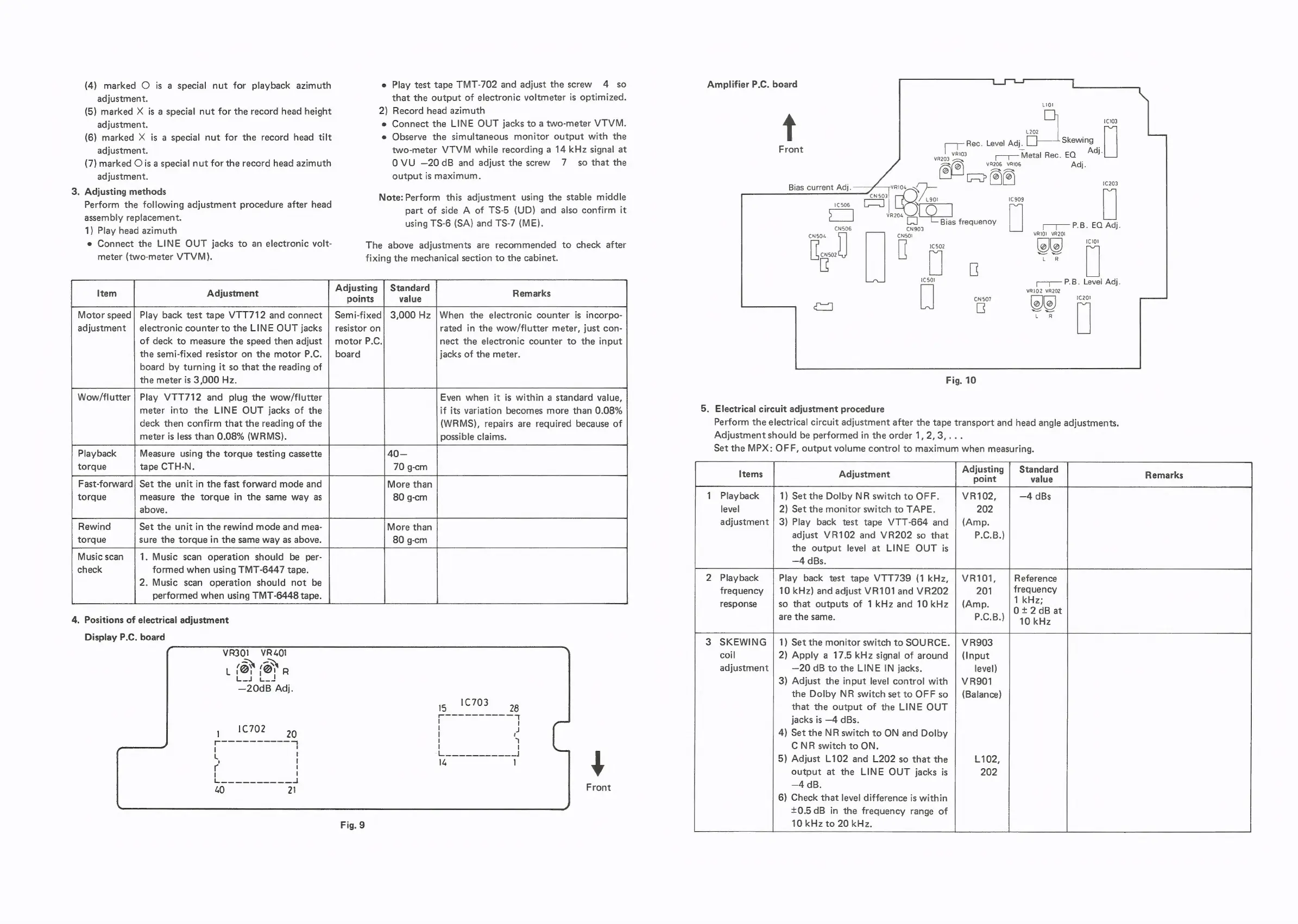
4.
Positions
of
electrical
adjustment
Display
P.C.
board
VR301_VR4OI
L
‘@r
‘Or
R
(mera
|
—20dB
Adj.
Front
Amplifier
P.C.
board
t
L202
-
Skewing
fein
Rec.
Level
Adj.
s
Front
VvRI03
‘Metal
Rec.
EO
Adj.
VR203
—~
AO
VR206
VRIOg
Adj.
ee!
CP
Ic909
Bias
current
Adj.
1€203
1C506
[al
Bias
frequeno
:
CN506
CN903
eve
M
i=milues
PB.
EQYAG):
CNSO4
CNSOI
vR101
VR201
1C101
1¢502
CNS02
a
eee
te
t—1—
P.B.
Level
Adj.
VR102
VR202
oF
|
ca
i
aR
1¢501
Fig.
10
5.
Electrical
circuit
adjustment
procedure
Perform
the
electrical
circuit
adjustment
after
the
tape
transport
and
head
angle
adjustments.
Adjustment
should
be
performed
in
the
order
1,2,3,...
Set
the
MPX:
OFF,
output
volume
control
to
maximum
when
measuring.
:
Adjusting
|
Standard
1
Playback
1)
Set
the
Dolby
NR
switch
to
OFF.
level
2)
Set
the
monitor
switch
to
TAPE.
adjustment
|
3)
Play
back
test
tape
VTT-664
and
adjust
VR102
and
VR202
so
that
the
output
level
at
LINE
OUT
is
—4
dBs.
Play
back
test
tape
VTT739
(1
kHz,
Reference
Playback
frequency
|
10
kHz)
and
adjust
VR101
and
VR202
frequency
response
so
that
outputs
of
1
kHz
and
10
kHz
eae
t
are
the
same.
10
kHz
°
SKEWING
|
1)
Set
the
monitor
switch
to
SOURCE.
|
VR903
coil
2)
Apply
a
17.5
kHz
signal
of
around
|
(Input
adjustment
—20
dB
to
the
LINE
IN
jacks.
level)
3)
Adjust
the
input
level
control
with
|
VR901
the
Dolby
NR
switch
set
to
OFF
so
|
(Balance)
that
the
output
of
the
LINE
OUT
jacks
is
—4
dBs.
4)
Set
the
NR
switch
to
ON
and
Dolby
C
NR
switch
to
ON.
5)
Adjust
L102
and
L202
so
that
the
L102,
output
at
the
LINE
OUT
jacks
is
202
—4
dB.
6)
Check
that
level
difference
is
within
+0.5
dB
in
the
frequency
range
of
10
kHz
to
20
kHz.

Related product manuals