EasyManua.ls Logo

JVC KD-V6 - Page 9

JVC KD-V6
25 pages
Print Icon
To Next Page IconTo Next Page
To Previous Page IconTo Previous Page
Loading...
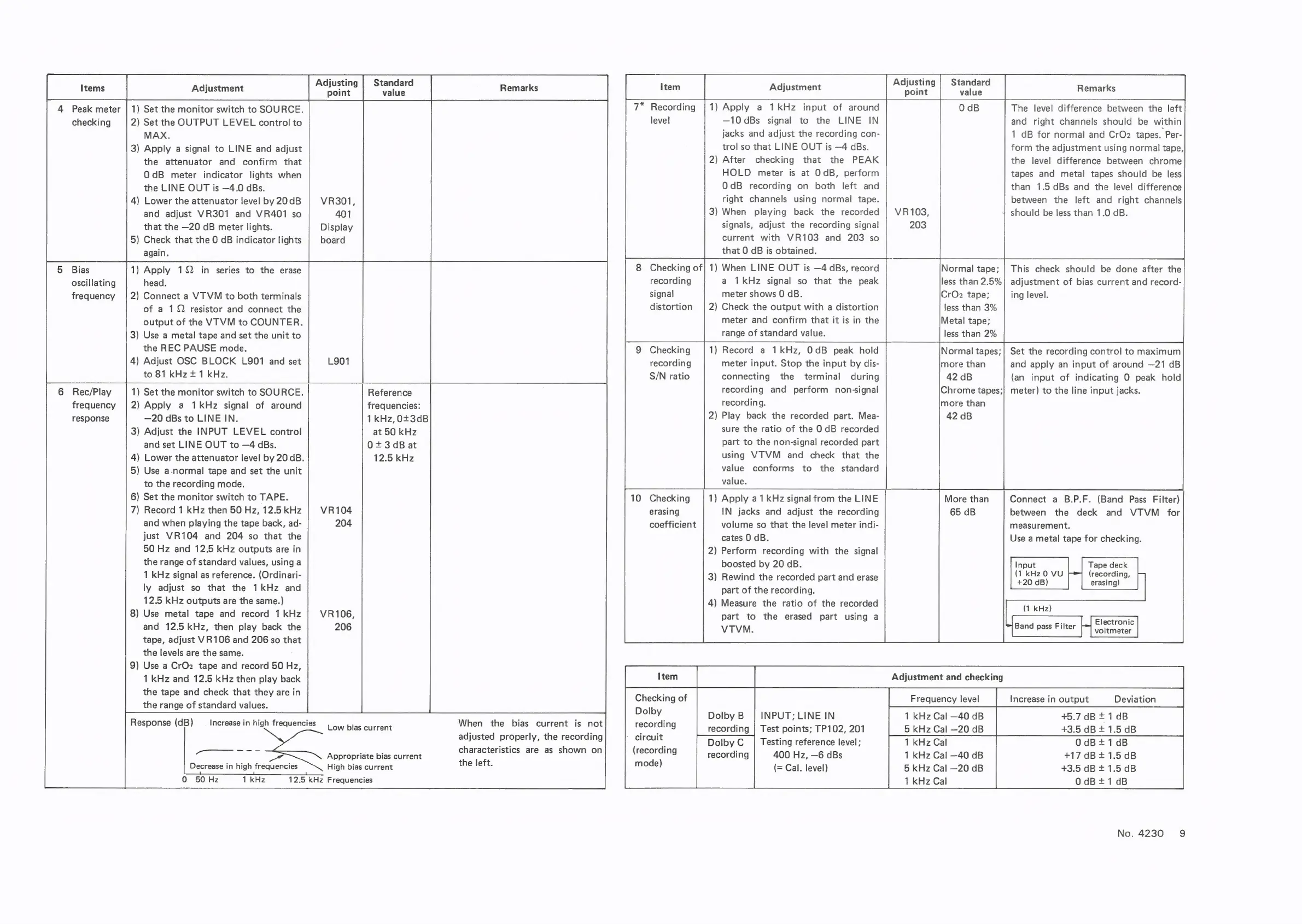
7*
Recording
|1)
Apply
a
1kHz
input
of
around
level
—10dBs
signal
to
the
LINE
IN
jacks
and
adjust
the
recording
con-
trol
so
that
LINE
OUT
is
—4
dBs.
2)
After
checking
that
the
PEAK
HOLD
meter
is
at
OdB,
perform
OdB
recording
on
both
left
and
right
channels
using
normal
tape.
3
Adjusting
|
Standard
|
tems
|
Adjustment
point
vale
Remarks
4
Peak
meter
|
1)
Set
the
monitor
switch
to
SOURCE.
checking
2)
Set
the
OUTPUT
LEVEL
control
to
MAX.
3)
Apply
a
signal
to
LINE
and
adjust
the
attenuator
and
confirm
that
OdB
meter
indicator
lights
when
the
LINE
OUT
is
—4.0
cBs.
4)
Lower
the
attenuator
level
by
20
dB
VR301,
The
level
difference
between
the
left
and
right
channels
should
be
within
1
dB
for
normal
and
CrO2
tapes.
Per-
form
the
adjustment
using
normal
tape,
the
level
difference
between
chrome
tapes
and
metal
tapes
should
be
less
than
1.5
dBs
and
the
level
difference
between
the
left
and
right
channels
and
adjust
VR301
and
VR401
so
401
3)
When
playing
back
the
recorded
|
VR103,
should
be
less
than
1.0
dB.
that
the
—20
dB
meter
lights.
Display
signals,
adjust
the
recording
signal
203
5)
Check
that
the
0
dB
indicator
lights
|
board
current
with
VR103
and
203
so
again.
that
O
dB
is
obtained.
BeEBiae
1)
Apply
1Q
in
series
to
the
erase
8
Checking
of}
1)
When
LINE
OUT
is
—4
dBs,
record
Normal
tape;
|
This
check
should
be
done
after
the
oscillating
head.
recording
a
1kHz
signal
so
that
the
peak
less
than
2.5%|
adjustment
of
bias
current
and
record-
frequency
|
2)
Connect
a
VTVM
to
both
terminals
signal
meter
shows
0
dB.
CrO2
tape;
ing
level.
of
a
12
resistor
and
connect
the
distortion
|
2)
Check
the
output
with
a
distortion
less
than
3%
output
of
the
VTVM
to
COUNTER.
meter
and
confirm
that
it
is
in
the
Metal
tape;
3)
Use
a
metal
tape
and
set
the
unit
to
range
of
standard
value.
less
than
2%
the
REC
PAUSE
mode.
Checking
1)
Record
a
1kHz,
OdB
peak
hold
;|
Set
the
recording
control
to
maximum
4)
Adjust
OSC
BLOCK
L901
and
set
L901
to
81
kHz
+
1
kHz.
6
Rec/Play
1)
Set
the
monitor
switch
to
SOURCE.
Reference
frequency
|2)
Apply
a
1kHz
signal
of
around
frequencies:
response
—20
dBs
to
LINE
IN.
1kHz,0+3dB
3)
Adjust
the
INPUT
LEVEL
control
at
50
kHz
and
set
LINE
OUT
to
—4
dBs.
0+3dB
at
4)
Lower
the
attenuator
level
by
20
dB.
12.5
kHz
5)
Use
a-normal
tape
and
set
the
unit
to
the
recording
mode.
6)
Set
the
monitor
switch
to
TAPE.
recording
S/N
ratio
meter
input.
Stop
the
input
by
dis-
connecting
the
terminal
during
recording
and
perform
non-signal
recording.
2)
Play
back
the
recorded
part.
Mea-
sure
the
ratio
of
the
0
dB
recorded
part
to
the
non-signal
recorded
part
using
VTVM
and
check
that
the
value
conforms
to
the
standard
value.
1)
Apply
a1
kHz
signal
from
the
LINE
and
apply
an
input
of
around
—21
dB
(an
input
of
indicating
O
peak
hold
Chrome
tapes;|
meter)
to
the
line
input
jacks.
more
than
42
dB
More
than
Connect
a
B.P.F.
(Band
Pass
Filter)
10
Checking
7)
Record
1
kHz
then
50
Hz,
12.5
kHz
erasing
IN
jacks
and
adjust
the
recording
65
dB
between
the
deck
and
VTVM
for
and
when
playing
the
tape
back,
ad-
coefficient
volume
so
that
the
level
meter
indi-
measurement.
just
VR104
and
204
so
that
the
cates
0
dB.
Use
a
metal
tape
for
checking.
50
Hz
and
12.5
kHz
outputs
are
in
the
range
of
standard
values,
using
a
1
kHz
signal
as
reference.
(Ordinari-
ly
adjust
so
that
the
1kHz
and
12.5
kHz
outputs
are
the
same.)
8)
Use
metal
tape
and
record
1
kHz
and
12.5
kHz,
then
play
back
the
tape,
adjust
VR106
and
206
so
that
the
levels
are
the
same.
9)
Use
a
CrOz
tape
and
record
50
Hz,
1
kHz
and
12.5
kHz
then
play
back
the
tape
and
check
that
they
are
in
the
range
of
standard
values.
2)
Perform
recording
with
the
signal
boosted
by
20
dB.
3)
Rewind
the
recorded
part
and
erase
part
of
the
recording.
4)
Measure
the
ratio
of
the
recorded
part
to
the
erased
part
using
a
VTVM.
Tape
deck
(recording,
erasing)
Electronic
voltmeter
Input
(1
kHz0
VU
+20
dB)
(1
kHz)
Band
pass
Filter
Adjustment
and
checking
Frequency
level
Increase
in
output
Deviation
Checking
of
DY:
INPUT;
LINE
IN
1
kHz
Cal
—40
dB
+5.7
dB
+
1dB
Response
(dB)
—_
Increase
in
high
frequencies
|
ow
pias
current
When
the
bias
current
is
not
recording
recording
|
Test
points;
TP102,
201
5
kHz
Cal
—20
dB
+3.5dB+1.5dB
aajusted
properly,
mereeotaind
CAOCUNE
Dolby
C
|
Testing
reference
level;
1
kHz
Cal
OdB+1dB
gs
Aporapaats
bias
client
cheractonstis/
ate.
abcchowsy
jan
vesarding
recording
|
400
Hz,
—6
dBs
1
kHz
Cal
—40
dB
+17
dB
+
1.5
dB
Decrease
in
high
frequencies
High
bias
current
the
left.
mode)
(=
Cal.
level)
5
kHz
Cal
—20
dB
+3.5
dB
+
1.5
dB
0
50Hz
1
kHz
12.5
kHz
Frequencies
1
kHz
Cal
O0dB+1dB
No.
4230
9

Related product manuals