EasyManua.ls Logo

JVC KD-W110 - Page 8

JVC KD-W110
20 pages
Print Icon
To Next Page IconTo Next Page
To Previous Page IconTo Previous Page
Loading...
__
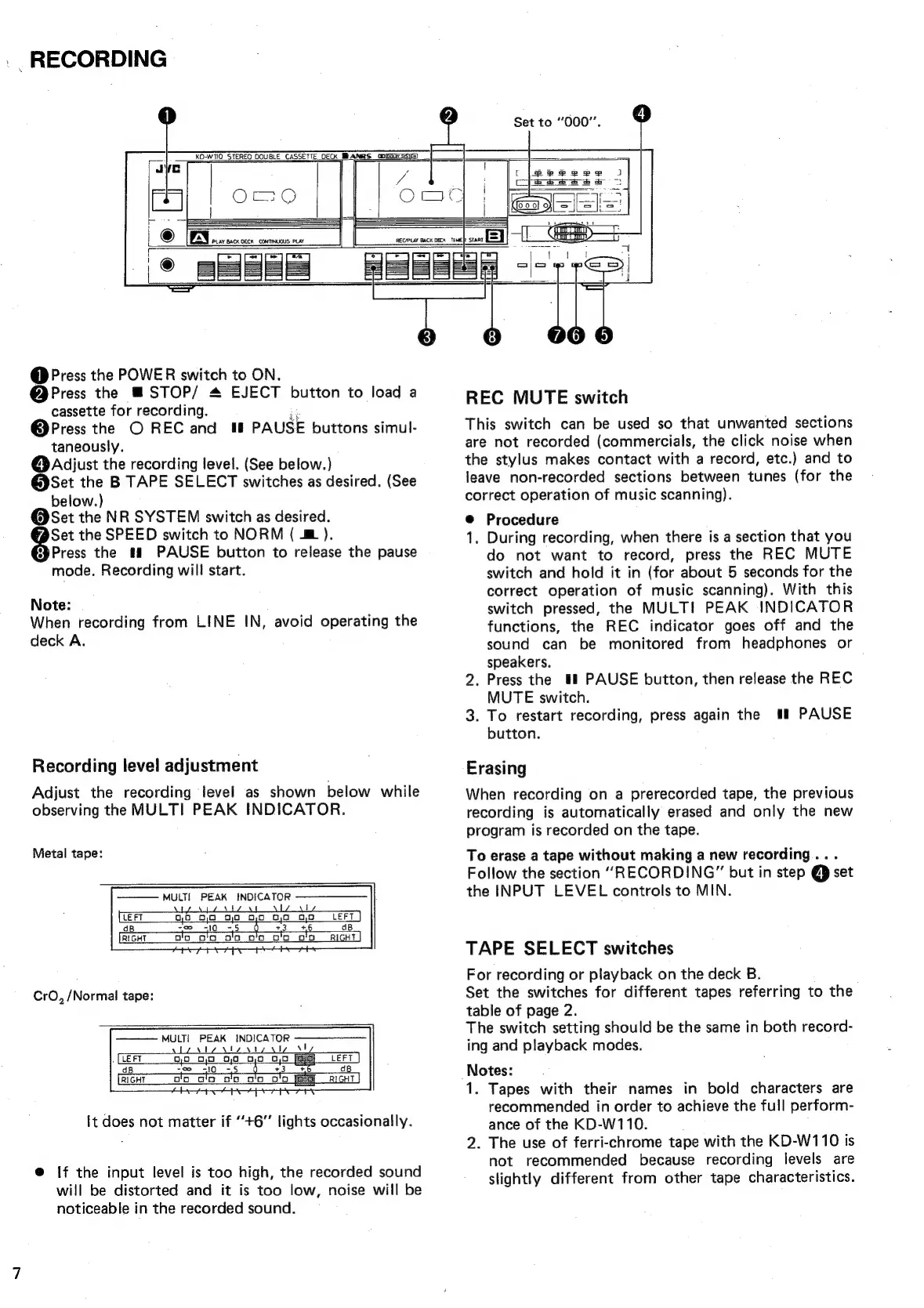
RECORDING
@
Press
the
POWER
switch
to
ON.
@Press
the
STOP/
&
EJECT
button
to
load
a
cassette
for
recording.
@Press
the
O
REC
and
Wt
PAUSE
buttons
simul-
taneously.
@Adijust
the
recording
level.
(See
below.)
@Set
the
B
TAPE
SELECT
switches
as
desired.
(See
below.)
@Set
the
NR
SYSTEM
switch
as
desired.
Set
the
SPEED
switch
to
NORM
(
&
).
Press
the
#&
PAUSE
button
to
release
the
pause
mode.
Recording
will
start.
Note:
When
recording
from
LINE
IN,
avoid
operating
the
deck
A.
Recording
level
adjustment
Adjust
the
recording
level
as
shown
below
while
observing
the
MULTI
PEAK
INDICATOR.
Metal
tape:
MULTI
PEAK
INDICATOR
\
1
OO
0,0
30
08,0
0,0
0,0
LEFT
so
_
310
=5
0
+3
+6
Dolo
_
o'o
oO
OG
OO
OO
CrO,
/Normal
tape:
MULTI
PEAK
INDICA
a
t
!
It
does
not
matter
if
“+6”
lights
occasionally.
@
If
the
input
level
is
too
high,
the
recorded
sound
will
be
distorted
and
it is
too
low,
noise
will
be
noticeable
in
the
recorded
sound.
REC
MUTE
switch
This
switch
can
be
used
so
that
unwanted
sections
are
not
recorded
(commercials,
the
click
noise
when
the
stylus
makes
contact
with
a
record,
etc.)
and
to
leave
non-recorded
sections
between
tunes
(for
the
correct
operation
of
music
scanning).
@
Procedure
1.
During
recording,
when
there
is
a
section
that
you
do
not
want
to
record,
press
the
REC
MUTE
switch
and
hold
it
in
(for
about
5
seconds
for
the
correct
operation
of
music
scanning).
With
this
switch
pressed,
the
MULTI
PEAK
INDICATOR
functions,
the
REC
indicator
goes
off
and
the
sound
can
be
monitored
from
headphones
or
speakers.
2.
Press
the
#
PAUSE
button,
then
release
the
REC
MUTE
switch.
3.
To
restart
recording,
press
again
the
##!
PAUSE
button.
Erasing
When
recording
on
a
prerecorded
tape,
the
previous
recording
is
automatically
erased
and
only
the
new
program
is
recorded
on
the
tape.
To
erase
a
tape
without
making
a
new
recording...
Follow
the
section
“RECORDING”
but
in
step
@
set
the
INPUT
LEVEL
controls
to
MIN.
TAPE
SELECT
switches
For
recording
or
playback
on
the
deck
B.
Set
the
switches
for
different
tapes.
referring
to
the
table
of
page
2.
The
switch
setting
should
be
the
same
in
both
record-
ing
and
playback
modes.
Notes:
1.
Tapes
with
their
names
in
bold
characters
are
recommended
in
order
to
achieve
the
full
perform-
ance
of
the
KD-W110.
2.
The
use
of
ferri-chrome
tape
with
the
KD-W110
is
not
recommended
because
recording
levels
are
slightly
different
from
other
tape
characteristics.

Related product manuals