EasyManua.ls Logo

JVC KD-W110 - Page 9

JVC KD-W110
20 pages
Print Icon
To Next Page IconTo Next Page
To Previous Page IconTo Previous Page
Loading...
\
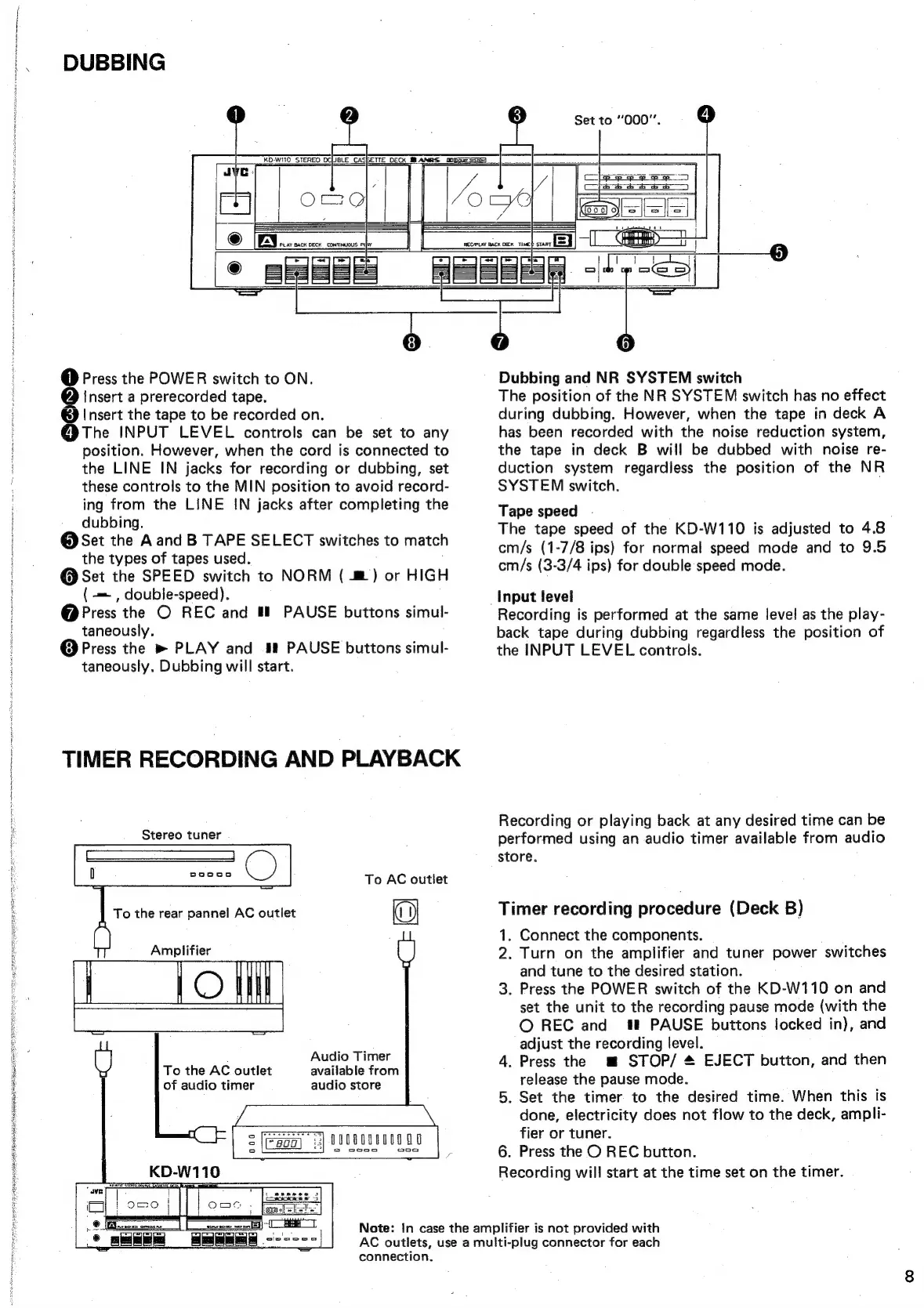
DUBBING
KD-W110_
STEREO DCUBLE
CASBETTE
DECK
MI
ANRS
oD)
Set
to
“000”.
1)
Press
the
POWER
switch
to
ON.
@
Insert
a
prerecorded
tape.
@
Insert
the
tape
to
be
recorded
on.
@The
INPUT
LEVEL
controls
can
be
set
to
any
position.
However,
when
the
cord
is
connected
to
the
LINE
IN
jacks
for
recording
or
dubbing,
set
these
controls
to
the
MIN
position
to
avoid
record-
ing
from
the
LINE
IN
jacks
after
completing
the
dubbing.
@
Set
the
Aand
B
TAPE
SELECT
switches
to
match
the
types
of
tapes
used.
@
Set
the
SPEED
switch
to
NORM
(
@)
or
HIGH
(-—
,
double-speed).
@
Press
the
O
REC
and
#!
PAUSE
buttons
simul-
taneously.
@
Press
the
»
PLAY
and
i!
PAUSE
buttons
simul-
taneously.
Dubbing
will
start.
TIMER
RECORDING
AND
PLAYBACK
Stereo
tuner
To
AC
outlet
An
the
rear
pannel
AC
outlet
Amplifier
Audio
Timer
available
from
audio
store
To
the
AC
outlet
of
audio
timer
7]
D0UR00800
00
al
mislead
aac
(ip
ssa
|
connection.
Dubbing
and
NR
SYSTEM
switch
The
position
of
the
NR
SYSTEM
switch
has
no
effect
during
dubbing.
However,
when
the
tape
in
deck
A
has
been
recorded
with
the
noise
reduction
system,
the
tape
in
deck
B
will
be
dubbed
with
noise
re-
duction
system
regardless
the
position
of
the
NR
SYSTEM
switch.
Tape
speed
The
tape
speed
of
the
KD-W110
is
adjusted
to
4.8
cm/s
(1-7/8
ips)
for
normal
speed
mode
and
to
9.5
cm/s
(3-3/4
ips)
for
double
speed
mode.
Input
level
Recording
is
performed
at
the
same
level
as
the
play-
back
tape
during
dubbing
regardless
the
position
of
the
INPUT
LEVEL
controls.
Recording
or
playing
back
at
any
desired
time
can
be
performed
using
an
audio
timer
available
from
audio
store.
Timer
recording
procedure
(Deck
B)
1.
Connect
the
components.
2.
Turn
on
the
amplifier
and
tuner
power
switches
and
tune
to
the
desired
station.
3.
Press
the
POWER
switch
of
the
KD-W110
on
and
set
the
unit
to
the
recording
pause
mode
(with
the
©
REC
and
#
PAUSE
buttons
locked
in),
and
adjust
the
recording
level.
4.
Press
the
m
STOP/
&
EJECT
button,
and
then
release
the
pause
mode.
5.
Set
the
timer
to
the
desired
time.
When
this
is
done,
electricity
does
not
flow
to
the
deck,
ampli-
fier
or
tuner.
6.
Press
the
O
REC
button.
Recording
will
start
at
the
time
set
on
the
timer.
Note:
In
case
the
amplifier
is
not
provided
with
AC
outlets,
use
a
multi-plug
connector
for
each

Related product manuals