Tuner
25English
Tuner
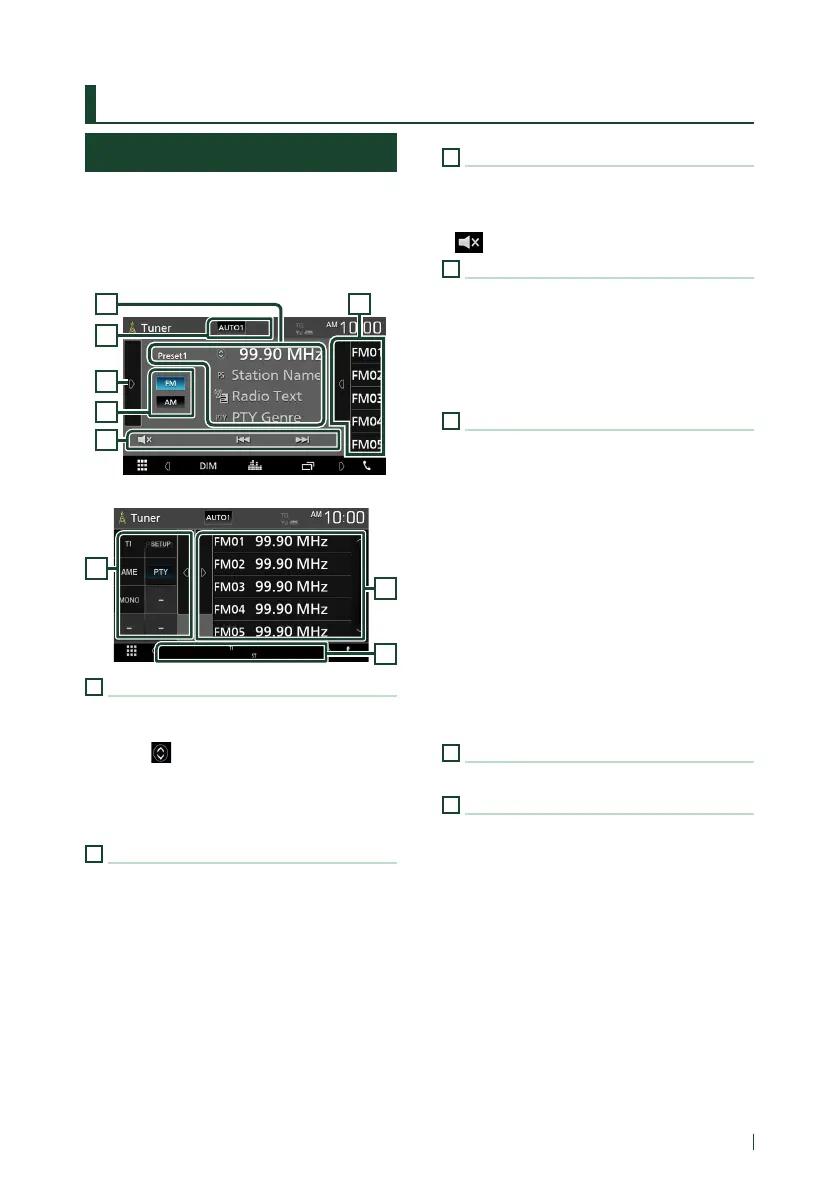
Tuner Basic Operation
Most functions can be controlled from the
source control screen.
To enter Tuner source, touch [Tuner] icon in the
source selection screen. (P.10)
Control screen
4
6
5
3
1
2
Open the drawer
4
7
5
1
Information display
Displays the information of the current station:
Frequency
Touching [ ] allows you to switch between
Content A and Content B.
– Content A: PS name, Radio Text, PTY Genre
– Content B: Radio Text plus, Title Artist
[Preset#]: Preset number
2
Seek mode
Switches the seek mode in the following
sequence; [AUTO1], [AUTO2], [MANUAL].
• [AUTO1]: Tunes in a station with good
reception automatically.
• [AUTO2]: Tunes in stations in memory one
after another.
• [MANUAL]: Switches to the next frequency
manually.
3
Operation keys
• [E] [F] : Tunes in a station. The method of
frequency switching can be changed (see 2
in table).
• [
] : Touch to mute or not to mute.
4
Preset list
• Touch on the right side of the screen to
display the Preset list. Touch again to close
the list.
• Recalls the memorized station.
• When touched for 2 seconds, stores the
current receiving station in memory.
5
Function panel
Touch on the left side of the screen to display
the function panel. Touch again to close the
panel.
• [TI] (FM only): Sets the traffic information
mode on. For details, see Trac Information
(P.27).
• [SETUP]: Displays the Tuner SETUP screen. For
details, see Tuner Setup (P.27).
• [AME]: Presets stations automatically. For
details, see Auto memory (P.26).
• [PTY] (FM only): Searches a program by setting
program type. For details, see Search by
program type (P.26).
• [MONO] (FM only): Select the Monaural
reception.
6
[FM] [AM]
Switches the band.
7
Indicator Items
• [ST]: A stereo broadcast is being received.
• [MONO]: The forced monaural function is on.
• [TI]: Indicates the reception state of traffic
information.
White: TP is being received.
Orange: TP is not being received.
!B5H-0357-03_JVC_KWV_K_En.indb 25 2020/07/09 8:19



 To Next Page
 Loading...






