USB
16
USB
Connecting a USB device
1
Connect the USB device with the USB
cable. (P.29)
2
Press the [ ] button.
3
Touch [ ].
4
Touch [USB]. (P.11)
Ñ Disconnect the USB device
1
Press the [ ] button.
2
Touch [ ].
3
Touch a source other than [USB].
4
Detach the USB device.
Ñ Usable USB device
You can use a mass-storage-class USB device on
this unit.
The word “USB device” appearing in this manual
indicates a flash memory device.
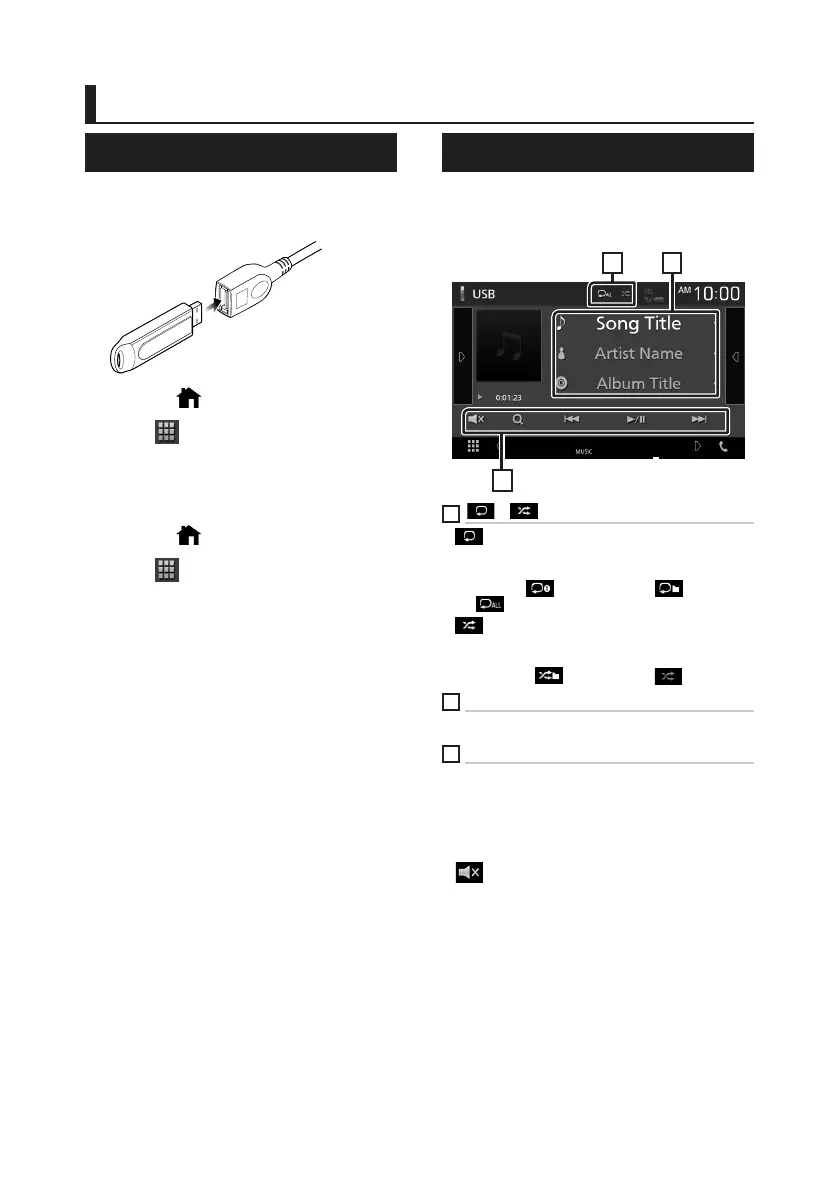
USB Basic Operation
Most functions can be controlled from the
source control screen and playback screen.
Control screen
2
3
1
1
[ ] / [ ]
• [ ] : Repeats the current track/folder. Each time
you touch the key, repeat mode switches in the
following sequence;
File repeat ([
]), Folder repeat ([ ]), Repeat
all ([
])
• [
] : Randomly plays all tracks in current folder.
Each time you touch the key, random mode
switches in the following sequence;
File random ([
]), Random off ([ ])
2
Track information
Displays the information of the current file.
3
[Operation keys
• [1] : Searches track/file. For details on search
operation, see Instruction Manual.
• [E] [F] : Searches the previous/next track/file.
Touch and hold to fast forward or fast backward.
• [D/H] : Plays or pauses.
• [
] : Touch to mute or not to mute.
!B5H-0357-03_QSG_JVC_KWV_K_EnFrEs.indb 16 2020/06/03 13:13



 To Next Page
 Loading...






