Tuner
26
Memory Operation
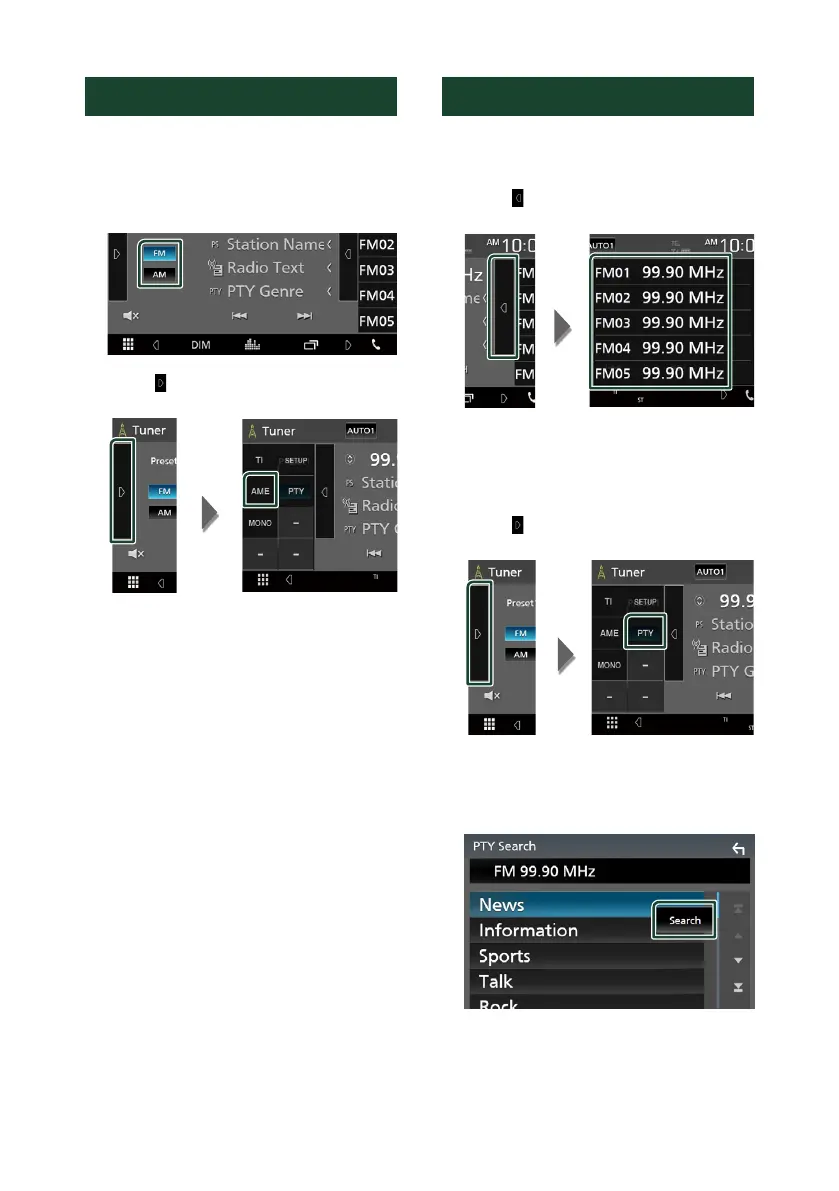
Ñ Auto memory
You can store stations with good reception in
memory automatically.
1
Touch desired band key.
2
Touch [ ] on the left side of the screen.
Touch [AME].
A confirmation screen appears.
3
Touch [Ye s ].
Auto memory starts.
Ñ Manual memory
You can store the current receiving station in
memory.
1
Select a station you wish to store in
memory.
2
Touch [FM#] (#: 1-24) or [AM#] (#: 1-12) in
which you want to store the station for 2
seconds.
Selecting Operation
Ñ Preset select
You can list and select memorized station.
1
Touch [ ] on the right side of the screen.
Select a station from the list.
Ñ Search by program type
(FM only)
You can tune to a station with a specific
program type when listening to FM.
1
Touch [ ] on the left side of the screen.
Touch [PTY].
PTY Search screen appears.
2
Select a program type from the list.
3
Touch [Search].
You can search a station of the selected
program type.
!B5H-0357-03_JVC_KWV_K_En.indb 26 2020/07/09 8:19



 To Next Page
 Loading...






