ASSEMBLY
Stand Assembly
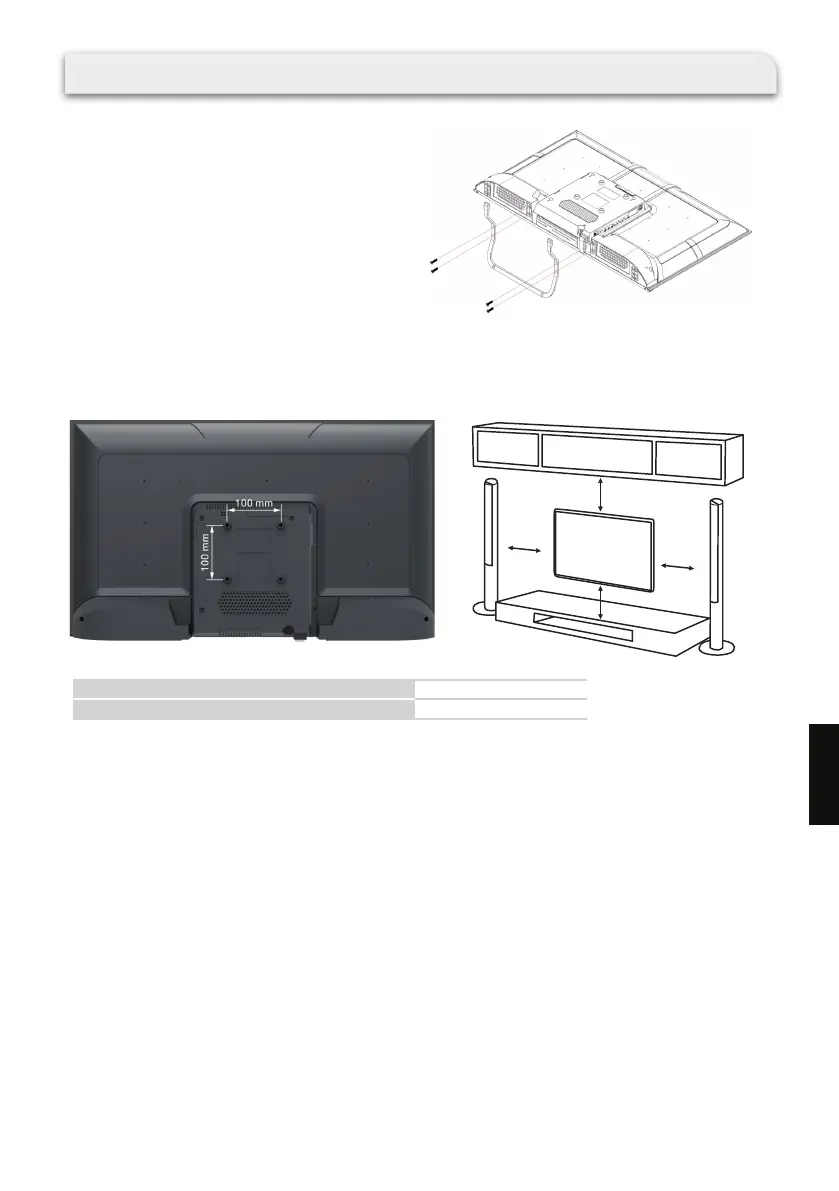
Place the TV unit face down on a soft, at surface to
prevent any damage to the screen.
Attach the stand to the bottom of the TV using the
included screws.
10 cm
10 cm
10 cm
10 cm
Wall mount hole pattern VESA (mm)
Wall mount screw size (mm)
100 x 100
M6 x 10
·The TV can be mounted on a wall using a 100 mm x 100 mm VESA kit sold separately.
·Place the TV face down on a clean, safe and cushioned surface. Remove the TV stands if you have
already attached them.
·Mount the TV according to the instructions supplied with the kit. Beware of electrical cables, gas and
water pipes in the wall.
·To complete the installation, please contact the store from which you purchase the TV.
Wall Mounting
157
EN



 To Next Page