10
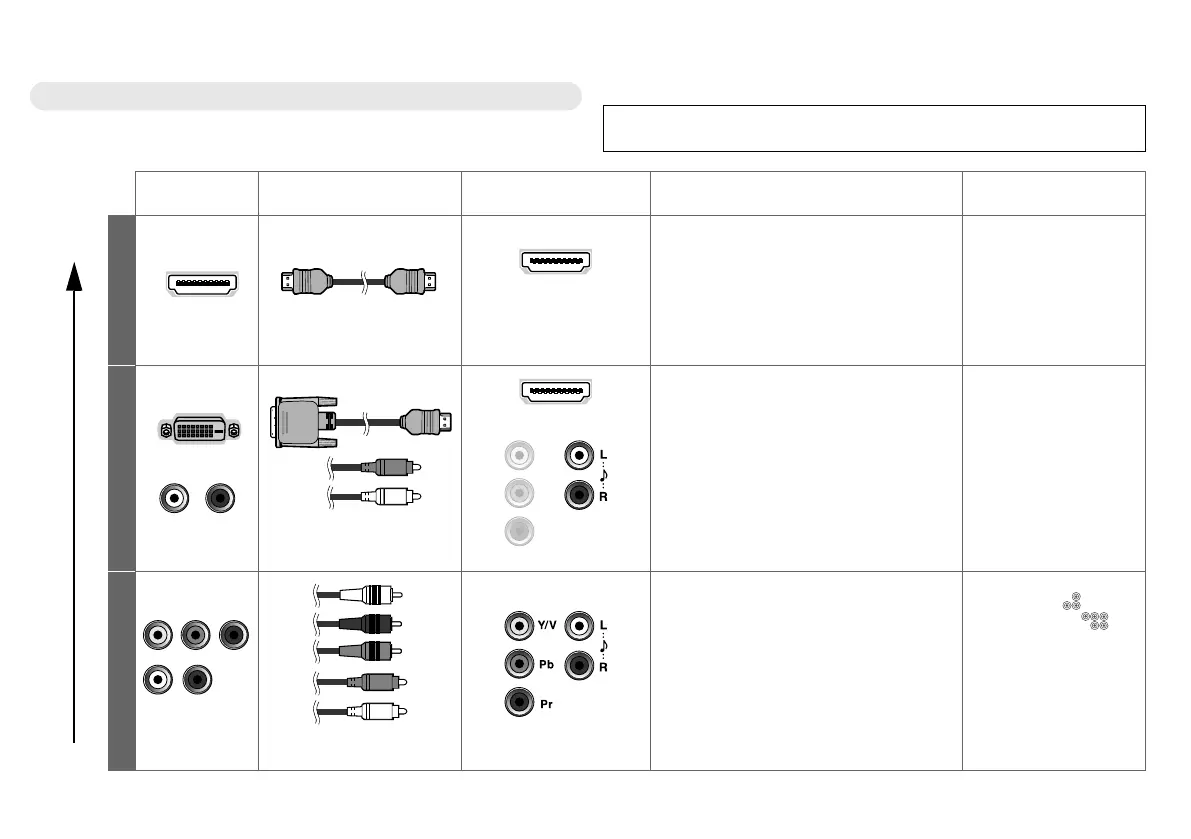
Choose your best connection
You can connect your TV to other devices in seven different ways. Check
your devices and choose the best connection. In addition, please read
“Notes” before using.
Please do not change any of the menu settings before completing the “Initial
settings” (P. 13). Otherwise, the “Initial settings” will not start automatically.
Picture
quality
Other devices Connecting cables Connect to your TV Available signals Notes
Best
A
HDMI
HDMI cable
EXT-4
EXT-5
EXT-6
Input
z HDMI (digital)
SD: 576i (625i), 480i (525i)
ED: 576p (625p), 480p (525p)
HD: 1080i (1125i),
1080p (1125p) / 24Hz,
1080p (1125p) / 50Hz,
1080p (1125p) / 60Hz, 720p (750p)
Audio L / R
If there is no sound,
change the “HDMI-1
Audio Setting” (P. 30).
B
DVI
Audio
DVI-HDMI cable,
Audio cable
EXT-4
EXT-3: L and R jacks
Input
z DVI (digital)
SD: 576i (625i), 480i (525i)
ED: 576p (625p), 480p (525p)
HD: 1080i (1125i),
1080p (1125p) / 24Hz,
1080p (1125p) / 50Hz,
1080p (1125p) / 60Hz, 720p (750p)
z Audio L / R (analogue)
If there is no sound,
change the “HDMI-1
Audio Setting” (P. 30).
Better
C
Component
video and Audio
Component video cable,
Audio cable
EXT-3
Input
z Component (analogue)
SD: 576i (625i), 480i (525i)
ED: 576p (625p), 480p (525p)
HD: 1080i (1125i), 1080p (1125p) /
50Hz, 1080p (1125p) / 60Hz,
720p (750p)
z Audio L / R (analogue)
Change the EXT-3
setting from “ ”
(composite) to “ ”
(component). (P. 31)
Getting started
LT-42DS9BJ_EN.book Page 10 Monday, February 25, 2008 5:16 PM


 To Next Page
 Loading...







