(No.MB350)1-23
3.2 Speaker
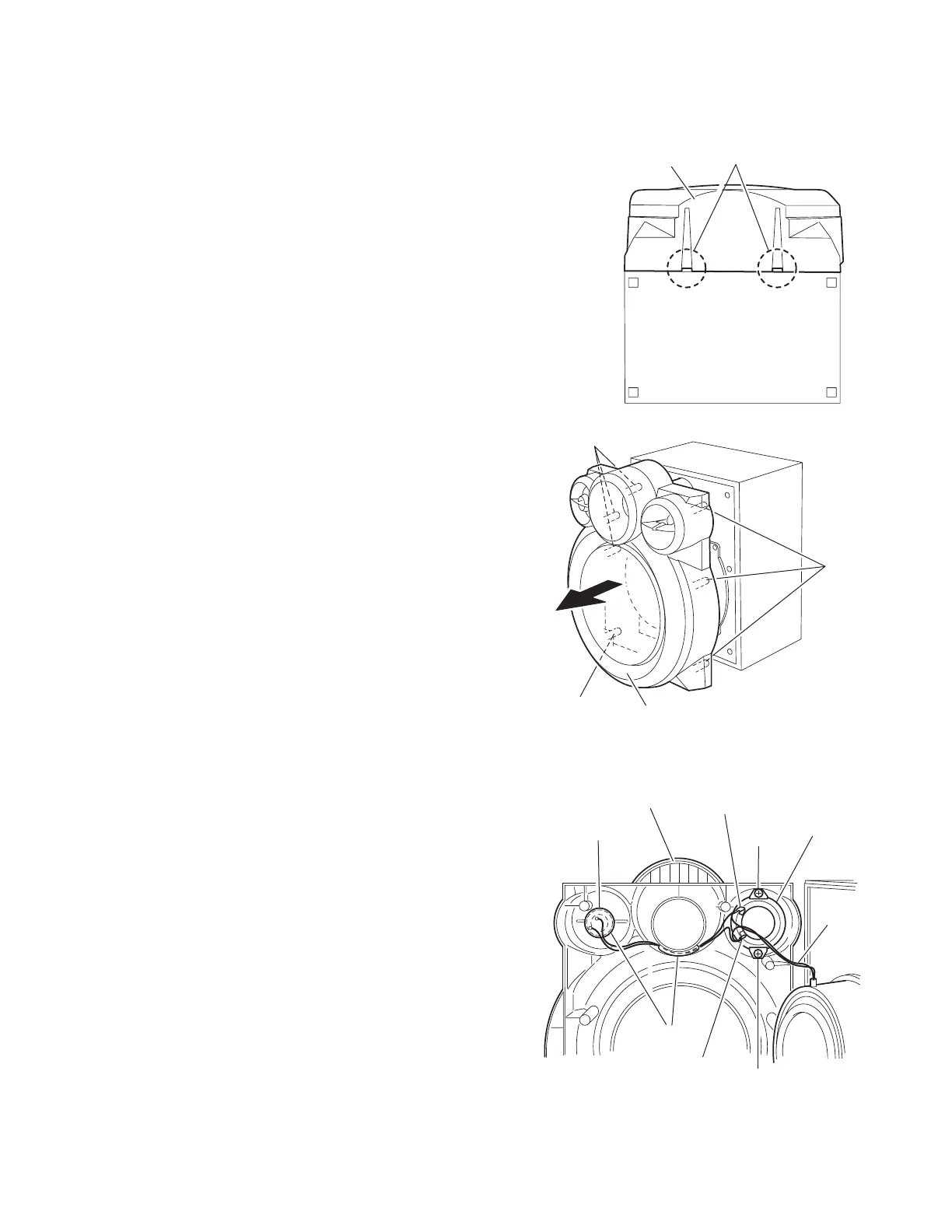
3.2.1 Removing the front cabinet
(See Fig.1, 2)
Caution:
Cover the product with cloth to avoid damage.
(1) Insert a screwdriver into the two slots h at the bottom of the
speaker and release the seven bosses on the inside of the
front panel assembly toward the front.
Caution:
The seven bosses are attached with adhesion bond. Cover the
product with cloth to avoid damage and release each boss
slowly.
Reference:
Also the speaker wire extending from the main speaker comes
off. Remove each speaker if necessary.
Fig.1
Fig.2
3.2.2 Removing the sub speaker/speaker
(See Fig.3)
• Prior to performing the following procedure, remove the front
cabinet.
(1) Disconnect the wire from the two sub speaker terminals.
(2) Remove the two screws U attaching the sub speaker.
(3) Detach the speaker, which is attached with bond.
Fig.3
Front panel assembly
h
(Bottom)
Boss
Boss
Boss
Front panel assembly
Sub speaker terminal
Sub speaker
Speaker
U
U
Sub speaker terminal
Bond
Wier
Front cabinet


 To Next Page