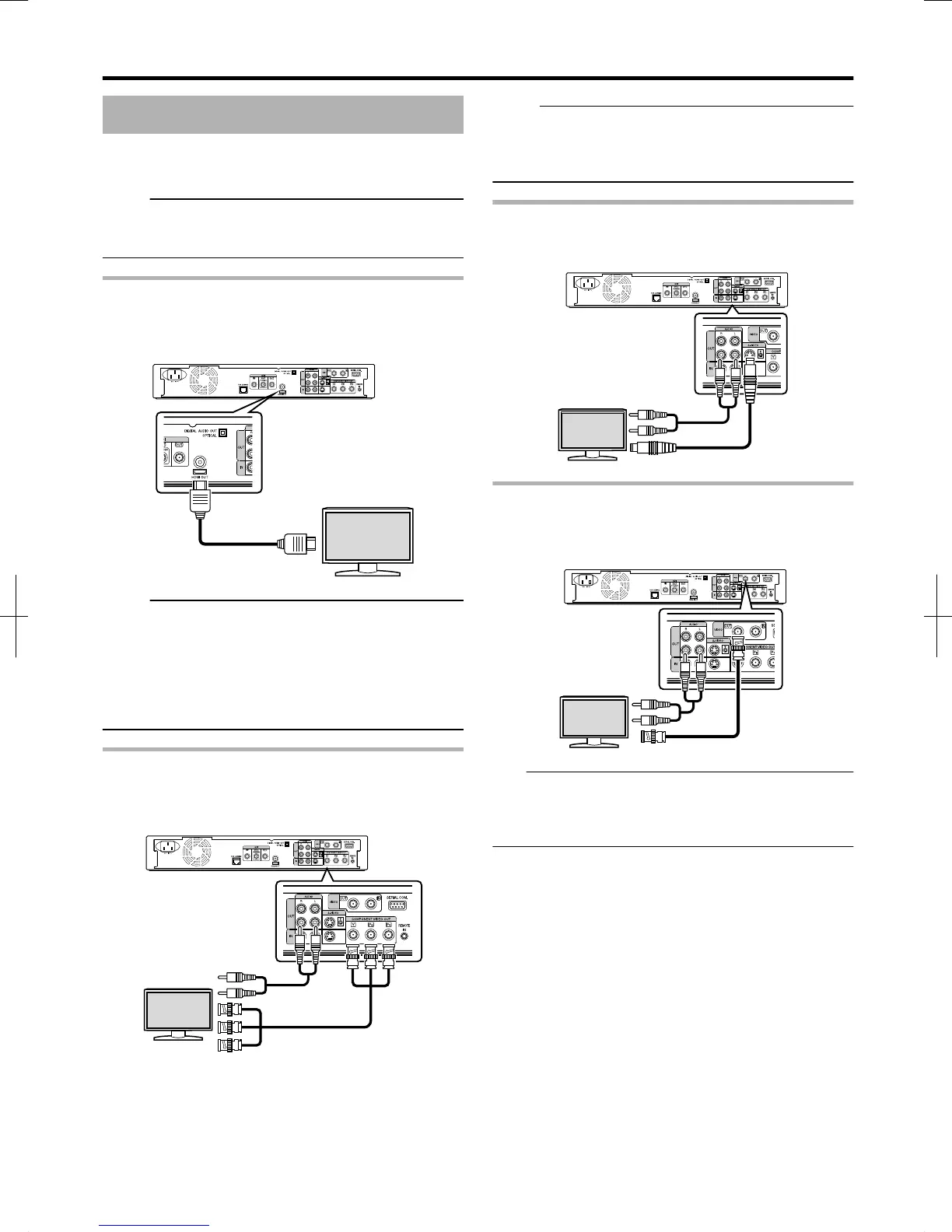
Connecting a Monitor
To display video images from this unit, connect it to a monitor.
v
This unit supports connections using “HDMI cable”,
“component video cable”, “S-video cable”, or “video cable”.
Memo:
v
Switch to the appropriate monitor input according to the
type of connection cable used.
For details, refer to the instruction manual of the monitor.
Connecting using a HDMI cable
Connecting using a HDMI cable (sold separately) enables
signals to be maintained in the digital format, and thus
playback of clear video images.
.
Memo:
v
Videos cannot be displayed on a monitor that does not
support the copyright protection system (HDCP).
v
Use a High Speed HDMI Cable.
v
After connecting using a HDMI cable, change the unit
setting to “HDMI CONNECTION”.
For more details, refer to “VIDEO PRIORITY MODE” (A page
83) .
Connecting using a component video cable
Connecting using a component video cable (sold separately)
delivers playback images that are clearer than those by an S-
video cable.
.
Memo:
v
After connecting a component video cable, change the unit
setting to “COMPONENT OUTPUT”.
For more details, refer to “COMPONENT OUTPUT” (A page
85) .
Connecting using an S-video cable
Connecting using an S-video cable (sold separately) delivers
video images that are clearer than those by a video cable.
.
Connecting using a video cable
Connect the output terminal of this unit to the input terminal of
a TV using the supplied video/audio cable.
(Use the supplied BNC adapter)
.
Note:
v
Connect the S-video/video output of this unit directly to the
TV (or monitor). Connecting this unit to the TV or monitor
via a video deck triggers the copy protection function, and
may cause distortion in the video images during playback.
Preparation
17
2012/3/8 13:53:0



 To Next Page