(No.MB595)1-11
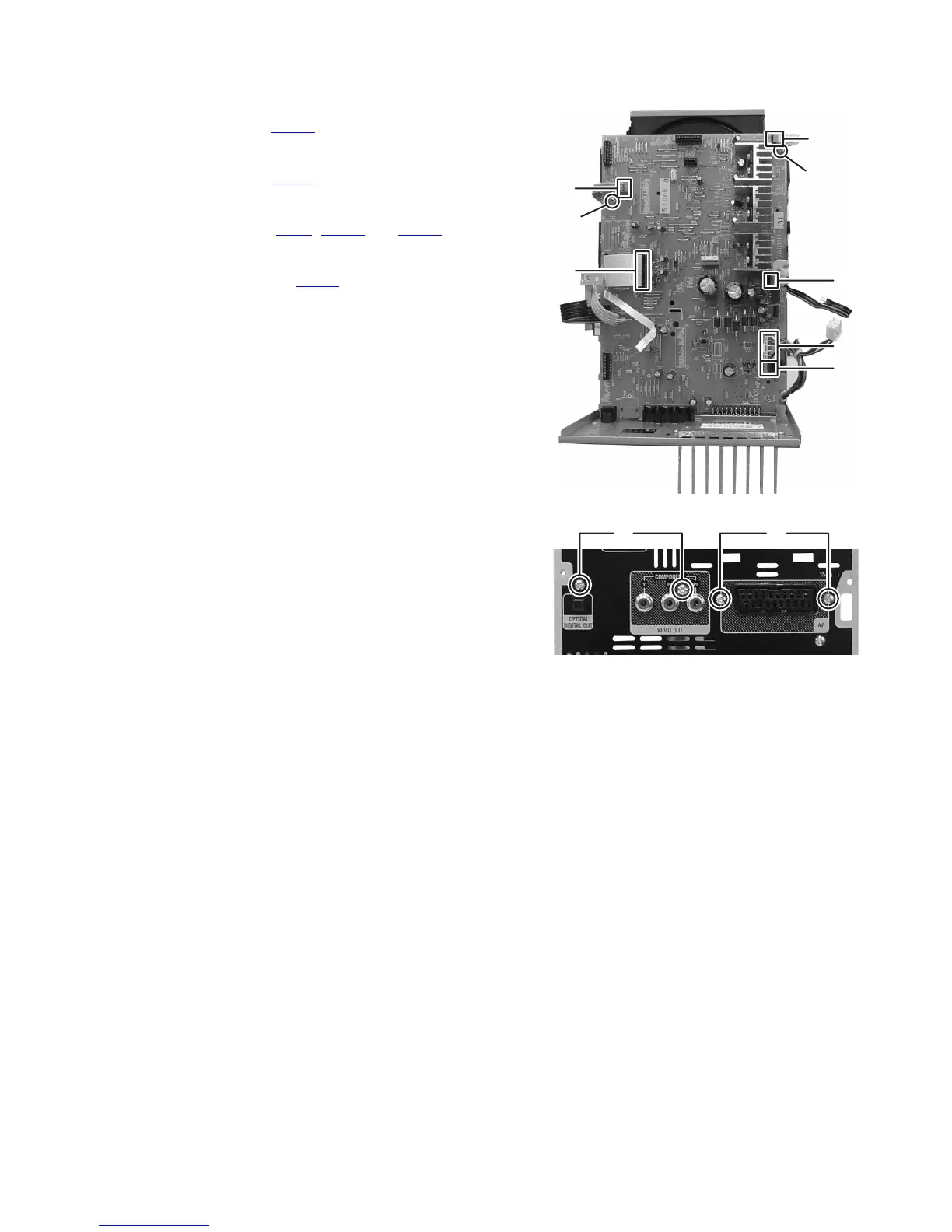
3.1.6 Removing the Micon board assembly
(See Fig.12, 13)
(1) Disconnect the connector wire from Power transformer
connected to connector CN202
of the Micon board assem-
bly. (See Fig.12)
(2) Disconnect the card wire from Power trans board assembly
connected to connector CN201
of the Micon board assem-
bly. (See Fig.12)
(3) Disconnect the card wire from DVD mechanism assembly
connected to connector CN21
, CN711 and CN831 of the
Micon board assembly. (See Fig.12)
(4) Disconnect the card wire from the USB jack board assem-
bly connected to connector CN206
of the Micon board as-
sembly. (See Fig,12)
(5) Remove the two screws K attaching the Micon board as-
sembly. (See Fig.12)
(6) Remove the four screws L attaching the Micon board as-
sembly. (See Fig.13)
Fig.12
Fig.13
CN202
CN21
CN711
CN206
CN201
CN831
K
K
LL


 To Next Page
 Loading...