EasyManua.ls Logo

JVC XP-A1000BK - Specifications

JVC XP-A1000BK
73 pages
Print Icon
To Next Page IconTo Next Page
To Previous Page IconTo Previous Page
Loading...
ZL-L
(Z900Z
“ON)
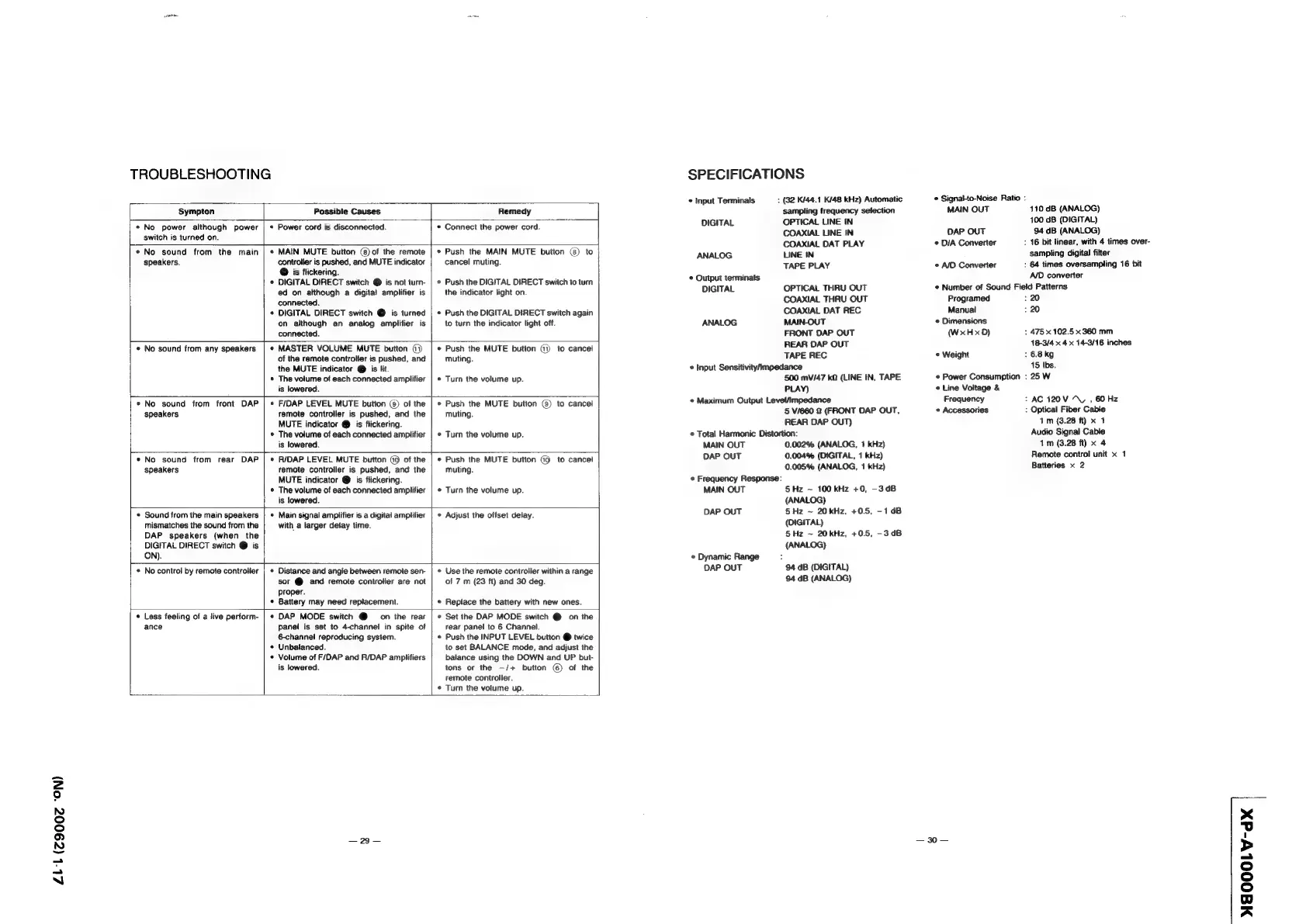
TROUBLESHOOTING
Sympton
Possible
Causes
Remedy
*
No
power
although
power
|
«
switch
is
turned
on.
Power
cord
is
disconnected.
Connect
the
power
cord.
*
No
sound
from
the
main
|
*
speakers.
MAIN
MUTE
button
(8)
of
the
remote
controtier
is
pushed,
and
MUTE
indicator
@
is
flickering.
DIGITAL
DIRECT
switch
@
is
not
turn-
ed
on
although
a
digital
amplifier
is
connected.
DIGITAL
DIRECT
switch
@
is
turned
on
although
an
analog
amplifier
is
connected.
Push
the
MAIN
MUTE
button
(8)
to
cancel
muting.
Push
the
DIGITAL
DIRECT
switch
to
turn
the
indicator
light
on.
Push
the
DIGITAL
DIRECT
switch
again
to
turn
the
indicator
light
off.
*
No
sound
from
any
speakers
*
No
sound
from
front
DAP
speakers
=
MASTER
VOLUME
MUTE
button
@)
of
the
remote
controller
is
pushed,
and
the
MUTE
indicator
@
is
lit.
The
volume
of
each
connected
amplifier
is
lowered.
Push
the
MUTE
button
(7)
to
cancel
muting.
Turn
the
volume
up.
F/DAP
LEVEL
MUTE
button
(8)
of
the
remote
controller
is
pushed,
and
the
MUTE
indicator
@
is
flickering.
The
volume
of
each
connected
amplifier
is
lowered.
*
No
sound
from
rear
DAP
speakers
RIDAP
LEVEL
MUTE
button
(9
of
the
remote
controller
is
pushed,
and
the
MUTE
indicator
@
is
flickering.
The
volume
of
each
connected
amplifier
is
lowered.
Push
the
MUTE
button
(8)
to
cancel
muting.
Turn
the
volume
up.
Push
the
MUTE
button
@9
to
cancel
muting.
Turn
the
volume
up.
Sound
from
the
main
speakers
mismatches
the
sound
from
the
DAP
speakers
(when
the
DIGITAL
DIRECT
switch
@
is
ON).
Main
signal
amplifier
is
a
digital
amplifier
with
a
larger
delay
time.
°
Adjust
the
offset
delay.
No
control
by
remote
controller
|
¢
Distance
and
angle
between
remote
sen-
sor
@
and
remote
controller
are
not
proper.
Battery
may
need
replacement.
Use
the
remote
controller
within
a
range
of
7
m
(23
ft)
and
30
deg.
Replace
the
battery
with
new
ones.
Less
feeling
of
a
live
perform-
|
ance
DAP
MODE
switch
@
on
the
rear
panel
is
set
to
4-channel
in
spite
of
6channel
reproducing
system.
*
Unbalanced.
*
Volume
of
F/DAP
and
R/DAP
amplifiers
is
lowered.
Set
the
DAP
MODE
switch
@
on
the
rear
panel
to
6
Channel.
Push
the
INPUT
LEVEL
button
@
twice
to
set
BALANCE
mode,
and
adjust
the
balance
using
the
DOWN
and
UP
but-
tons
or
the
—/+
button
(6)
of
the
remote
controller.
Turn
the
volume
up.
SPECIFICATIONS
©
input
Terminals
:
(32
K/44.1
K/48
kHz)
Automatic
sampling
frequency
selection
DIGITAL
OPTICAL
LINE
IN
COAXIAL
LINE
IN
COAXIAL
DAT
PLAY
ANALOG
LINE
IN
TAPE
PLAY
*
Output
terminats
DIGITAL
OPTICAL
THRU
OUT
COAXIAL
THRU
OUT
COAXIAL
DAT
REC
ANALOG
MAIN-OUT
FRONT
DAP
OUT
REAR
DAP
OUT
TAPE
REC
*
Input
Sensitivitympedance
500
mV/47
kQ
(LINE
IN,
TAPE
PLAY)
*
Maximum
Output
Level/impedance
5
V/660
&
(FRONT
DAP
OUT,
REAR
DAP
OUT)
*
Total
Harmonic
Distortion:
MAIN
OUT
0.002%
(ANALOG,
1
kHz)
DAP
OUT
0.004%
(DIGITAL,
1
kHz)
0.005%
(ANALOG,
1
kHz)
*
Frequency
Response:
MAIN
OUT
5Hz
~
100
kHz
+0,
—3dB
(ANALOG)
DAP
OUT
5
Hz
~
20
kHz,
+0.5,
-1dB
(DIGITAL)
5Hz
~
20kHz,
+0.5,
-3dB
(ANALOG)
*
Dynamic
Range
:
DAP
OUT
94
dB
(DIGITAL)
94
dB
(ANALOG)
©
Signal-to-Noise
Ratio
:
MAIN
OUT
110
dB
(ANALOG)
100
dB
(DIGITAL)
DAP
OUT
94
dB
(ANALOG)
:
16
bit
linear,
with
4
times
over-
sampling
digital
filter
:
64
times
oversampling
16
bit
AID
converter
¢
Number
of
Sound
Field
Patterns
©
D/A
Converter
°
A/D
Converter
Programed
220
Manual
:20
*
Dimensions
(WxHxD)
:
475
x
102.5
x
360
mm
18-3/4
x
4
x
14-3/16
inches
©
Weight
>
6.8kg
15
Ibs.
¢
Power
Consumption
:
25
W
©
Line
Voltage
&
Frequency
7
AC
120V
~U
,
60
Hz
*
Accessories
:
Optical
Fiber
Cable
1m
(3.28
ft)
x
1
Audio
Signal
Cable
1m
(3.28
ft)
x
4
Remote
control
unit
x
1
Batteries
x
2
—
30
—
MAOOOLV-dX