EasyManua.ls Logo

JVC XP-A1000BK - Operation

JVC XP-A1000BK
73 pages
Print Icon
To Next Page IconTo Next Page
To Previous Page IconTo Previous Page
Loading...
(29002
‘ON)
OL-L
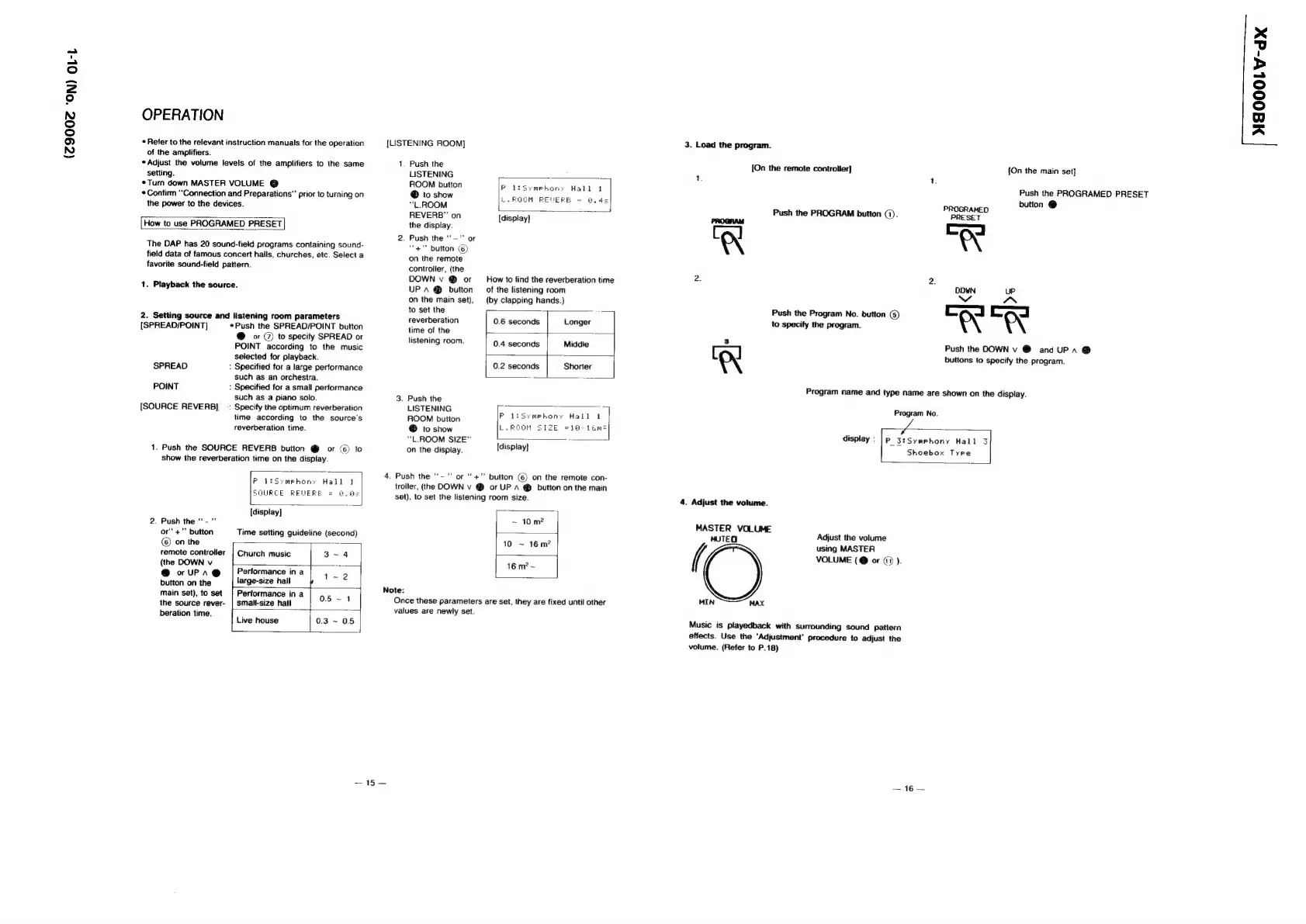
OPERATION
Refer
to
the
relevant
instruction
manuals
for
the
operation
of
the
amplifiers.
«Adjust
the
volume
levels
of
the
amplifiers
to
the
same
setting.
*Turn
down
MASTER
VOLUME
@
Confirm
“Connection
and
Preparations‘
prior
to
turning
on
the
power
to
the
devices.
How
to
use
PROGRAMED
PRESET
The
DAP
has
20
sound-fieid
programs
containing
sound-
field
data
of
famous
concert
hails,
churches,
etc.
Select
a
favorite
sound-fieid
pattern.
1.
Playback
the
source.
2.
Setting
source
and
listening
room
parameters
{SPREAD/POINT]
Push
the
SPREAD/POINT
button
@
or
@
to
specify
SPREAD
or
POINT
according
to
the
music
selected
for
playback.
SPREAD
:
Specified
for
a
large
performance
such
as
an
orchestra.
POINT
:
Specified
for
a
small
performance
such
as
a
piano
solo.
[SOURCE
REVERB]
_
:
Specify
the
optimum
reverberation
time
according
to
the
source's
reverberation
time.
1.
Push
the
SOURCE
REVERB
button
@
or
(6)
to
show
the
reverberation
time
on
the
display
P44
mehory
Hall
SOURCE
REWERE
=
4.4
[display]
2.
Push
the
‘'-
"
or‘
+"
button
Time
setting
guideline
(second)
©)
on
the
a
remote
controller
|
Church
music
3~4
(the
DOWN
v
ed
@
o
WPPA®
Performance
in
a
1~2
button
on
the
large-size
hall
+
J
main
set),
to
set
|
Performance
in
a
05-14
ihe
source
rever-
|
small-size
hall
:
beration
time.
:
Live
house
0.3
~
0.5
[LISTENING
ROOM)
1.
Push
the
LISTENING
ROOM
button
®
to
show
“L.ROOM
REVERB”
on
[display]
the
display.
2.
Push
the
“-"'
or
“+""
button
©)
on
the
remote
controller,
(the
DOWN
v
@
or
How
to
find
the
reverberation
time
UP
A
@
button
—
of
the
listening
room
on
the
main
set),
(by
clapping
hands.)
PoltsSymehony
L.ROOM
REVERB
to
set
the
reverberation
0.6
seconds
Longer
time
of
the
-
.
listening
room.
0.4
seconds
Middie
0.2
seconds
Shorter
3.
Push
the
LISTENING
ROOM
button
®
to
show
“L.ROOM
SIZE”
on
the
display.
{display}
4.
Push
the
"'-"
or
‘'+”’
button
(6)
on
the
remote
con-
trotler,
(the
DOWN
v
@
or
UP
A
®
button
on
the
main
set),
to
set
the
listening
room
size.
Note:
Once
these
parameters
are
set,
they
are
fixed
until
other
values
are
newly
set.
aif
Stat
3.
Load
the
program.
{On
the
remote
controller}
[On
the
main
set}
Push
the
PROGRAMED
PRESET
button
@
5
Push
the
PROGRAM
button
(1).
AUR
AED
Zl
gl
4
[=]
=
4
UP
INN
Push
the
DOWN
v
@
and
UP
a
@
buttons
to
specify
the
program.
Push
the
Program
No.
button
(5)
to
specify
the
program.
i.
Program
name
and
type
name
are
shown
on
the
display.
Program
No.
display:
|
p_3:Symehony
Hall
3
Shoebox
Tyre
4.
Adjust
the
volume.
MASTER
VOLUME
MUTEO
Adjust
the
volume
using
MASTER
(
VOLUME
(@
or
(1)
).
MIN
MAX
Music
is
playedback
with
Surrounding
sound
pattern
effects.
Use
the
‘Adjustment’
procedure
to
adjust
the
volume.
(Refer
to
P.18)
AG
=
NEOOOLV-dx