EasyManua.ls Logo

JVC XP-A1000BK - Description and Functions

JVC XP-A1000BK
73 pages
Print Icon
To Next Page IconTo Next Page
To Previous Page IconTo Previous Page
Loading...
£1
(z9002
“ON)
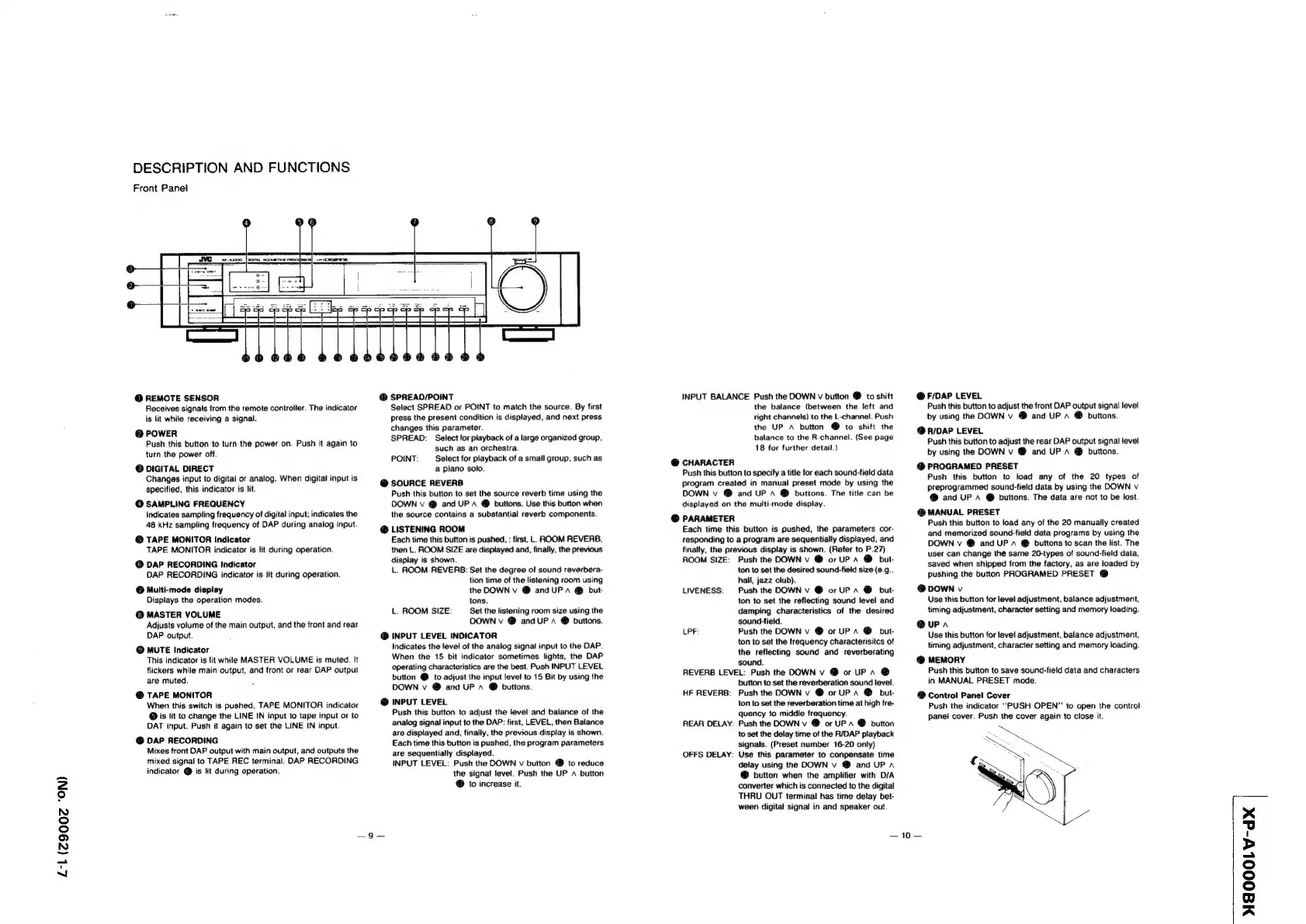
DESCRIPTION
AND
FUNCTIONS
Front
Panet
@
REMOTE
SENSOR
Receives
signals
from
the
remote
controller.
The
indicator
is
lit
while
receiving
a
signal.
@
POWER
Push
this
button
to
turn
the
power
on.
Push
it
again
to
turn
the
power
off.
@
DIGITAL
DIRECT
Changes
input
to
digital
or
analog.
When
digital
input
is
specified,
this
indicator
is
lit.
@
SAMPLING
FREQUENCY
Indicates
sampling
frequency
of
digital
input;
indicates
the
48
kHz
sampling
frequency
of
DAP
during
analog
input.
©
TAPE
MONITOR
Indicator
TAPE
MONITOR
indicator
is
lit
during
operation.
@
DAP
RECORDING
Indicator
DAP
RECORDING
indicator
is
lit
during
operation.
@
Multi-mode
display
Displays
the
operation
modes.
@
MASTER
VOLUME
Adjusts
volume
of
the
main
output,
and
the
front
and
rear
DAP
output.
©
MUTE
Indicator
This
indicator
is
lit
while
MASTER
VOLUME
is
muted.
It
flickers
while
main
output,
and
front
or
rear
DAP
output
are
muted.
@
TAPE
MONITOR
When
this
switch
is
pushed,
TAPE
MONITOR
indicator
@
is
it
to
change
the
LINE
IN
input
to
tape
input
or
to
DAT
input.
Push
it
again
to
set
the
LINE
IN
input.
@
DAP
RECORDING
Mixes
front
DAP
output
with
main
output,
and
outputs
the
mixed
signal
to
TAPE
REC
terminal.
DAP
RECORDING
indicator
@
is
lit
during
operation.
@
SPREAO/POINT
Select
SPREAD
or
POINT
to
match
the
source.
By
first
press
the
present
condition
is
displayed,
and
next
press
changes
this
parameter.
SPREAD:
Select
for
playback
of
a
large
organized
group,
such
as
an
orchestra.
POINT:
Select
for
playback
of
a
small
group,
such
as
a
piano
solo.
@
SOURCE
REVERB
Push
this
button
to
set
the
source
reverb
time
using
the
DOWN
v
@
and
UP
A
@
buttons.
Use
this
button
when
the
source
contains
a
substantial
reverb
components.
@
LISTENING
ROOM
Each
time
this
button
is
pushed,
:
first,
L.
ROOM
REVERB,
then
L.
ROOM
SIZE
are
displayed
and,
finally,
the
previous
display
is
shown.
iL.
ROOM
REVERB:
Set
the
degree
of
sound
reverbera-
tion
time
of
the
listening
room
using
the
DOWN
v
@
and
UP”
@
but-
tons.
L.
ROOM
SIZE:
Set
the
listening
room
size
using
the
DOWN
v
@
and
UP
A
®
buttons.
@
INPUT
LEVEL
INDICATOR
Indicates
the
level
of
the
analog
signal
input
to
the
DAP.
When
the
15
bit
indicator
sometimes
lights,
the
DAP
operating
characteristics
are
the
best.
Push
INPUT
LEVEL
button
@
to
adjust
the
input
level
to
15
Bit
by
using
the
DOWN
v
@
and
UP
A
@
buttons.
@
INPUT
LEVEL
Push
this
button
to
adjust
the
level
and
balance
of
the
analog
signal
input
to
the
DAP:
first,
LEVEL,
then
Balance
are
displayed
and,
finally,
the
previous
display
is
shown.
Each
time
this
button
is
pushed,
the
program
parameters
are
sequentially
displayed.
INPUT
LEVEL:
Push
the
DOWN
v
button
to
reduce
the
signal
level.
Push
the
UP
A
button
@
to
increase
it.
INPUT
BALANCE
Push
the
DOWN
v
button
@
to
shift
the
balance
{between
the
left
and
right
channels)
to
the
L-channel.
Push
the
UP
A
button
@
to
shift
the
balance
to
the
R-channel.
(See
page
18
for
further
detail.)
@
CHARACTER
Push
this
button
to
specify
a
title
for
each
sound-tield
data
program
created
in
manual
preset
mode
by
using
the
DOWN
v
@
and
UP
a
@
buttons.
The
title
can
be
displayed
on the
multi-mode
display.
@
PARAMETER
Each
time
this
button
is
pushed,
the
parameters
cor-
responding
to
a
program
are
sequentially
displayed,
and
finalty,
the
previous
display
is
shown.
(Refer
to
P.27)
ROOM
SIZE:
Push
the
DOWN
v
@
or
UP
A
@
but-
ton
to
set
the
desired
sound-field
size
(@.9.,
hall,
jazz
club).
LIVENESS:
Push
the
DOWN
v
@
or
UP
a
@
but-
ton
to
set
the
reflecting
sound
level
and
damping
characteristics
of
the
desired
sound-field.
LPF:
Push
the
DOWN
v
@
or
UPA
@
but
ton
to
set
the
frequency
characterisitcs
of
the
reflecting
sound
and
reverberating
sound.
REVERB
LEVEL:
Push
the
DOWN
v
@
or
UPA
@
button
to
set
the
reverberation
sound
level.
HF
REVERB:
Push
the
DOWN
v
@
or
UPA
@
but-
ton
to
set
the
reverberation
time
at
high
fre-
quency
to
middle
frequency.
REAR
DELAY:
Push
the
DOWN
v
@
or
UP
1
@
button
to
set
the
delay
time
of
the
R/DAP
playback
signals.
(Preset
number
16-20
only)
OFFS
DELAY:
Use
this
parameter
to
conpensate
time
delay using
the
DOWN
v
@
and
UP
a
@
button
when
the
amplifier
with
D/A
converter
which
is
connected
to
the
digital
THRU
OUT
terminal
has
time
delay
bet-
ween
digital
signal
in
and
speaker
out.
@
F/DAP
LEVEL
Push
this
button
to
adjust
the
front
DAP
output
signal
level
by
using
the
DOWN
v
@
and
UP
A
@
buttons.
@
R/DAP
LEVEL
Push
this
button
to
adjust
the
rear
DAP
output
signal
level
by
using
the
DOWN
v
@
and
UP
A
@
buttons.
@
PROGRAMED
PRESET
Push
this
button
to
load
any
of
the
20
types
of
preprogrammed
sound-field
data
by
using
the
DOWN
v
@
and
UP
A
@
buttons.
The
data
are
not
to
be
lost.
@
MANUAL
PRESET
Push
this
button
to
load
any
of
the
20
manually
created
and
memorized
sound-field
data
programs
by
using
the
DOWN
v
@
and
UP
~
@
buttons
to
scan
the
list.
The
user
can
change
thé
same
20-types
of
sound-field
data,
saved
when
shipped
from
the
factory,
as
are
loaded
by
pushing
the
button
PROGRAMED
PRESET
@
@
DOWN
v
Use
this
button
for
level
adjustment,
balance
adjustment,
timing
adjustment,
character
setting
and
memory
loading.
@upa
Use
this
button
for
level
adjustment,
balance
adjustment,
timing
adjustment,
character
setting
and
memory
loading.
@
MEMORY
Push
this
button
to
save
sound-field
data
and
characters
in
MANUAL
PRESET
mode.
@
Control
Panel
Cover
Push
the
indicator
‘PUSH
OPEN”
to
open
the
control
panel
cover.
Push
the
cover
again
to
close
it.
10
MAOOOLW-dX
|