EasyManua.ls Logo

JVC XP-A1000BK - Parameter Change

JVC XP-A1000BK
73 pages
Print Icon
To Next Page IconTo Next Page
To Previous Page IconTo Previous Page
Loading...
El-L
(29002
“ON)
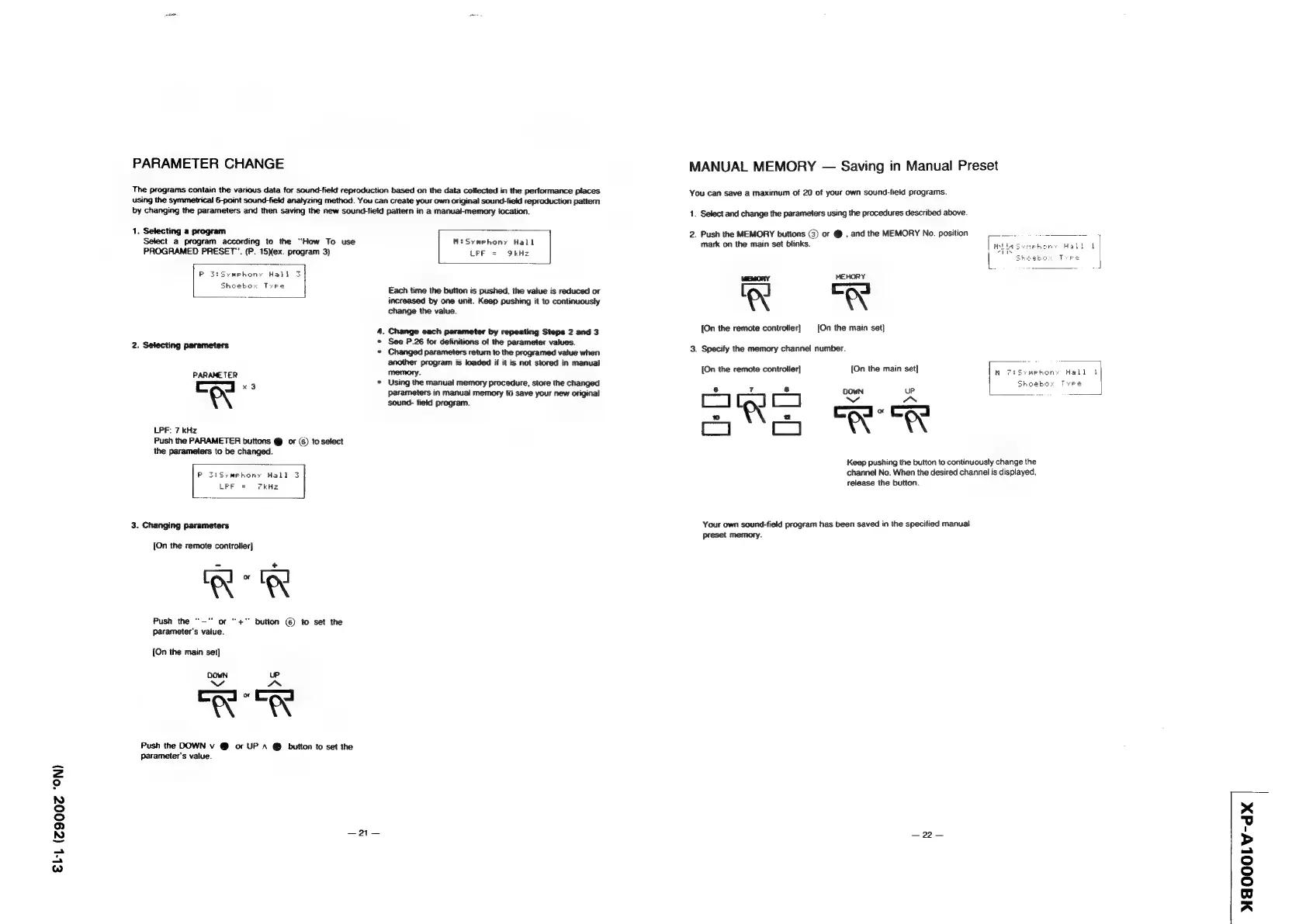
PARAMETER
CHANGE
The
programs
contain
the
various
data
for
sound-field
reproduction
based
on
the
data
collected
in
the
performance
places
using
the
symmetrical
6-point
sound-field
analyzing
method.
You
can
create
your
own
original
sound-field
reproduction
pattern
by
changing
the
parameters
and
then
saving
the
new
sound-field
pattern
in
a
manual-memory
tocation.
1.
Selecting
a
program
Select
a
program
according
to
the
“How
To
use
MiSymehony
Hall
PROGRAMED
PRESET”.
(P.
15Xex.
program
3)
LEE
=
9kHz
Each
time
the
button
is
pushed,
the
value
is
reduced
or
increased
by
one
unit.
Keep
pushing
it
to
continuously
change
the
value.
4.
Change
each
parameter
by
repeating
Steps
2
and
3
See
P.26
for
definitions
of
the
parameter
values.
«
Changed
parameters
retum
to
the
programed
vatue
when
another
program
is
loaded
if
it
is
not
stored
in
manual
2.
Selecting
parameters
PARAMETER
memory
i
co
“3
©
Using
the
manual
memory
procedure,
store
the
changed
e
Parameters
in
manual
memory
to
save
your
new
original
sound-
field
program.
LPF:
7
kHz
Push
the
PARAMETER
buttons
@
or
(6)
to
select
the
parameters
to
be
changed.
Po
SiSymrphony
Hall
3
LFF
=
kHz
3.
Changing
parameters
{On
the
remote
controller]
Push
the
‘“—"
or
“+”
button
(@)
to
set
the
parameter’s
value.
{On
the
main
set]
OOwWN
UP
aaa
Push
the
DOWN
v
@
or
UP
A
@
button
to
set
the
parameter's
value.
oi
MANUAL
MEMORY
—
Saving
in
Manual
Preset
You
can
save
a
maximum
of
20
of
your
own
sound-field
programs.
1.
Select
and
change
the
parameters
using
the
procedures
described
above.
2.
Push
the
MEMORY
buttons
(3)
or
@
,
and
the
MEMORY
No.
position
cs
ae
mark
on the
main
set
blinks.
MEMORY
MEMORY
{On
the
remote
controller}
[On
the
main
set)
3.
Specify
the
memory
channel
number.
[On
the
remote
controller]
[On
the
main
set]
ogc
&
8
s
‘a
Cpa:
Cad
ofS
A
A
Keep
pushing
the
button
to
continuously
change
the
channel
No.
When
the
desired
channel
is
displayed,
release
the
button.
Your
own
sound-field
program
has
been
saved
in
the
specified
manual
preset
memory.
—22—
MAOOOLV-dX