EasyManua.ls Logo

JVC XP-A1000BK - Page 14

JVC XP-A1000BK
73 pages
Print Icon
To Next Page IconTo Next Page
To Previous Page IconTo Previous Page
Loading...
(29002
“ON)
tL-L
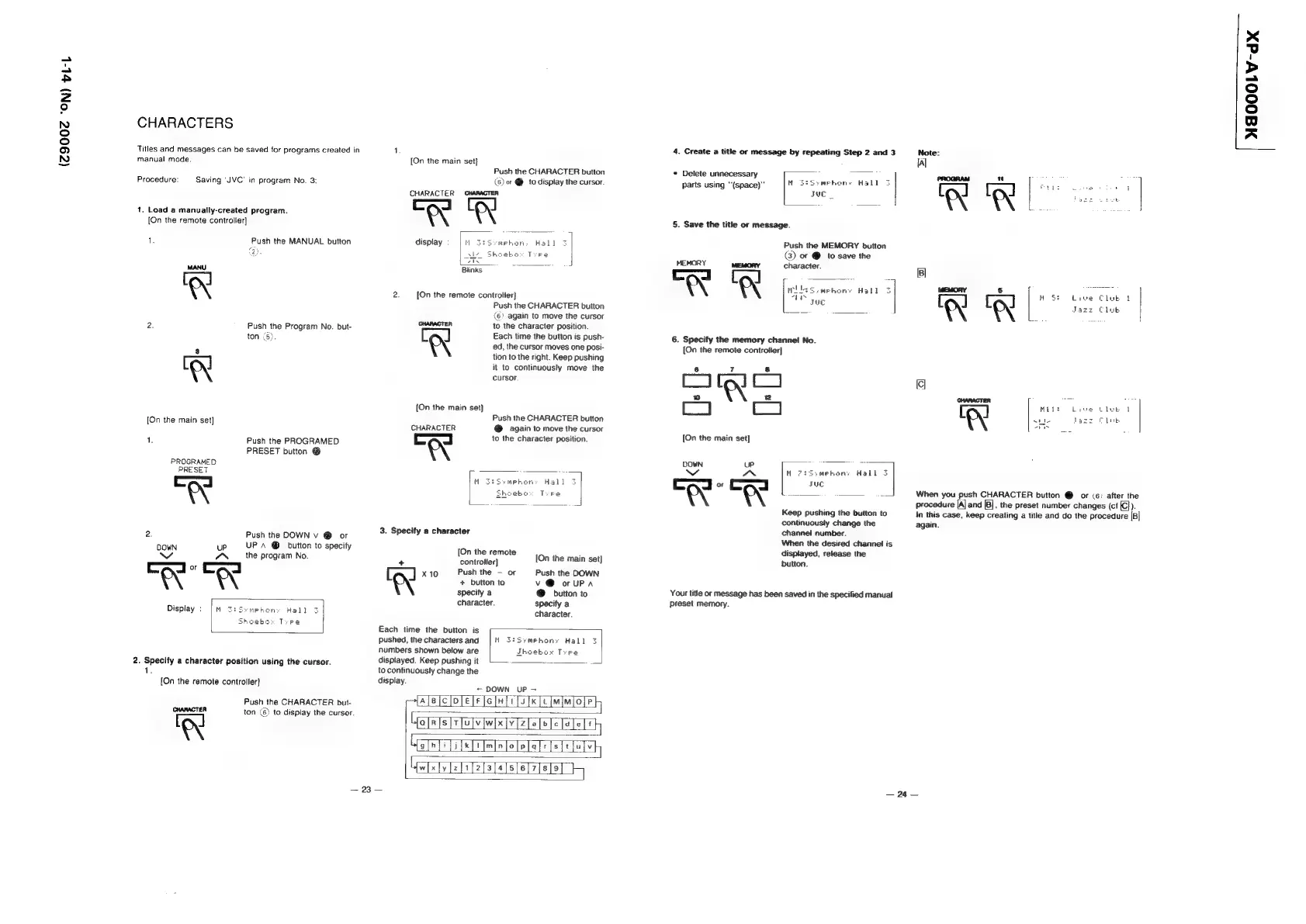
CHARACTERS
Titles
and
messages
can
be
saved
for
programs
created
in
manual
mode.
Procedure:
Saving
‘JVC’
in
program
No.
3:
1.
Load
a
manually-created
program.
[On
the
remote
controller]
1.
Push
the
MANUAL
button
a
2
2.
Push
the
Program
No.
but-
ton
(5).
[On
the
main
set]
1.
Push
the
PROGRAMED
PRESET
button
@
PROGRAMED
PRESET
Zl
2.
Push
the
DOWN
v
@
or
DOWN
uP
UP
A
@
button
to
specify
the
program
No.
ymphony
Hall
3
ebox
Tepe
2.
Specify
a
character
position
using
the
cursor.
1.
[On
the
remote
controller}
Push
the
CHARACTER
but-
CHARACTER
ton
(6)
to
display
the
cursor.
‘KX
[On
the
main
set}
Push
the
CHARACTER
button
(6)
or
@
to
display
the
cursor.
CHARACTER
CHARACTER
ew
display
Blinks
2:
[On
the
remote
controtler}
Push
the
CHARACTER
button
(6)
again
to
move
the
cursor
CHARACTER
to
the
character
position.
[ ]
Each
time
the
button
is
push-
\
ed,
the
cursor
moves
one
posi-
tion
to
the
right.
Keep
pushing
it
to
continuously
move
the
cursor.
{On
the
main
set}
Push
the
CHARACTER
button
CHARACTER
®
again
to
move
the
cursor
ao
to
the
character
position.
3.
Specify
a
character
‘On
the
remote
A
l
[On
the
main
set]
controller]
Push
the
—
or
Push
the
DOWN
A
+
button
to
v
@
or
UPA
specify
a
@
button
to
character.
specify
a
character.
Each
time
the
button
is
Pushed,
the
charactersand
|
M
3:Symebhons
Hall
3
numbers
shown
below
are
Thoebox
Tyre
displayed.
Keep
pushing
it
on
to
continuously
change
the
display.
+
DOWN
UP
—
pAieiclo
lee
lence
lciMisloly
“oieisiviulviwx[y
(2
[allel
lah
FAnEnoOGoOooGogoC,
Ufw[xly[z[1[2}3]4[s]6
alot}
~
—
23
—
4.
Create
a
title
or
message
by
repeating
Step
2
and
3
mebons
Hall
Juc
*
Delete
unnecessary
parts
using
“(space)”
4
5.
Save
the
title
or
message.
Push
the
MEMORY
button
(3)
or
@
to
save
the
MEMORY
MEMORY
character.
6.
Specify
the
memory
channel
No.
[On
the
remote
controler]
ees
=
[On
the
main
set]
DOWN
UP.
a
w~
cas
M
72Ssmehony
Hall
3
“ree
Keep
pushing
the
button
to
continuously
change
the
channei
number.
When
the
desired
channel
is
displayed,
release
the
button.
Your
title
or
message
has
been
saved
in
the
specified
manual
preset
memory.
Note:
al
LA!
Mitt
Lewe
thet
od
~éhle
Jazz
Club
or
When
you
push
CHARACTER
button
@
or
(6:
after
the
procedure
[A]
and
|B],
the
preset
number
changes
(ct
[C}).
In
this
case,
keep
creating
a
title
and
do
the
procedure
[B]
again.
—
24
—
NEOOOLV-dx