EasyManua.ls Logo

JVC XP-A1000BK - Page 15

JVC XP-A1000BK
73 pages
Print Icon
To Next Page IconTo Next Page
To Previous Page IconTo Previous Page
Loading...
GL-L
(79002
‘ON)
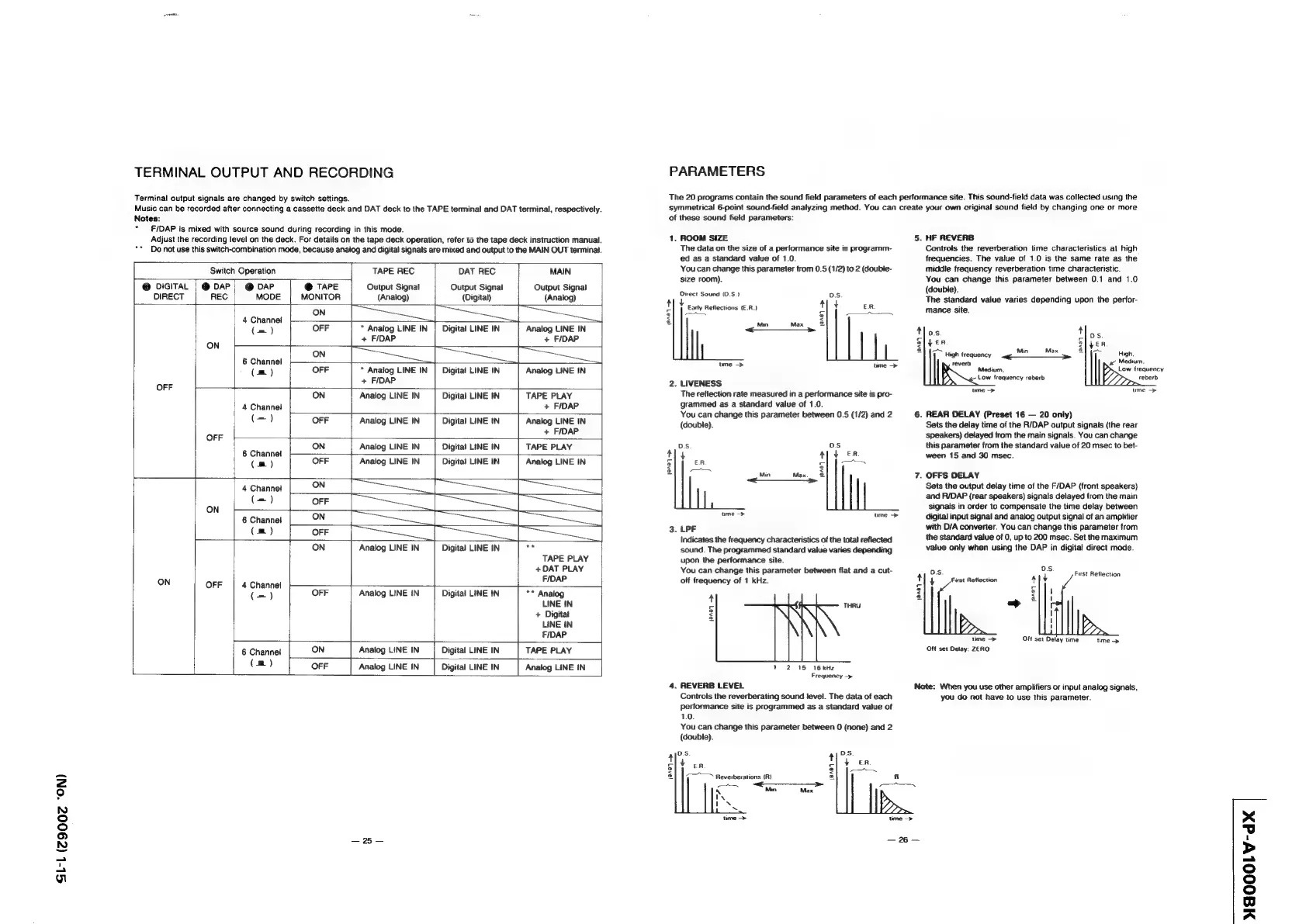
TERMINAL
OUTPUT
AND
RECORDING
Terminal
output
signals
are
changed
by
switch
settings.
Music
can
be
recorded
after
connecting
a
cassette
deck
and
DAT
deck
to
the
TAPE
terminal
and
DAT
terminal,
respectively.
Notes:
F/DAP
is
mixed
with
source
sound
during
recording
in
this
mode.
Adjust
the
recording
level
on
the
deck.
For
details
on
the
tape
deck
operation,
refer
to
the
tape
deck
instruction
manual.
Do
not
use
this
switch-combination
mode,
because
anaiog
and
digital
signals
are
mixed
and
output
to
the
MAIN
OUT
terminal.
Switch
Operation
TAPE
REC
DAT
REC
MAIN
@
DIGITAL
|
@
DAP;
@
DAP
@
TAPE
Output
Signal
Output
Signal
Output
Signal
DIRECT
|
REC
MODE
MONITOR
(Analog)
(Digital)
(Analog)
ON
4
Channel
(=)
OFF
*
Analog
LINE
IN
Digital
LINE
IN
Analog
LINE
IN
+
F/DAP
+
F/DAP
ON
+
ON
6
Channel
(m)
OFF
*
Analog
LINE
IN
|
Digital
LINE
IN
Analog
LINE
IN
+
FIDAP
OFF
ON
Analog
LINE
IN
Digital
LINE
IN
TAPE
PLAY
4
Channel
+
FIDAP
(=)
OFF
Analog
LINE
IN
Digital
LINE
'N
Analog
LINE
IN
eee
+
FIDAP
ON
Analog
LINE
IN
Digital
LINE
IN
TAPE PLAY
6
Channel
(mm)
OFF
Analog
LINE
IN
Digital
LINE
IN
Analog
LINE
IN
2
4
Channel
ON
ee
Pra
ON
(es)
OFF
pa
a
ee
ea
6
Channel
ON
—_|
(m)
OFF
ON
Analog
LINE
IN
Digital
LINE
IN
o
TAPE
PLAY
+DAT
PLAY
F/DAP
ON
OFF
4
Channel
C=)
OFF
Analog
LINE
iN
Digital
LINE
IN
**
Analog
LINE
IN
+
Digital
LINE
iN
{
FIDAP
6
Channel
ON
Analog
LINE
IN
|
Digital
LINE
IN
TAPE PLAY
(m)
OFF
Analog
LINE
IN
Digital
LINE
IN
Analog
LINE
IN
30522
PARAMETERS
The
20
programs
contain
the
sound
field
parameters
of
each
performance
site.
This
sound-field
data
was
collected
using
the
symmetrical
6-point
sound-field
analyzing
method.
You
can
create
your
own
original
sound
field
by
changing
one
or
more
of
these
sound
field
parameters:
1.
ROOM
SIZE
The
data
on the
size
of
a
performance
site
is
programm-
ed
as
a
Standard
value
of
1.0.
You
can
change
this
parameter
from
0.5
(1/2)
to
2
(double-
size
room).
Direct
Sound
(0.S.)
DS.
t
Early
Reflections
(E.R.)
tly
EA.
8)
|
S
[a
2
@
Min
Max
=
<____>
ume
—->
ume
>
2.
LIVENESS
The
reflection
rate
measured
in
a
performance
site
is
pro-
grammed
as
a
standard
value
of
1.0.
You
can
change
this
parameter
between
0.5
(1/2)
and
2
(double).
Ds oS
tly
A,
YER
s
ER
-|
|--
&
—_
2
=
Min
Max.
©
—_$___->
time
>
ume
>
3.
LPF
Indicates
the
frequency
characteristics
of
the
total
reflected
sound.
The
programmed
standard
value
varies
depending
upon
the
performance
site.
You
can
change
this
parameter
between
flat
and
a
cut-
off
frequency
of
1
kHz.
THRU
(9n0]
>
12
15
16
kHz
Frequency
—>
4.
REVERB
LEVEL
Controls
the
reverberating
sound
level.
The
data
of
each
performance
site
is
programmed
as
a
standard
value
of
1.0.
You
can
change
this
parameter
between
0
(none)
and
2
(double).
5.
HF
REVERB
Controls
the
reverberation
time
characteristics
at
high
frequencies.
The
value
of
1.0
is
the
same
rate
as
the
middle
frequency
reverberation
time
characteristic.
You
can
change
this
parameter
between
0.1
and
1.0
(double).
The
standard
value
varies
depending
upon
the
perfor-
mance
site.
tos
Nos
5
c
ajver
a}
yer
pa
iy
High
frequency
age
Mi
Max
a
VT
High,
reverb
ie
Medium.
Medium,
Low
frequency
Low
frequency
reberb
reberd
ume
>
ume
>
6.
REAR
DELAY
(Preset
16
—
20
only)
Sets
the
delay
time
of
the
R/DAP
output
signals
(the
rear
speakers)
delayed
from
the
main
signals.
You
can
change
this
parameter
from
the
standard
value
of
20
msec
to
bet-
ween
15
and
30
msec.
7.
OFFS
DELAY
Sets
the
output
delay
time
of
the
F/DAP
(front
speakers)
and
R/DAP
{rear
speakers)
signals
delayed
from
the
main
signals
in
order
to
compensate
the
time
delay
between
digital
input
signal
and
analog
output
signal
of
an
amplifier
with
D/A
converter.
You
can
change
this
parameter
from
the
standard
value
of
0,
up
to
200
msec.
Set
the
maximum
value
only
when
using
the
DAP
in
digital
direct
mode.
OS
DS
i
Fust
Reflection
ty
Fist
Reflection
t
J
7
elyt
= <
2
>
a)yl
time
>
Off
set
Delay
time
time
>
Off
set
Delay:
ZERO
Note:
When
you
use
other
amplifiers
or
input
analog
signals,
you
do
not
have
to
use
this
parameter.
DS
t
¥
ER
e|
}—~~X
3
g
oof!
ume
>
_
96
—
NMAOOOLV-dX