EasyManua.ls Logo

JVC XP-A1000BK - Page 12

JVC XP-A1000BK
73 pages
Print Icon
To Next Page IconTo Next Page
To Previous Page IconTo Previous Page
Loading...
(Z9002
-ON)
ZI-L
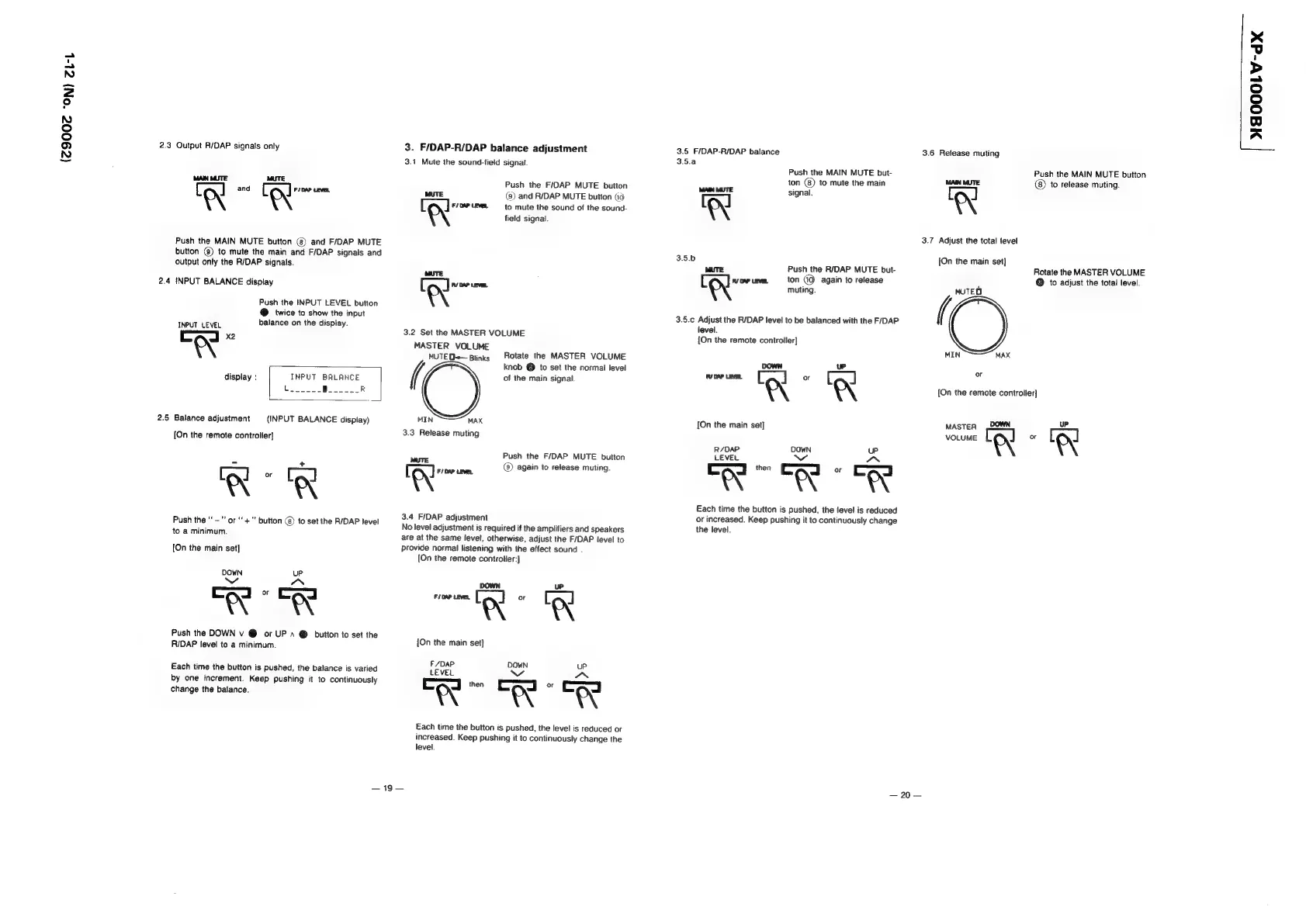
2.3
Output
R/DAP
signals
only
MAN
MUTE
ron
and
tol
Push
the
MAIN
MUTE
button
(8)
and
F/DAP
MUTE
button
@)
to
mute
the
main
and
F/DAP
signals
and
output
only
the
R/DAP
signals.
2.4
INPUT
BALANCE
display
Push
the
INPUT
LEVEL
button
@
twice
to
show
the
input
INPUT
LEVEL
balance
on
the
display.
Cad
aN
display
:
INPUT
BALANCE
eh
cerca
|
Pee
R
2.5
Balance
adjustment
(INPUT
BALANCE
display)
[On
the
remote
controller]
+
Xx”
RX
Push
the
"—"'
or
‘‘
+"
button
@
to
set
the
R/DAP
level
to
a
minimum.
[On
the
main
set]
DOWN
uP
Ww
IN
me
7
muy
Push
the
DOWN
v
@
or
UP
~
@
button
to
set
the
RIDAP
level
to
a
minimum.
Each
time
the
button
is
pushed,
the
balance
is
varied
by
one
increment.
Keep
pushing
it
to
continuously
change
the
balance.
3.
F/DAP-R/DAP
balance
adjustment
3.1
Mute
the
sound-field
signal.
Push
the
F/DAP
MUTE
button
(8)
and
R/DAP
MUTE
button
(id:
MUTE
[
el
F/DAP
LEVEL
to
mute
the
sound
of
the
sound-
field
signal.
tole
3.2
Set
the
MASTER
VOLUME
MASTER
VOLUME
MUTED
Blinks
Rotate
the
MASTER
VOLUME
(,
knob
@
to
set
the
normal
level
of
the
main
signal
MIN
MAX
3.3
Release
muting
Push
the
F/DAP
MUTE
button
(8)
again
to
release
muting.
[olen
3.4
F/DAP
adjustment
No
level
adjustment
is
required
if
the
amplifiers
and
speakers
are
at
the
same
level,
otherwise,
adjust
the
F/DAP
level
to
provide
normal
listening
with
the
effect
sound
.
[On
the
remote
controlier:]
pate
(ay
6
ed
A
A
{On
the
main
set]
F/DAP
DOWN
uP
LEVEL
ce
oS
eS
‘a
a
&
I
Each
time
the
button
is
pushed,
the
level
is
reduced
or
increased.
Keep
pushing
it
to
continuously
change
the
level.
—19
—
3.5
F/DAP-R/DAP
balance
3.5.a
Push
the
MAIN
MUTE
but-
ton
()
to
mute
the
main
MAIN
MATE
signal.
‘XX
3.5.b
MUTE
Push
the
R/DAP
MUTE
but-
[ ]
vow
eve,
ton
(Q
again
to
release
tN
muting.
3.5.c
Adjust
the
R/DAP
level
to
be
balanced
with
the
F/DAP
level.
{On
the
remote
controller]
[On
the
main
set]
R/DAP
DOWN
uP
LEVEL
aN
TAN
AN
Each
time
the
button
is
pushed,
the
level
is
reduced
or
increased.
Keep
pushing
it
to
continuously
change
the
level.
3.6
Release
muting
Push
the
MAIN
MUTE
button
MAIN
MUTE:
to
release
muting.
3.7
Adjust
the
total
level
[On
the
main
set]
Rotate
the
MASTER
VOLUME
:
@®
to
adjust
the
total
level.
MUTED
(
MIN
MAX
or
[On
the
remote
controller]
MASTER
,OOWN
—20—
[
HO00LV-dX