EasyManua.ls Logo

JVC XP-A1000BK - Page 9

JVC XP-A1000BK
73 pages
Print Icon
To Next Page IconTo Next Page
To Previous Page IconTo Previous Page
Loading...
6-L
(@900Z
“ON)
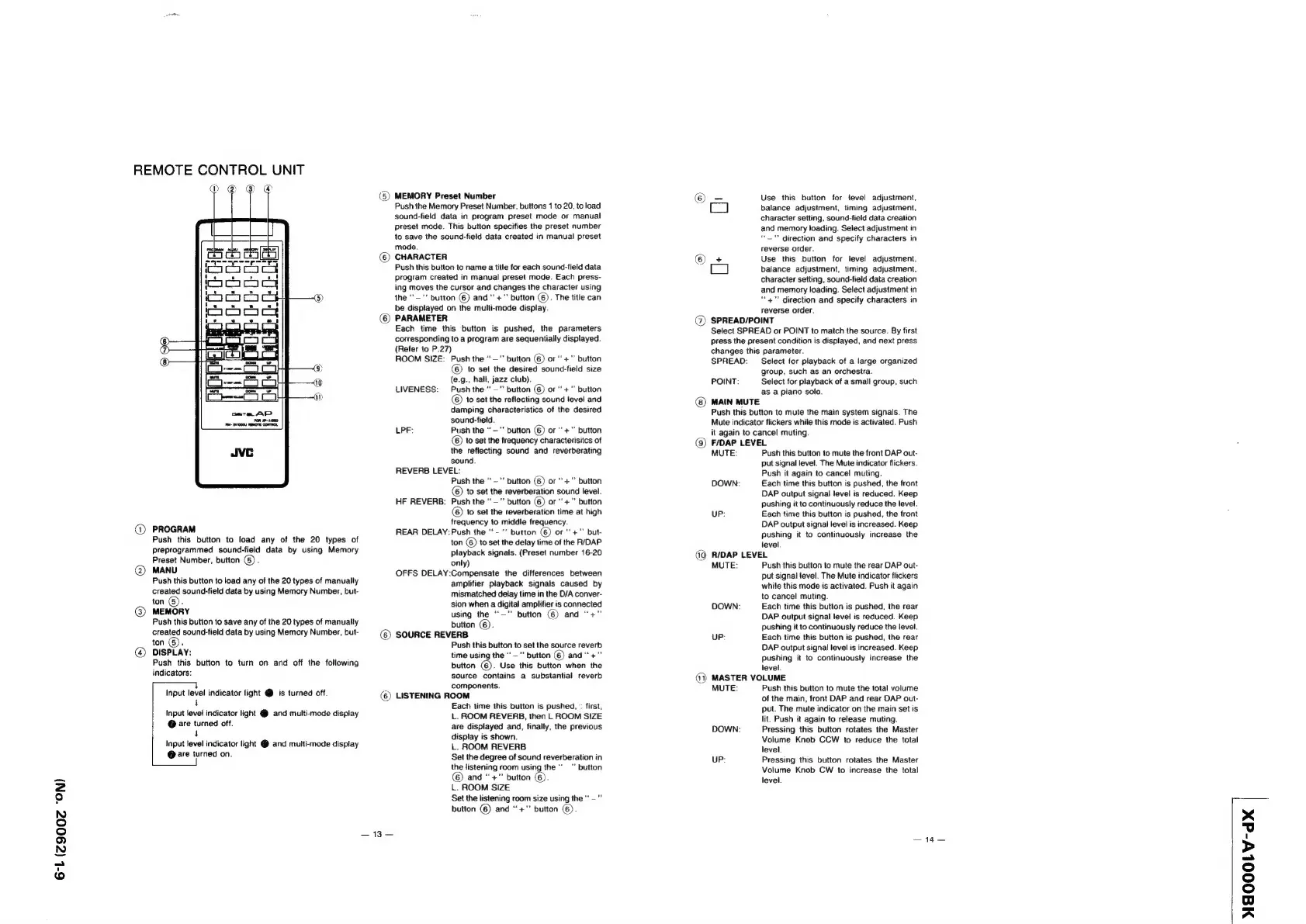
REMOTE
CONTROL
UNIT
Dn
@
om
iacorocs
moog
ood
}
5)
mono
HO)
os
9)
fs
i
is
ween,
Ad:
i
i
is
area
AP
fon
-
41000
Pet
000
REMTE
CONTROL
@)
PROGRAM
Push
this
button
to
load
any
of
the
20
types
of
preprogrammed
sound-field
data
by
using
Memory
Preset
Number,
button
(5)
.
MANU
Push
this
button
to
load
any
of
the
20
types
of
manually
created
sound-field
data
by
using
Memory
Number,
but-
ton
G)
MEMORY
Push
this
button
to
save
any
of
the
20
types
of
manually
created
sound-field
data
by
using
Memory
Number,
but-
ton
().
DISPLAY:
Push
this
button
to
turn
on
and
off
the
following
indicators:
Input
level
indicator
light
@
is
turned
off.
4
Input
level
indicator
light
@
and
multi-mode
display
@
are
turned
off.
4
Input
level
indicator
light
@
and
multi-mode
display
@
are
turned
on.
®
©
©
ae
ke
MEMORY
Preset
Number
Push
the
Memory
Preset
Number,
buttons
1
to
20,
to
load
sound-field
data
in
program
preset
mode
or
manual
preset
mode.
This
button
specifies
the
preset
number
to
save
the
sound-fieid
data
created
in
manual
preset
mode.
CHARACTER
Push
this
button
to
name
a
title
for
each
sound-field
data
program
created
in
manual
preset
mode.
Each
press-
ing
moves
the
cursor
and
changes
the
character
using
the
“‘—’’
button
(6)
and
+"
button
(6).
The
title
can
be
displayed
on
the
multi-mode
display.
PARAMETER
Each
time
this
button
is
pushed,
the
parameters
corresponding
to
a
program
are
sequentially
displayed.
(Refer
to
P.27)
ROOM
SIZE:
Push
the
‘‘—"
button
(6)
or‘
+”’
button
©
to
set
the
desired
sound-field
size
(e.g.,
hall,
jazz
club).
LIVENESS:
Push
the
“*—""
button
(6)
or
“+"”
button
©
to
set
the
reflecting
sound
level
and
damping
characteristics
of
the
desired
sound-field.
LPF:
Push
the
“—""
button
(6)
or"
+""
button
to
set
the
frequency
characterisitcs
of
the
reflecting
sound
and
reverberating
sound.
REVERB
LEVEL:
Push
the
"~"”
button
(6)
or
"+"
button
©)
to
set
the
reverberation
sound
level.
HF
REVERB:
Push
the
“—"
button
(6)
or
“+”
button
©
to
set
the
reverberation
time
at
high
frequency
to
middle
frequency.
REAR
DELAY:
Push
the
“-”
button
(6)
or
+"
but-
ton
©)
to
set
the
delay
time
of
the
R/DAP
playback
signals.
(Preset
number
16-20
only)
OFFS
DELAY:Compensate
the
differences
between
amplifier
playback
signals
caused
by
mismatched
delay
time
in
the
D/A
conver-
sion
when
a
digital
amplifier
is
connected
using
the
““—”
button
(6)
and
“+”
button
(6).
SOURCE
REVERB
Push
this
button
to
set
the
source
reverb
time
using
the
‘'—"”
button
(6)
and
“+”
button
©.
Use
this
button
when
the
source
contains
a
substantial
reverb
components.
LISTENING
ROOM
Each
time
this
button
is
pushed,
:
first,
L.
ROOM
REVERB,
then
L
ROOM
SIZE
are
displayed
and,
finally,
the
previous
display
is
shown.
L.
ROOM
REVERB
Set
the
degree
of
sound
reverberation
in
the
listening
room
using
the"
"’
button
©
and
“+”
button
©).
L.
ROOM
SIZE
Set
the
listening
room
size
using
the
“—"”
button
(6)
and
“+”
button
6).
@
-
Use
this
button
for
jevel
adjustment,
CI
balance
adjustment,
timing
adjustment,
character
setting,
sound-field
data
creation
and
memory
loading.
Select
adjustment
in
“—"
direction
and
specify
characters
in
reverse
order.
+
Use
this
button
for
level
adjustment,
CO
balance
adjustment,
timing
adjustment,
character
setting,
sound-field
data
creation
and
memory
loading.
Select
adjustment
in
“+”
direction
and
specify
characters
in
reverse
order.
SPREAD/POINT
Select
SPREAD
or
POINT
to
match
the
source.
By
first
press
the
present
condition
is
displayed,
and
next
press
changes
this
parameter.
SPREAD:
Select
for
playback
of
a
large
organized
group,
such
as
an
orchestra.
POINT:
Select
for
playback
of
a
small
group,
such
as
a
piano
solo.
MAIN
MUTE
Push
this
button
to
mute
the
main
system
signals.
The
Mute
indicator
flickers
while
this
mode
is
activated.
Push
it
again
to
cancel
muting.
F/DAP
LEVEL
MUTE:
Push
this
button
to
mute
the
front
DAP
out-
put
signal
level.
The
Mute
indicator
flickers.
Push
it
again
to
cancel
muting.
DOWN:
Each
time
this
button
is
pushed,
the
front
DAP
output
signal
level
is
reduced.
Keep
pushing
it
to
continuously
reduce
the
level.
UP:
Each
time
this
button
is
pushed,
the
front
DAP
output
signal
level
is
increased.
Keep
pushing
it
to
continuously
increase
the
level.
R/DAP
LEVEL
MUTE:
Push
this
button
to
mute
the
rear
DAP
out-
put
signal
level.
The
Mute
indicator
flickers
while
this
mode
ts
activated.
Push
it
again
to
cancel
muting.
DOWN:
Each
time
this
button
is
pushed,
the
rear
DAP
output
signal
level
is
reduced.
Keep
pushing
it
to
continuously
reduce
the
level.
UP:
Each
time
this
button
is
pushed,
the
rear
DAP
output
signal
level
is
increased.
Keep
pushing
it
to
continuously
increase
the
level.
MASTER VOLUME
MUTE:
Push
this
button
to
mute
the
total
volume
of
the
main,
front
DAP
and
rear
DAP
out-
put.
The
mute
indicator
on
the
main
set
is
lit.
Push
it
again
to
release
muting.
DOWN:
Pressing
this
button
rotates
the
Master
Volume
Knob
CCW
to
reduce
the
total
level.
UP:
Pressing
this
button
rotates
the
Master
Volume
Knob
CW
to
increase
the
total
level.
—14—
NAOOOLV-d@Xx