MT5000-0200-1 Rev f (10-2010) DCN0528 23
EXTENDED SETUP is a menu containing features designed to fine tune the operation of
the MT5000. This menu contains WAVEFORM options which allow access to a graphic
representation of the return signal and a LINEARIZATION MENU.
To access the items in the EXTENDED SETUP menu from the main display:
1. Press the SELECT button.
2. Scroll DOWN to EXTENDED SETUP.
3. Press the SELECT button.
EXTENDED SETUP
LVL: XX.XX in XX.XX mA
4.6.1. WAVEFORM DISPLAY
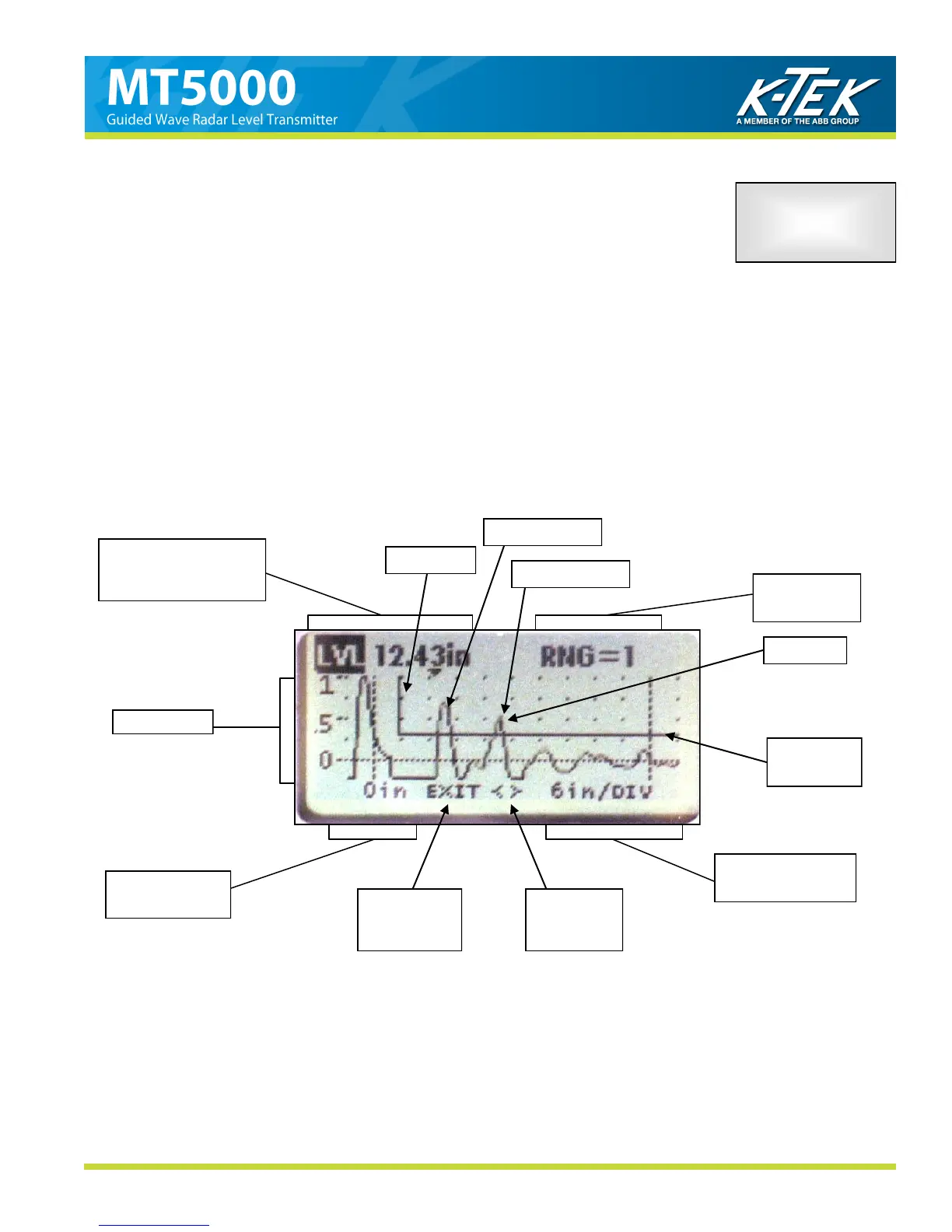
The first four menu options in the EXTENDED SETUP, will allow access to a graphic display of the return signal
from the sensor of the MT5000. Each of these WAVEFORM screens has the same configuration and will allow ac-
cess to the same functions. Figure 4.6.1. outlines the features of the WAVEFORM screens.
Figure 16
a. Measured Level or
Raw Counts at
c. Reference
Measurement
h. Return to
EXTENDED
f. Scroll
Left or
e. Measurement
Per Division
b. Volts DC
Threshold
Voltage
d. Access to
Functions
Blanking
g. Signal
4.6 EXTENDED SETUP
Return Signal
End of Probe



 To Next Page