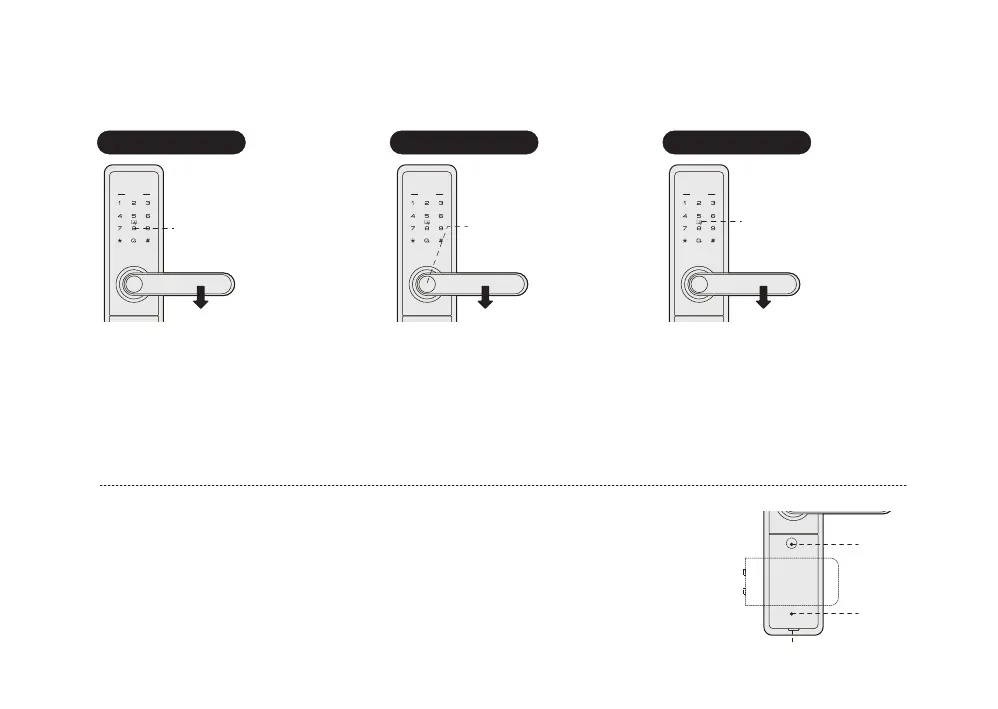
In case of forgetting PIN code, battery run out or system error; Mechanical key is used to open
door as backup mode.
Open mechanical key hole cover, insert the key into key hole and rotate it with proper angles;
Then press the handle to open the door.
How to open the mechanical key cover: use finger to pull out the cover at the position as the
picture showed, then rotate the cover 90degree, find the mechanical key hole.
Dig position
Mechanical
key hole
Mechanical
key cover
Open door by mechanical key override
Enter PIN code
Fingerprint
sensor
Card reader area
Press the handle
to open
Press the handle
to open
Press the handle
to open
4 How to use
Open from outside
PIN code opening Fingerprint opening Card opening
Touch pad screen by palm to
lighten keypad, Enter the
enrolled PIN code with end of [#].
Voice prompt “door opened” .
Press the handle to open the door.
Place the enrolled finger properly on
the fingerprint sensor area until one
beep sound and voice prompt
“door opened”.
Press the handle to open the door.
Place the enrolled card properly on the
card icon area until one beep sound and
voice prompt “door opened”.
Press handle to open the door.
Notice:In security mode, double verification is required for opening door.
1. PIN Code + Fingerprint 2. PIN Code + Card 3. Fingerprint + Card



 To Next Page