WWW.KAARTA.COM 75
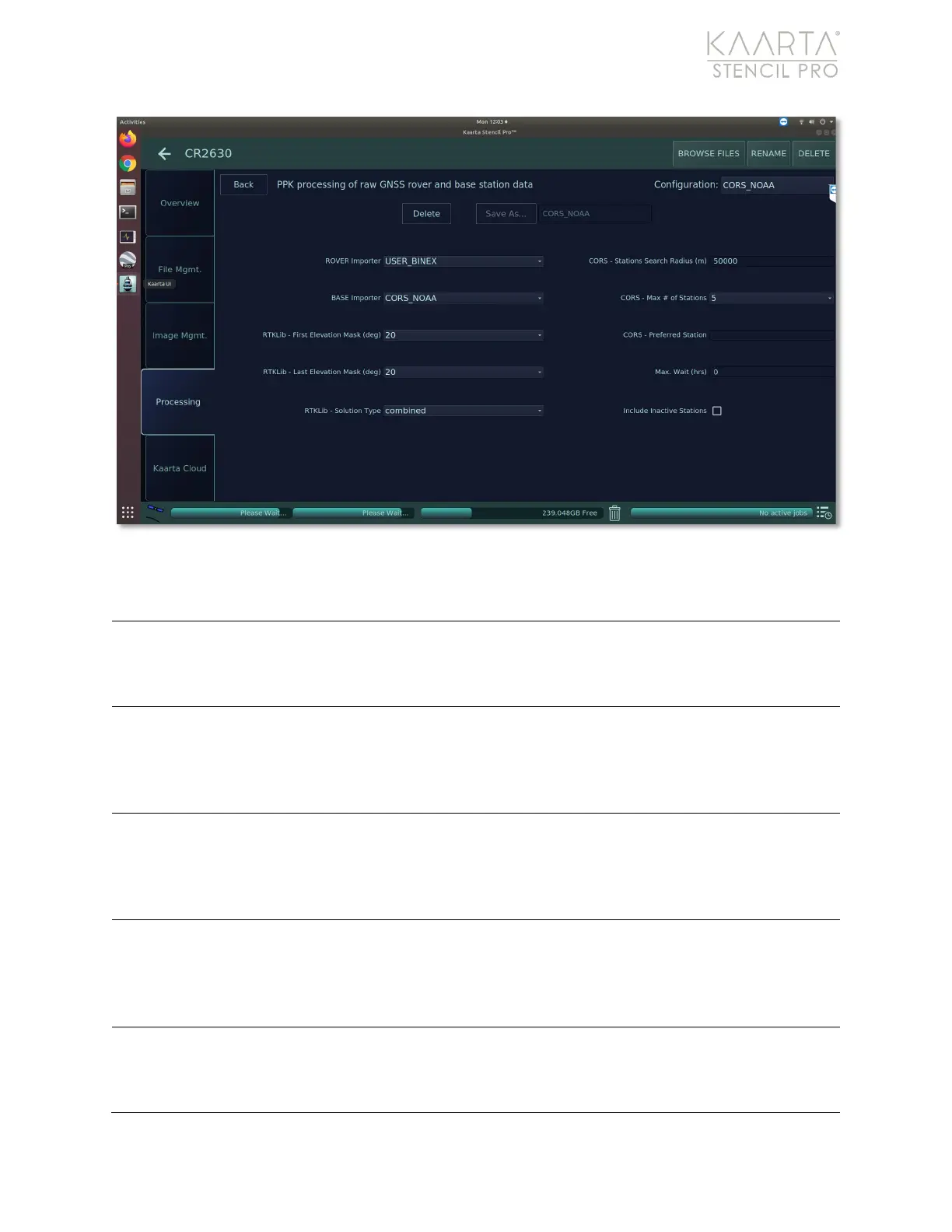
Figure 53: GNSS Correct settings.
GNSS CORRECT SETTINGS
For processing Stencil Pro datasets, the rover file should be kept at
USER_BINEX. However, if importing datasets
created on other devices
for processing on Stencil Pro, the rover file will need adjusted according
to file format of the roving device (RINEX, UBLOX, RTCM3, or PLAIN).
The base importer file is automatically configured when a GNSS Preset
is chosen in the previous step. You can change the file format manually
by clicking into the dropdown menu and selecting a different file
format. However, file format should correspond to base station receiver
Mask (degree)
An elevation mask excludes satellites with elevations lower than this
number (in degrees) from being used. Generally, a recommended
setting is between 10-20 degrees. Use the First Elevation Mask value,
in conjunction with the Last Elevation Mask value, to set a range for an
Mask (degree)
An elevation mask excludes satellites with elevations lower than this
number (in degrees) from being used. Generally, a recommended
setting is between 10-20 degrees. Use the Last Elevation Mask value,
in conjunction with the First Elevation Mask value, to set a range for
The Solution Type is the direction in time that the Kalman filter is run
on the data. Options are forward (starting at the beginning), backward
(starting at the end), or combined (merges the results of forward and



 To Next Page