WWW.KAARTA.COM 17
CHAPTER 3
STENCIL PRO OPERATION
At the heart of Stencil Pro is the system’s software and intuitive user interface. Stencil Pro
not only has full computing capabilities to capture real world spaces easily and accurately,
it can also be used to review files and replay raw data. In addition, Stencil Pro performs
post-processing data functions such as sharpening, filtering, and colorization of the point
cloud.
MAIN GALLERY
Once Stencil Pro’s controller and scanner are properly connected and
powered on, and the device successfully boots, the Stencil Pro UI
automatically opens. If the UI is accidentally closed, it should promptly
reopen. There is also an icon on the Ubuntu desktop to reopen the Stencil
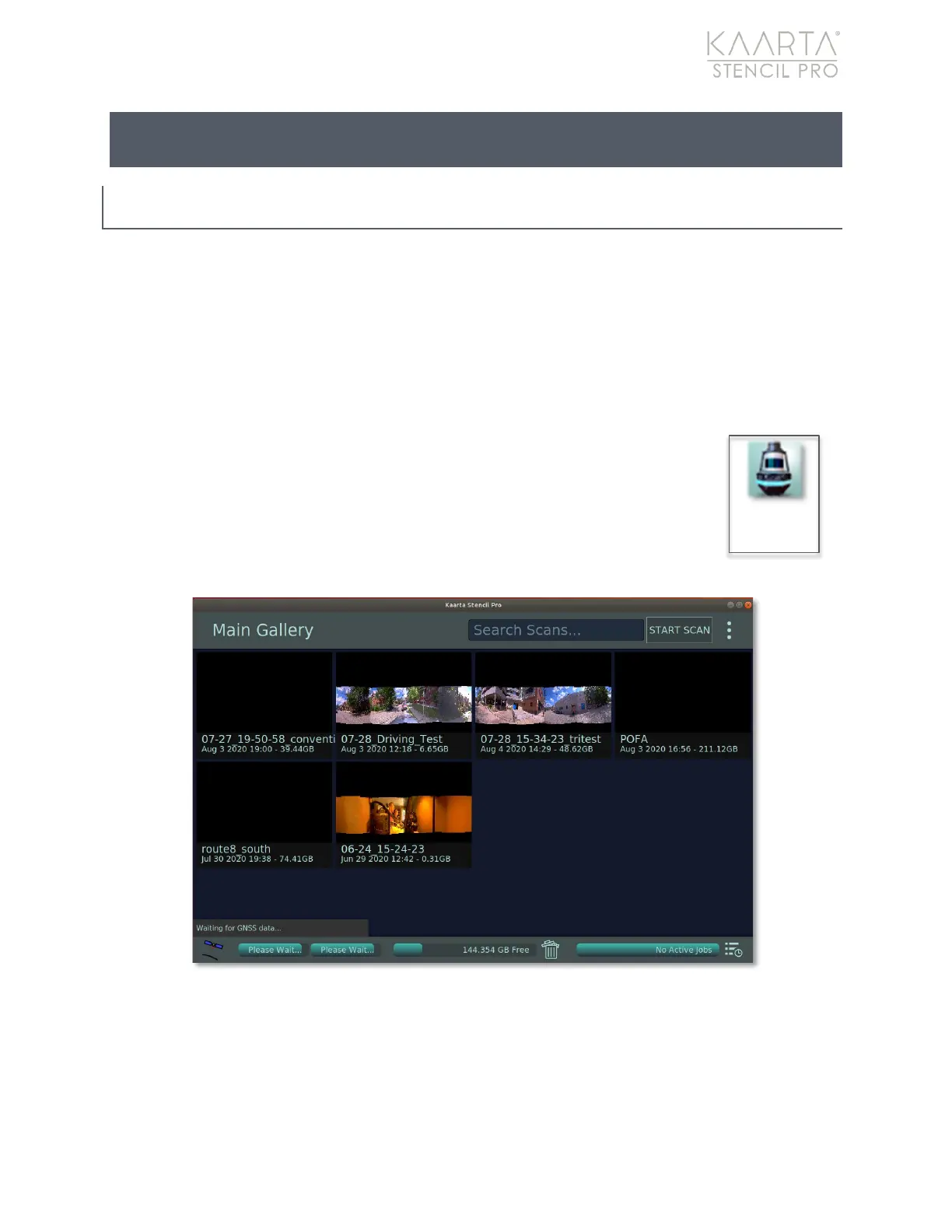
Pro UI. The UI opens to the Main Gallery screen where scans are displayed
when generated (Figure 3).
Figure 3: Stencil Pro Main Gallery.
Main Gallery Menu
From the Main Gallery, you can browse scans and albums by simply scrolling through the
saved files using a connected mouse and keyboard. You can also search for a specific
scan by typing into the Search Scans text box located in the upper right corner of the UI



 To Next Page