WWW.KAARTA.COM 86
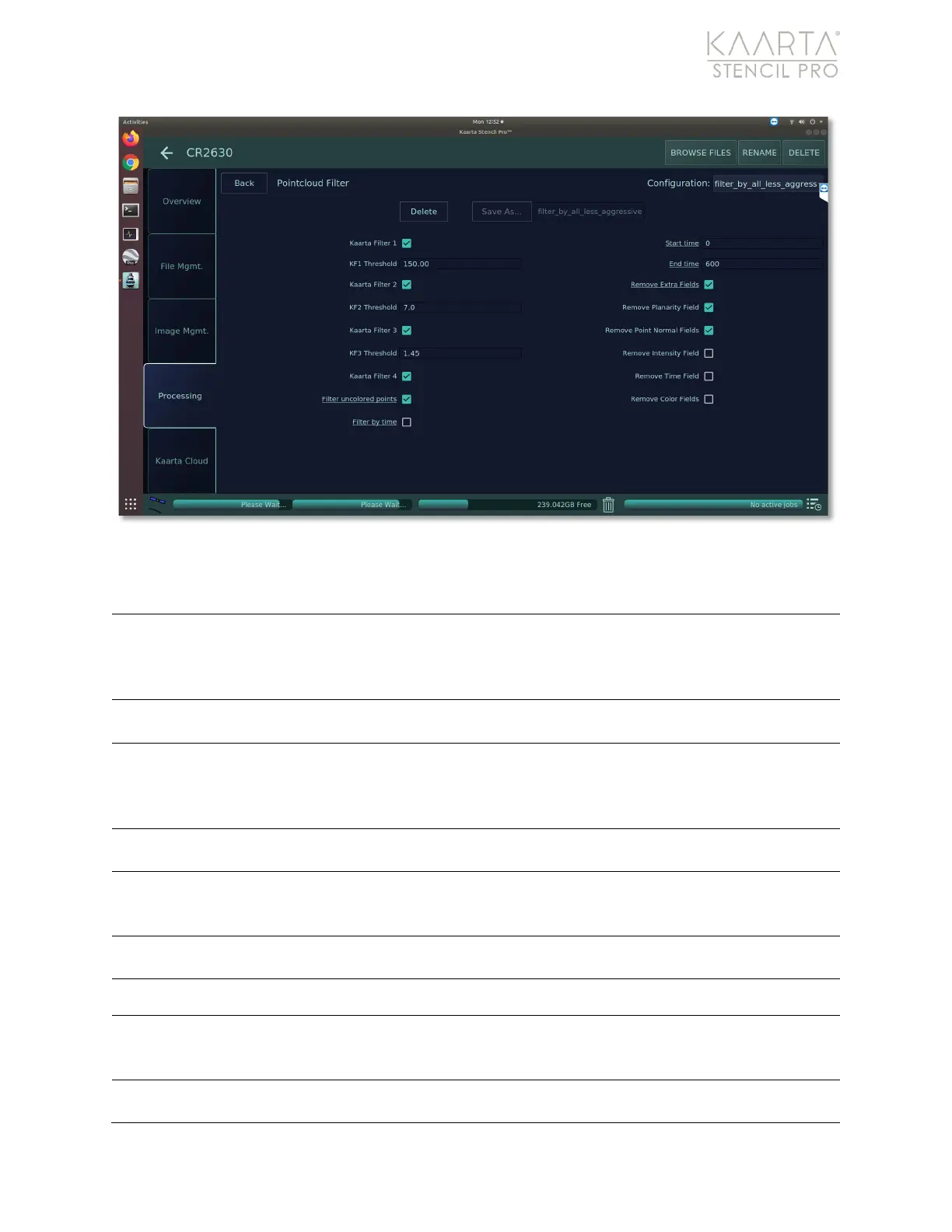
Figure 59: Filter settings.
FILTER SETTINGS
Check box to remove far away objects, calculated in the Pre-Filter task
under Calculate Normal. See Pre-Filter on page 81 for more details.
Filter 1 removes points beyond a certain range (which is likely the
distance of the lidar measurement that produced them).
Adjust value from 5 (low) to 200 (high). Default value is 50.00. Set lower
to filter out more points. The threshold is in meters.
Check box to remove spurious points or statistical outliers calculated in
the Pre-Filter task under Kaarta Clean. See Pre-Filter on page 81
for
more details. Filter 2 removes points above a standard deviation
Adjust value from 0 (low) to 10 (high). Default value is 0.08. Set lower to
filter out more points. The threshold is in meters.
Check box to remove questionable points or points outside of an
angular threshold, calculated in the Pre-Filter task under Label Points.
See Pre-Filter on page 81 for more details.
Adjust value from 0.5 (low) to 1.6 (high). Default value is 1.35. Set lower
to filter out more points. The threshold is in radians.
Removes duplicate or extraneous scalar fields from point cloud.
Removes points that were not colorized.
Also removes points that had
color extrapolated during the Color process.
See Color on page 70 for
Check box to filter points based on time. When selected, you must add
the minimum and maximum time to keep (in seconds) below.



 To Next Page