83
EN
6. NETWORK CONFIGURATION
Caution:
• It is necessary to forget any other around network and make sure the Android or IOS device
justconnecttotheWIFInetworkyouwanttocongure.
• Make sure the Android or IOS device WIFI function works well and can be connected back to
your original WIFI network automatically.
Kindly reminder:
When AC enters into AP mode, the air-conditioning remote controller can’t control it. It is neces-
sarytonishnetworkcongurationorpowertheACagaininordertocontrolit.Alternatively,you
need to wait 8 minutes to let the AC quit AP mode automatically.
USING ANDROID DEVICE TO DO NETWORK CONFIGURATION
1.Makesureyourmobiledevicehasalreadybeenconnectedtothewinetworkwhichyouwant
touse.Also,youneedtoforgetotherirrelativewinetworkincaseitinuencesyourcoguration
process.
2. Disconnect the power supply of AC.
3. Connect the power supply of AC, and continuously press the digital display button or do not
disturb button seven times in 3 minutes.
4. When the AC displays AP , it means that the AC WIFI has already entered into AP Mode.
Some type of AC do not need the 2 step to be in AP mode.
6. Scan QR Code which 9 is packed with smart
kit.
5. Press “+Add Device”.
USING IOS DEVICE TO DO NETWORK CONFIGURATION
1.Maksureyourmobiledevicehasalreadybeenconnectedtothewinetworkwhichyouwant
touse.Also,youneedtoforgetotherirrelativewinetworkincaseitinuencesyourcoguration
process.
2. Disconnect the power supply of AC(some units).
3. Connect the power supply of AC, and continuously press the digital display button or do not
disturb button seven times in 3 minutes.
4. When the AC displays “AP” , it means that the AC WIFI has already entered into AP Mode.
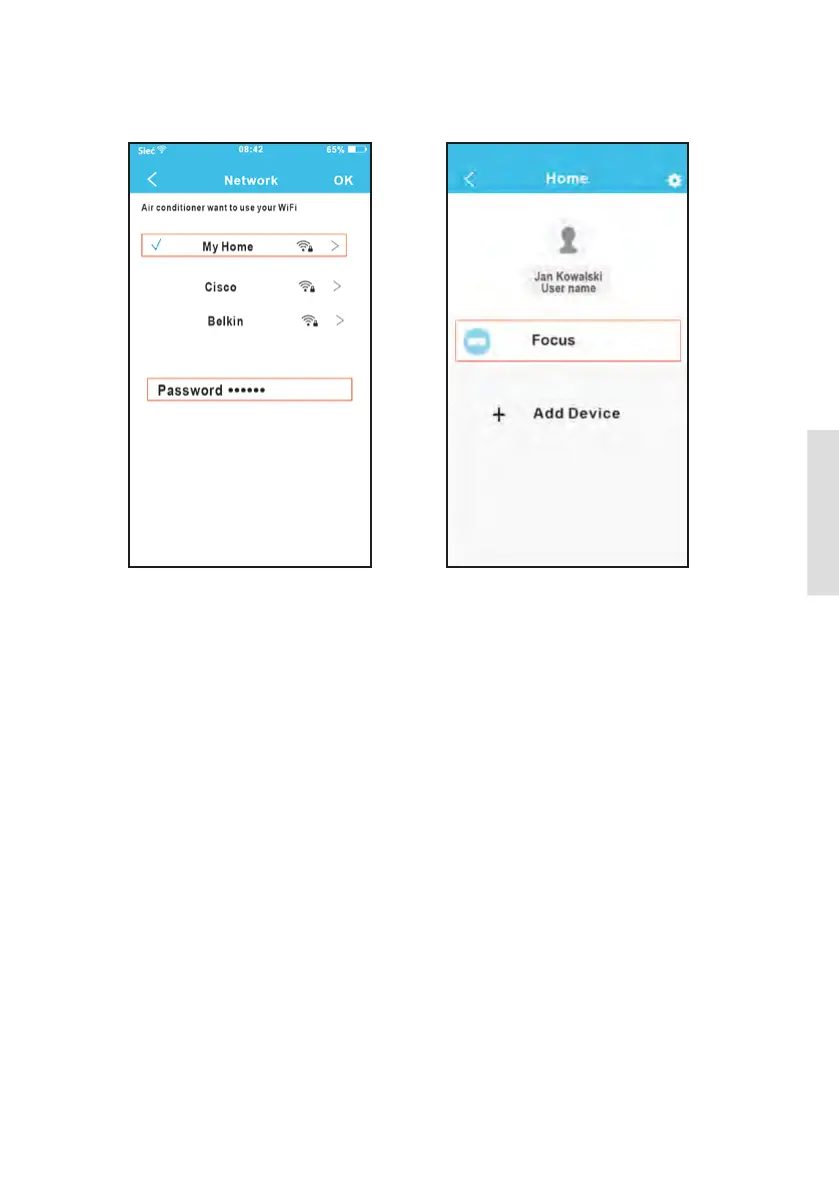
9. Conguration Success, you can see the
device on the list.
7. Select your own WiFi network, for example
My Home (the picture is only for reference).
8. Enter your own WiFi router password and
click OK.



 To Next Page