87
EN
NOTE:
Whennishingnetworkconguration,APPwilldisplay
success cue words on the screen.
Due to different internet environment, it is possible that
thedevicestatusstilldisplayofine.Ifthissituationoc-
curs, it is necessary to pull and refresh the device list on
the APP and make sure the device status become online.
Alternatively, user can turn off the AC power and turn
on it again, the device status will become online after
few minutes.
7. HOW TO USE APP
Please ensure both your mobile device and air conditio-
ner are connected to the Internet before using app to
control the air conditioner via internet, please follow the
next steps:
14.CongurationSuccess,youcanseethedeviceon
the list.
1. Type your own account and password, Click
“Sign in”.
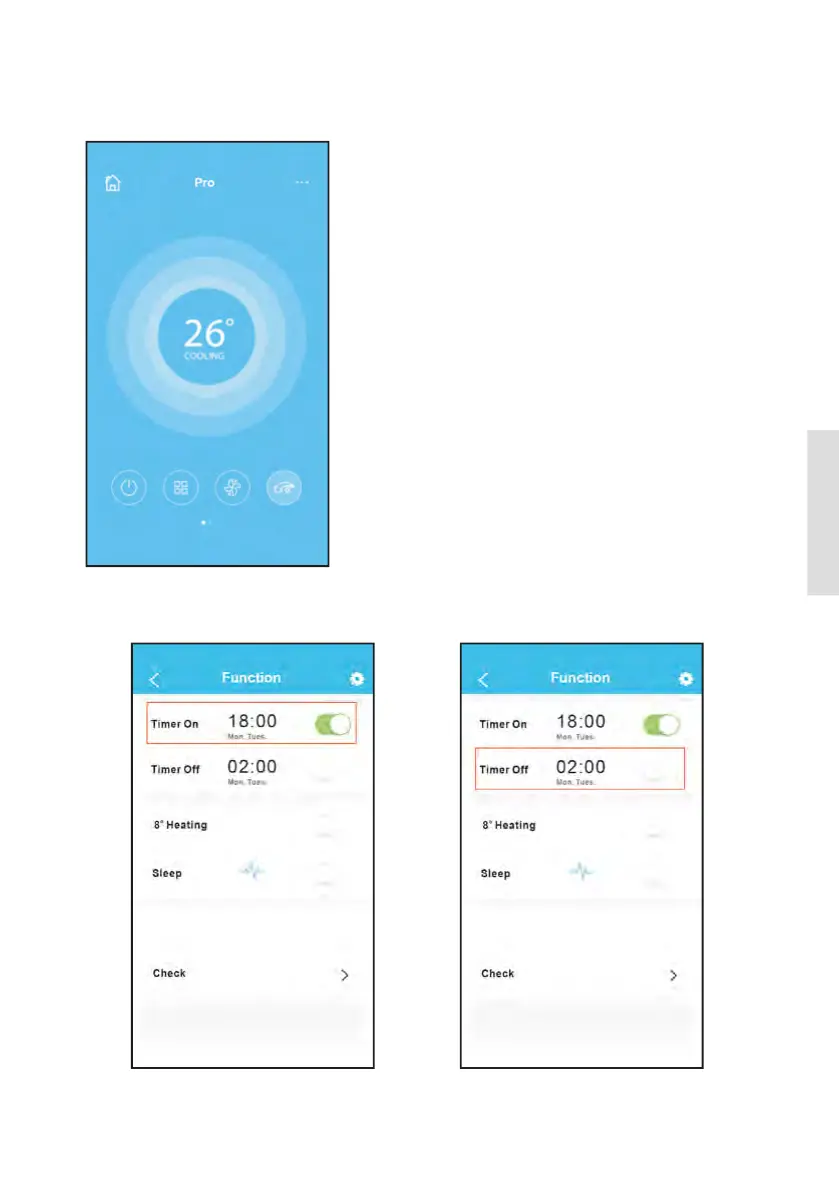
2. Select the target air conditioner to enter
into the main control interface.
NOTE:
Not all the function of the APP is available on air con-
ditioner. For example: ECO, Turbo, Left and Right Swing,
Up and Down swing function, please check the user ma-
nualtondmoreinformation
8. SPECIAL FUNCTIONS
Including: Timer on, Timer off, 8OC Heat, Sleep, Check.
NOTE: If the air conditioner do not support the above
function, the function will be hided from the function
list.
Timer on/Timer off
Weekly, user can make an appointment to turn on or off
AConspecictime.Useralsocanchoosecirculationto
keep the AC under schedule control every week.
3. Thus, user can control air conditioners on/off status,
operation mode, temperature, fan speed and so on.



 To Next Page