EasyManua.ls Logo

Kaiweets HT106E - Standard Receptacle Testing; RCD Receptacle Testing

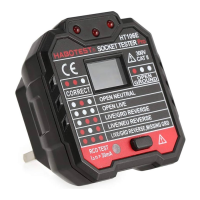
Kaiweets HT106E
4 pages
Print Icon
To Next Page IconTo Next Page
To Previous Page IconTo Previous Page
Loading...
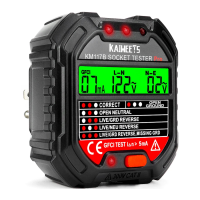
Standard
Receptacles
1.
Verify
tester
operation
by
testing
on
a
known
live
and
correctly
wired
receptacle.
2.
Plug
tester
into
receptacle.
3.
Compare
the
illuminated
lights
on
the
tester
to
the
key
code
printed
on
the
tester.
4.
If
the
tester
indicates
that
the
receptacle
is
not
wired
correctly,
consult
a
qualified
electrician.
Note:
1.
The
test
time
should
be
no
more
than
5
minutes.
2.
When
using,
please
be
careful
not
to
touch
the
RCD
button,
so as
not
to
trigger
the
leakage
protection
switch
and
cause
unnecessary
loss.
RCD
Receptacles
1.
Check
the
RCD
receptacle
user
manual
for
information
on
how
the
specific
receptacle
operates
prior
to
using
this
tester.
2.
Insert
the
tester
into
the
receptacle
under
test
to
check
for
correct
wiring.
Lights
on
the
tester
should
illuminate.
Only
press
the
RCD
button
when
the
lights
are
illuminated
as
“eso”
(CORRECT).
3.
Press
the
test
button
on
the
RCD
receptacle.
The
RCD
light
should
illuminate.
Did
the the
RCD
trip
and
all
lights
on
the
tester
go
dark?
YES:
Reset
the
RCD
by
pressing
the
reset
button.
The
RCD
is
operating
properly.
NO:
Proceed
to
step
4.
4.
Did the
RCD
light
illuminate?
YES:
The
RCD
is
not
operating
properly
or
the
receptacle
is
miswired
Consult
a
qualified
electrician.
NO: The
tester
is
not
operating
properly.
Please
contact
us
for
product
warranty.

Related product manuals