Need help?
Do you have a question about the Kaiweets HT106B and is the answer not in the manual?
Always test the voltage tester on a known circuit to ensure it is functional before use.
Wear safety shoes and keep fingers behind the anti-slip guard when checking uninsulated contacts.
Do not use the device if the screen is not lit, damage is evident, or the tip is not intact.
Press and hold the power key for over 2 seconds to turn the device on or off; it auto-powers off after 3 minutes of inactivity.
Keep the tester's tip near AC voltage; a beep and red tip light indicate detection, with signal intensity affecting bar graph and beep frequency.
Default mode (48V-1000V AC) with no beep for 12V-48V AC and high-frequency beep for 48V-1000V AC, indicated by a green screen.
Activated by pressing the green button (12V-1000V AC) with low-frequency beep for 12V-48V AC and high-frequency beep for 48V-1000V AC.
Use high sensitivity mode to distinguish live wires (stronger signals, red screen) from neutral wires (weaker signals, green screen).
Activate high sensitivity mode and move the NCV tip along the cable; the voltage alarm disappears at a breakpoint.
Turn the LED flashlight on/off by pressing and holding the green button for over 2 seconds; it auto-shuts down after 3 minutes of inactivity.
A specific symbol appears when battery voltage is below 2.5V; the tester auto-turns off if voltage drops below 2.3V.
Details voltage range (AC 12-1000V), operating/storage temperatures, humidity, altitude, security level, and battery type.
Remove the battery cover, insert new batteries with the positive terminal towards the tip, and fully seat the cap.
Clean the device with a soft, slightly damp cloth; avoid chemicals, abrasives, alcohol, or solvents.
KAIWEETS electronic test and measurement devices are guaranteed for three years from the date of purchase.
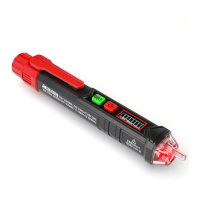
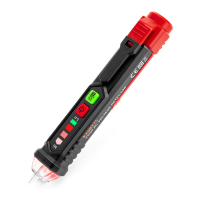
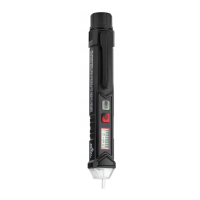
The KAIWEETS HT100 is a non-contact voltage tester designed for safely detecting the presence of AC voltage in electrical circuits. This device is an essential tool for electricians, DIY enthusiasts, and anyone working with electrical systems, providing a quick and reliable way to identify live wires without direct contact. Its primary function is to enhance safety by alerting the user to potentially dangerous voltages, thereby helping to prevent electric shocks and other electrical accidents.
The core function of the HT100 is non-contact voltage detection. It utilizes a probe (NCV sensor) at its tip to sense the electrostatic field generated by AC voltage. When the tester's tip is brought near an AC voltage source, it provides both audible and visual indications. A beep sounds, and the tip illuminates red, signaling the presence of voltage. The intensity of the voltage signal is further communicated through a bar graph on the LCD screen, which becomes higher or lower depending on the signal strength. Additionally, the frequency of blinking and beeping increases or decreases with the signal intensity, offering a clear and immediate understanding of the voltage level.
A crucial safety feature of the HT100 is the requirement to always test it on a known live circuit before each use to verify its functionality. This ensures that the device is working correctly and can reliably detect voltages, preventing false negatives that could lead to hazardous situations. The device is designed to detect effective voltage when a sufficiently intensive electrostatic field is present. However, it's important to note that if the field is very weak, the voltage detector may not detect the existence of voltage, emphasizing the need for careful use and verification.
The HT100 also incorporates a dual-range sensitivity mode, allowing for flexible application depending on the voltage levels expected. Upon turning on, the tester defaults to a low-sensitivity mode (48V~1000V). A brief press of the green 'S' button switches it to a high-sensitivity mode (12V~1000V). In low-sensitivity mode, for voltages between 12V-48V AC, there is no audible beep, but the screen turns green. For 48V-1000V AC, a high-frequency beep sounds, and the red tip illuminates continuously with a red screen. In high-sensitivity mode, for 12V-48V AC, a low-frequency beep is heard, and the red tip illuminates continuously. For 48V-1000V AC, a high-frequency beep sounds, and the red tip illuminates continuously with a red screen. This dual-range capability enhances the device's versatility, allowing for detection of both higher and lower voltages with appropriate sensitivity.
Beyond simple voltage detection, the HT100 can assist in identifying live and neutral wires. In high-sensitivity mode, by keeping individual cables separated, the tester can differentiate between live and neutral wires based on signal intensity. Live wires typically generate stronger signals, indicated by up to 8 bars on the graph, fast beeps, and a red screen. Neutral wires produce weaker signals, shown by below 3 bars, slow beeps, and a green screen. The screen also turns red and displays a high voltage symbol when the voltage exceeds 90V. It's important to rely on signal intensity rather than screen color alone for this distinction, especially activating high sensitivity mode for accurate identification.
Another advanced feature is breakpoint testing. In high-sensitivity mode, by moving the tester's NCV tip along a cable, the voltage alarm will disappear when a breakpoint (a break in the wire) is detected. This can be a valuable diagnostic tool for troubleshooting electrical issues in cables. However, it's crucial to remember that this feature should not be used on armored cables, cables in a cable duct, or those behind panels or metallic cladding, as these materials can interfere with accurate detection.
The device also includes a built-in LED flashlight, which can be activated by pressing and holding the green 'S' button for more than 2 seconds. This flashlight is useful for illuminating work areas, especially in dimly lit environments, further enhancing the practicality of the tester.
The HT100 is designed for user-friendliness and safety. To turn the device on, the power key (red button) must be pressed and held for more than 2 seconds, accompanied by a beep and the display lighting up. A single press of the power button again will turn the tester off. To conserve battery life, the tester automatically powers off after 3 minutes of non-use if no button is pressed and no voltage signal is detected. This auto-off function ensures that the device is not inadvertently left on, draining the batteries.
For safety during use, especially when checking uninsulated contacts, it is recommended to wear safety shoes to prevent electric shock. Users should also hold the tester with their fingers positioned behind the anti-slip guard, providing a secure grip and maintaining a safe distance from potential voltage sources. The device is intended for indoor use and should be protected from water, high air humidity, and heat to ensure its longevity and reliable operation.
A low battery indicator is integrated into the device. When the battery voltage drops below 2.5 volts, a "battery" symbol appears on the display, alerting the user to replace the batteries soon. If the voltage falls further to less than 2.3 volts, the tester automatically turns off to prevent inaccurate readings due to insufficient power.
Maintaining the KAIWEETS HT100 is straightforward, focusing on battery replacement and cleaning to ensure optimal performance and longevity.
Battery replacement is a simple process. The battery cover, located at the end of the device, can be rotated off. The old batteries should be removed, and new 2x1.5V AAA batteries should be inserted with the positive terminal facing towards the tip of the tester. After inserting the new batteries, the cap should be rotated back onto the body until it is fully seated. It is critical not to use the tester to test electricity before the cap is fully locked, to avoid the risk of electric shock.
For cleaning the device, only a soft, slightly damp cloth should be used. Harsh chemicals, abrasives, alcohol, ammonia, or cleaners containing solvents should never be used, as these can damage the device's components or exterior. After cleaning, it is important to ensure that the device is completely dry before further use or storage to prevent any moisture-related damage.
The KAIWEETS HT100 comes with a three-year warranty from the date of purchase, covering electronic test and measurement devices. This warranty provides peace of mind, ensuring support in case of manufacturing defects or malfunctions under normal use. Regular maintenance, including timely battery replacement and proper cleaning, will help ensure the device remains in good working condition throughout its lifespan.
 General
| Type | Digital Multimeter |
|---|---|
| Temperature Range | -20°C to 1000°C |
| Frequency | 50/60Hz |
| Alarm Mode | Yes |
| Operating Temperature | 0°C to 40°C |
| Safety Rating | CAT III 600V |
| Display | LCD |
| Measurement Functions | AC/DC Voltage, AC/DC Current, Resistance, Capacitance, Frequency, Temperature, NCV |
| AC Voltage Range | 0-600V |
| DC Voltage Range | 0-600V |
| Capacitance Range | 0.1nF to 100mF |
| Frequency Range | 10Hz/100Hz/1kHz/10kHz/100kHz/1MHz |
| Battery | 2 x 1.5V AAA |

 To Next Page