EasyManua.ls Logo

Kaiweets HT106B - Advanced Functions; Identify Wiring

Kaiweets HT106B
8 pages
Print Icon
To Next Page IconTo Next Page
To Previous Page IconTo Previous Page
Loading...
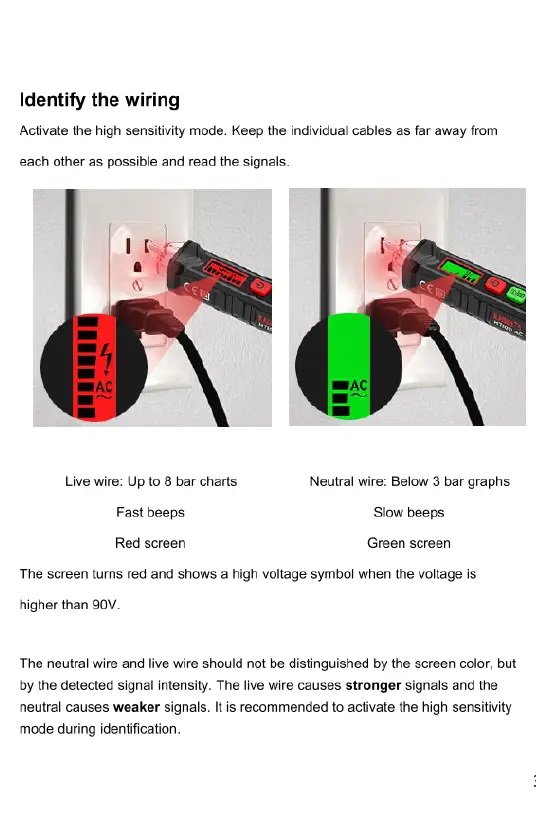
Identify
the
wiring
Breakpoint
testing
Activate
the
high
sensitivity
mode.
Keep
the
individual
cables
as
far
away
from
Activate
the
high
sensitivity
mode,
move
the
tester's
NCV
tip
along
the
cable,
the
each
other
as
possible
and
read
the
signals.
voltage
alarm
disappears
when
detected
a
breakpoint,
as
shown
in
Figure
2.
@ @ ®
Live
wire:
Up
to
8
bar
charts
Neutral
wire:
Below
3
bar
graphs
Fast
beeps
Slow
beeps
Red screen
Green
screen
The screen
tums
red
and
shows
a
high
voltage
symbol
when
the
voltage
is
higher
than
90V.
Attention:
Do
NOT
use
on
armored
cables
or
on
cables
in
a
cable
duct,
behind
panels
or
in
metallic
cladding.
The
neutral
wire
and
live
wire
should
not
be
distinguished
by
the
screen
color,
but
by
the
detected
signal
intensity.
The
live
wire
causes
stronger
signals and
the
neutral
causes
weaker
signals.
It
is
recommended
to
activate
the
high
sensitivity
mode
during
identification.

Related product manuals