EasyManua.ls Logo

Kaiweets KM117B - Page 4

Kaiweets KM117B
6 pages
Print Icon
To Next Page IconTo Next Page
To Previous Page IconTo Previous Page
Loading...
Wiring
Configuration
Testing
Conditions
indicated:
CORRECT,
OPEN
GROUND,
OPEN
NEUTRAL,
HOT/GRD
REVERSE,
HOT/NEU
REVERSE, HOT/GRD
REVERSE,
OPEN
GRD.
Conditions
NOT
indicated:
Quality
of
ground,
multiple
hot
wires,
combinations
of
defects, reversal
of
grounded
and
grounding
conductors.
All
appliances
or
equipment
on
the
circuit
being
tested
should
be
unplugged
to
help
reduce
the
possibility
of
erroneous
readings.
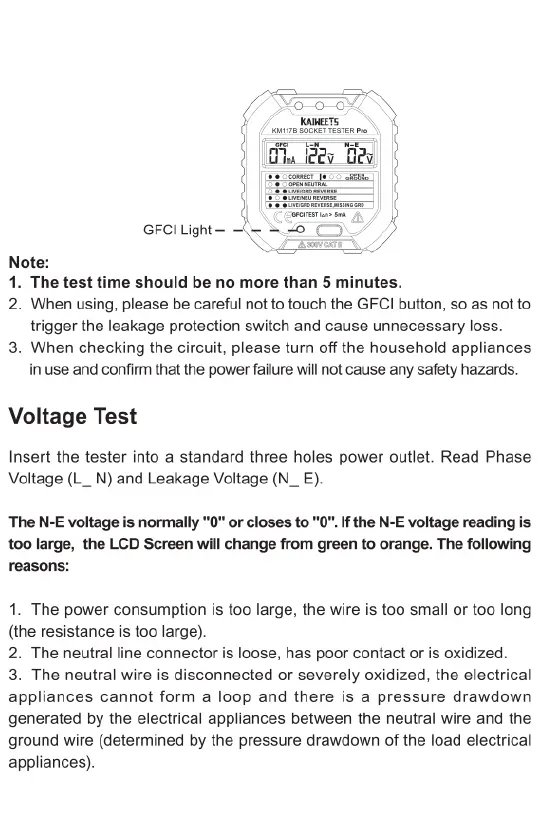
GFCI
Receptacles
1.
Check
the
GFCI
receptacle
user
manual
for
information
on
how
the
specific
receptacle
operates
prior
to
using
this
tester.
2.
Insert
the
tester
into
the
receptacle
under
test
to
check
for
correct
wiring.
Lights
on
the
tester
should
illuminate.
3.
Read
Current,
Phase
Voltage
(L_
N)
and
Leakage
Voltage
(N_
E)
4.
Press
the
test
button
on
the
GFCI
receptacle.
Only
press
the
GFCI
button
when
the
lights
are
illuminated
as
“esc”
(CORRECT).
The
GFClI
light
should
illuminate.
Did the
GFCI
trip
and
all
lights
on
the
tester
go
dark?
YES:
Reset
the
GFCI
by
pressing
the
reset
button.
The
GFCI
is
operating
properly.
NO:
Proceed
to
step
5.
5.
Did the
GFCI
light
illuminate?
YES:
The
GFCI
is
not
operating
properly
or
the
receptacle
is
miswired
Consult
a
qualified
electrician.
NO:
The
tester
is
operating
properly.
GFCI
Light
Note:
1.
The
test
time
should
be
no
more
than
5
minutes.
2.
When
using,
please
be
careful
not
to
touch
the
GFCI
button,
so
as
not
to
trigger
the
leakage
protection
switch
and
cause
unnecessary
loss.
3.
When
checking
the
circuit,
please
turn
off
the
household
appliances
in
use
and
confirm
that
the
power
failure
will
not
cause
any
safety
hazards.
Voltage
Test
Insert
the
tester
into
a
standard
three
holes
power
outlet.
Read
Phase
Voltage
(L_
N)
and
Leakage
Voltage
(N_
E).
The
N-E
voltage
is
normally
"0
or
closes
to
"0
If
the
N-E
voltage
reading
is
100
large,
the
LCD
Screen
will
change
from
green
to
orange.
The
following
reasons:
1.
The
power
consumption
is
too
large,
the
wire
is
too
small
or
too
long
(the
resistance
is
too
large).
2.
The
neutral
line
connector
is
loose,
has
poor
contact
or
is
oxidized.
3.
The
neutral
wire
is
disconnected
or
severely
oxidized,
the
electrical
appliances
cannot
form
a
loop
and
there
is
a
pressure
drawdown
generated
by
the
electrical
appliances
between
the
neutral
wire
and
the
ground
wire
(determined
by
the
pressure
drawdown
of
the
load
electrical
appliances).

Related product manuals