23
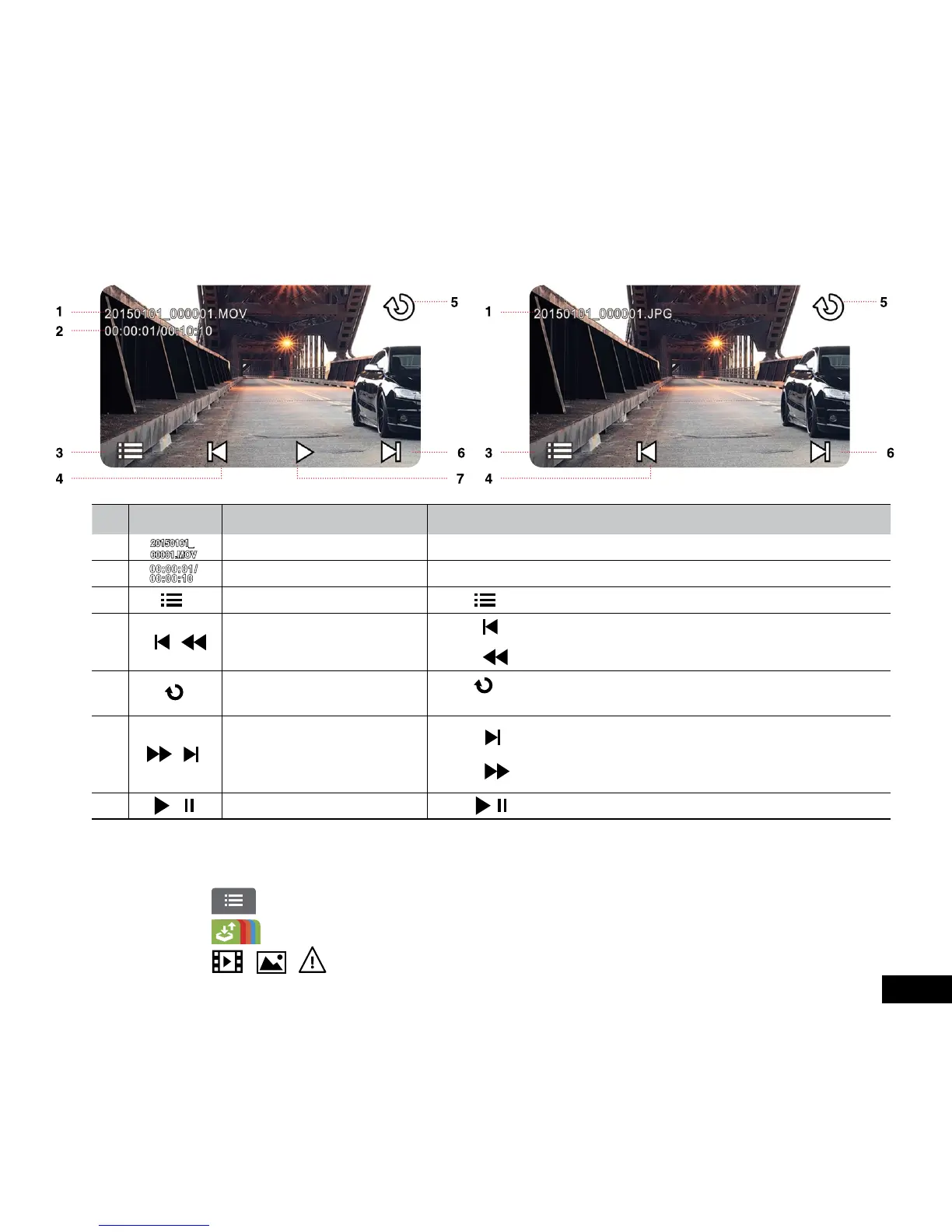
3.3.3 The Playback Screen
No. ICON ITEM DESCRIPTION
1 File Name Indicates name of current video or picture file.
2 Current Duration / Video Duration Indicates time code and duration of current video file.
3 Menu Touch to enter File Deletion menu.
4 / Fast Rewind / Previous File
• Touch when video or picture is not in playback to switch over to the
previous file.
• Touch in video playback mode to reverse the playback.
5 Return
Touch to return to preview screen of video or picture. Touch repetitively to
return to record screen.
6 / Fast forward / Next File
• Touch when video or picture is not in playback to switch over to the
next file.
• Touch in video playback mode to enable fast forward playing of video.
7 / Playback/ Pause Touch / to play or pause the video.
3.3.4 Deleting Files
To delete file(s), do the following:
1. Touch to enter the Main Menu
2. Touch to switch over to File / Position menu.
3. Touch / / to enter the Video/Picture/ Emergency function menu.


 To Next Page