8
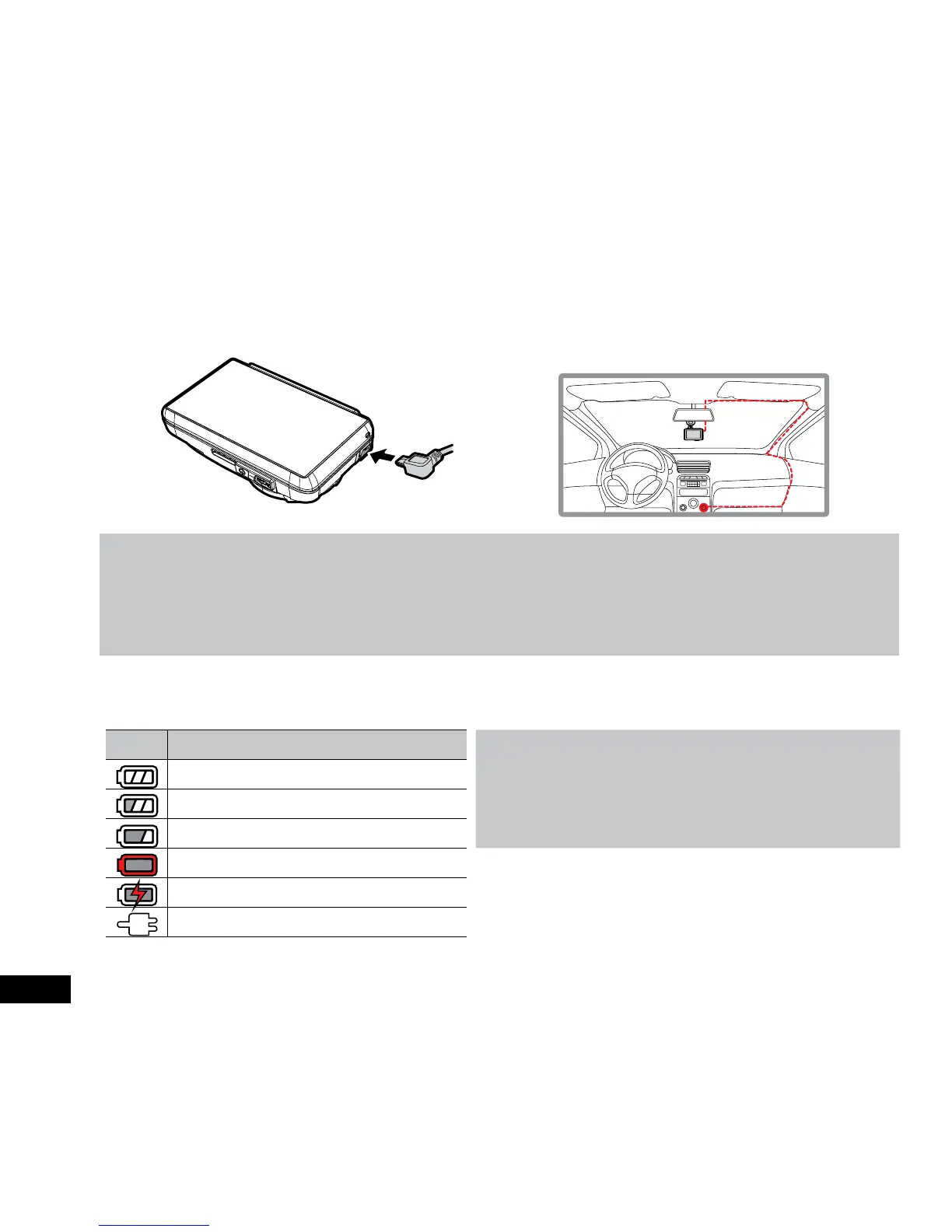
2.3 Connecting to Power
Use only the included charger to power the device and charge the built-in battery.
1. It is advised that the Car DVR is installed near the rear
view mirror, at the top centre of the windshield for optimal
operation.
2. Plug the other end of the car adapter to the cigarette
lighter socket of your vehicle. Once the vehicle engine is
started, the device automatically powers up.
Note:
1. This product contains functions such as LDWS (3.2.1) FCWS (3.2.2) and FCMD (3.2.3). Please refer to the alignment measures
given in these sections during their installation for improved accuracy.
2. The built in battery is designed for short use only to run parking mode when your vehicle is parked and the Car DVR is not
receiving power. The battery cannot power the device long term, for everyday use please ensure that the Car DVR is powered by
the included Charger.
Battery Status Indicator
ICON DESCRIPTION
Note:
Please take note if the environment temperature reaches 45°C
or above, the car adapter will supply power to device, but the
Lithium-ion battery will not charge. This is a characteristic of
Lithium-ion batteries and is not a malfunction.
Full battery power.
2/3 battery power.
1/3 battery power.
Low battery.
Battery charging.
Connect the car adapter to charge the battery.



 To Next Page