28
5. Installing the Software
You can customise the general settings via the on-screen display (OSD) menus.
1. Place the included CD ROM into the CD player of your computer.
2. If the CD does not execute automatically, please use Windows File Manager to execute the
Install_CD.exe file in the CD.
The screen (as pictured on the right) will be shown.
3. Click SuperCar to start the installation process and follow instructions on-screen.
Note:
1. If you do not have a CD reader on your computer, please visit www.kapturecam.com.au to download the Supercar software
directly from the product page.
2. The SuperCar software is only applicable to Windows operating systems however a Mac version is in development, please check
the product page at www.kapturecam.com.au periodically for software updates.
3. For ease of installation and smooth file playback it is recommended to copy the installation software and playback files to your
computer desktop before installation or media file playback.
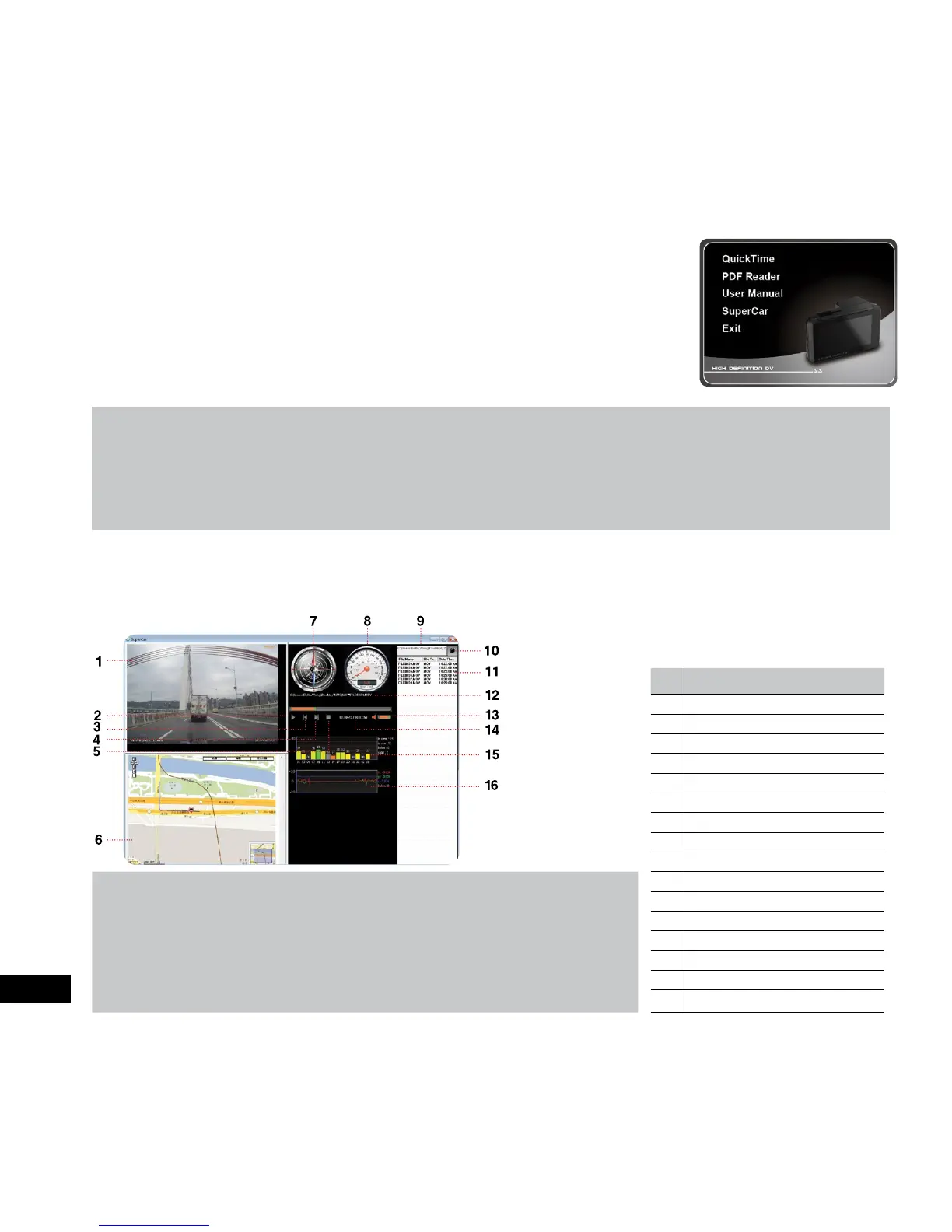
6. SuperCar File Viewing Software
You can view your (.MOV) video files on any computer video playback device like Windows Media Player or QuickTime. However
if you would like to view your video files in conjunction with live Google Maps and vehicle vital statistics like speed, direction or
G-Sensor you will need to view the files using the supplied SuperCar software. To load files, open the software and browse for the
file you wish to view.
No. ITEM
1
Video Player
2
Play / Pause
3
Previous
4
Next
5
Stop
6
Map
7
Compass
8
Speed Meter
9
File Path
Note:
1. To display the route on Google Maps, please make sure the internet is connected
before starting the video playback.
2. Video files (MOV / TS) and GPS/G-Sensor files (NMEA) must be stored in the same
folder before starting the playback.
3. The SuperCar software is only applicable to a Windows operating systems however a
Mac version is in development, please check the product page at
www.kapturecam.com.au periodically for software updates.
10
Browser File
11
File List
12
File Name
13
Volume
14
Current Duration / Total Duration
15
Signal Noise Ratio (SNR)
16
G-Sensor



 To Next Page