EasyManua.ls Logo

Kasda KW52283 - Wireless Setting; Basic

Kasda KW52283
44 pages
Print Icon
To Next Page IconTo Next Page
To Previous Page IconTo Previous Page
Loading...
WLAN VDSL Gateway User Manual
29
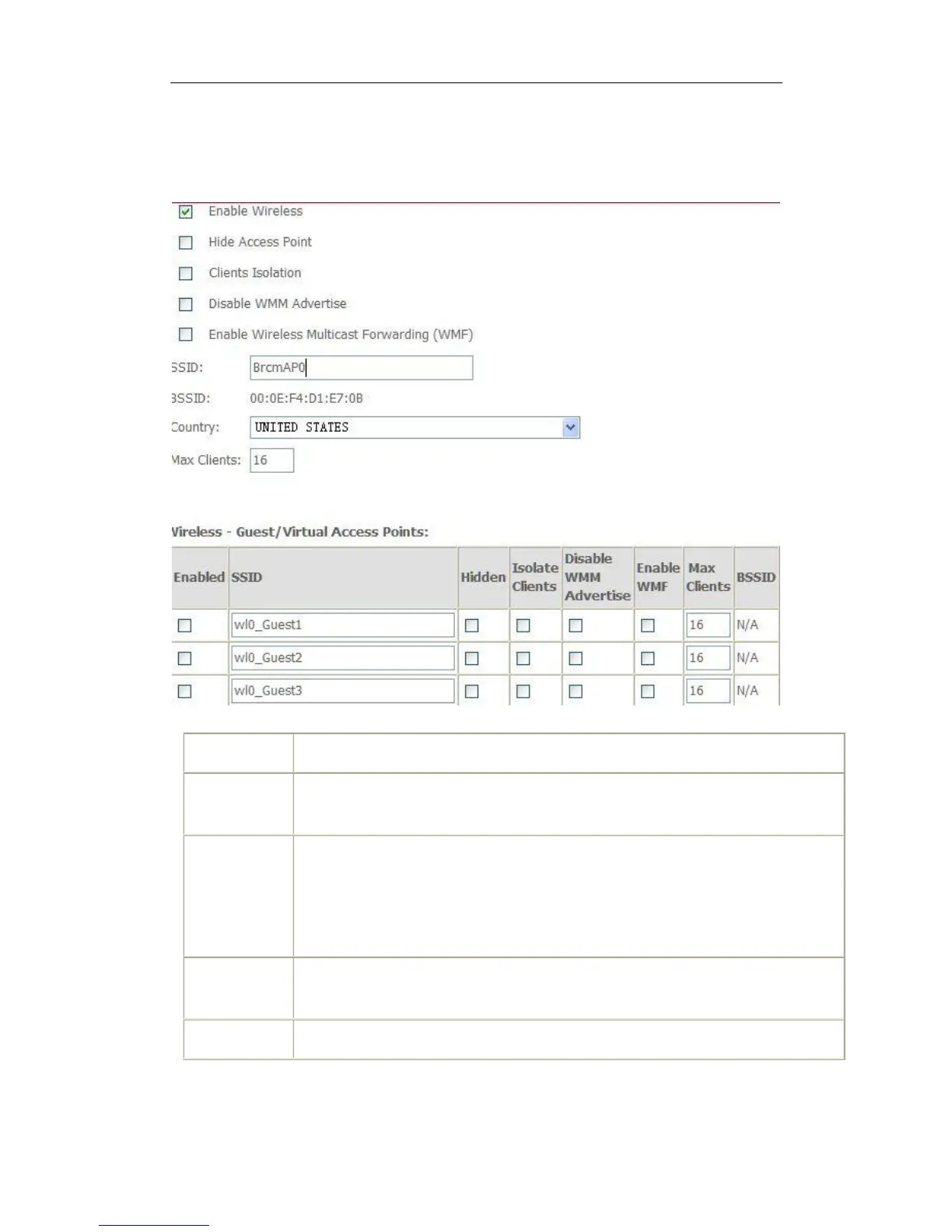
5.3 Wireless setting
5.3.1 Basic
Option
Description
Enable
wireless
A checkbox that enables or disables the wireless LAN interfaces. The default
is to enable wireless communications.
Network
name (SSID)
Enter a name for user’s wireless network here. SSID stands for Service Set
Identifier. This name must be between 1 and 32 characters long. All wireless
clients must either detect the gateway or be configured with the correct SSID to
access the Internet.
BSSID
Displays the gateway's wireless MAC address. (User may need this address
if user is using WDS or multiple gateways.) Click Apply to save changes.
Country
Drop-down menu that allows selection of specific channel.

Related product manuals