RECORDING YOUR PERFORMANCE
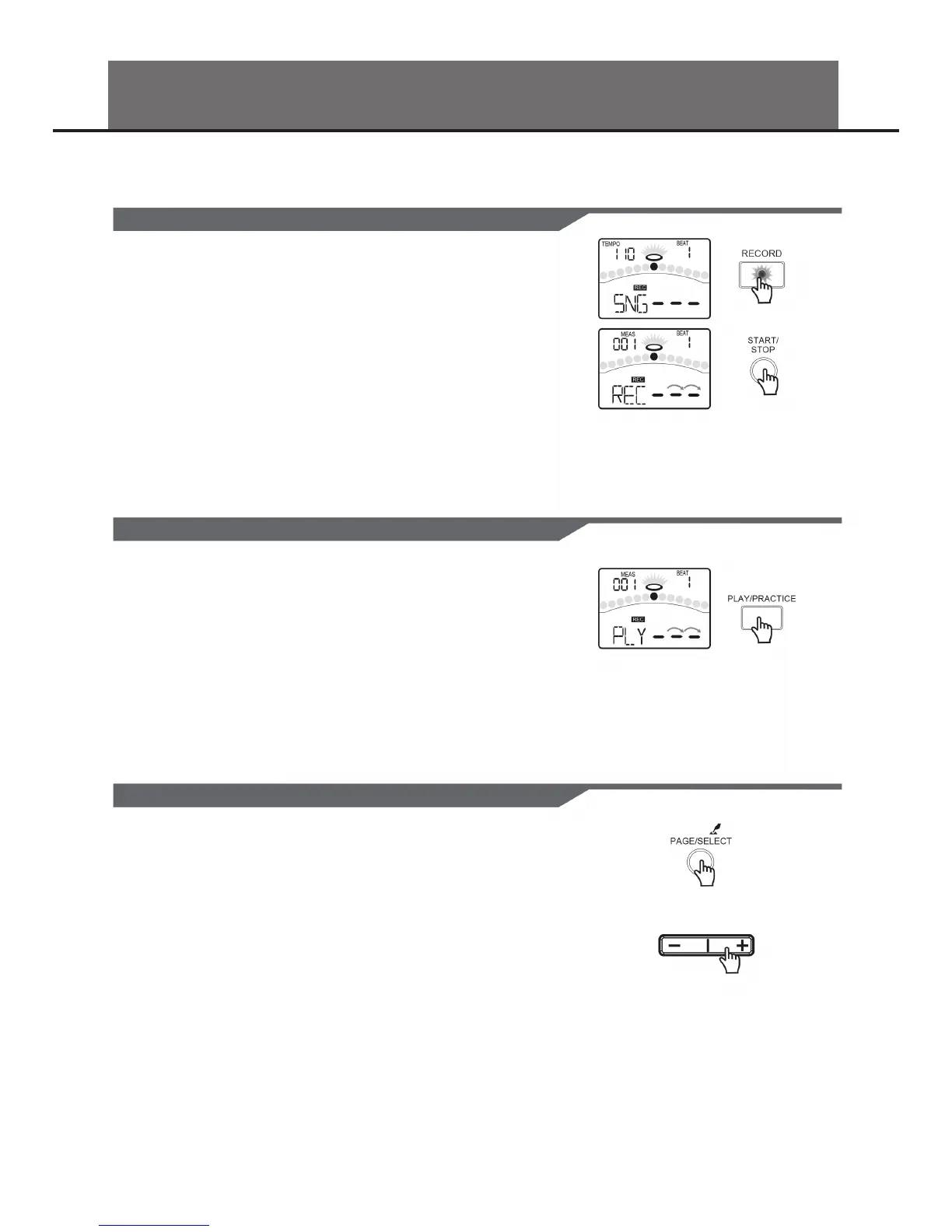
1. Press the [RECORD] button.
The [RECORD] LED will ash. The Metronome will be turned on automatical-
ly.
The display will show:
2. Press the [START/STOP] button or strike the pad. Recording will start. The
[RECORD] LED will turn on.
3. Press the [START/STOP] button again, or press the [RECORD] button.
Stop recording, the [RECORD] LED will turn o. Your performance has been
recorded.
RECORDING YOUR PERFORMANCE QUICKLY
IN RECORD MENU, YOU CAN RECORD PAD PERFORMANCES AND THE SONG AS ACCOMPANIMENT.
1. Press the [PLAY] button.
Play back your recording.
The display will show:
2. Press the [PLAY] button again.
Stop playing back your performance.
If you are not satised with your recording, please press the [RECORD] button to
restart the recording progress.
You can make the settings for recording on Record Standby.
1. Press the [PAGE] button.
Select the Record Setting pages.
2. Press the [ - ] or [ + ] button.
Adjust the parameters about recording.
For details on record setting, refer to Advanced Use.
PLAYING BACK YOUR RECORDED PEFORMANCE
MAKING THE SETTINGS FOR RECORDING
12


 To Next Page