PERFORMING
SELECTING A DRUM KIT
PLAYING THE PADS
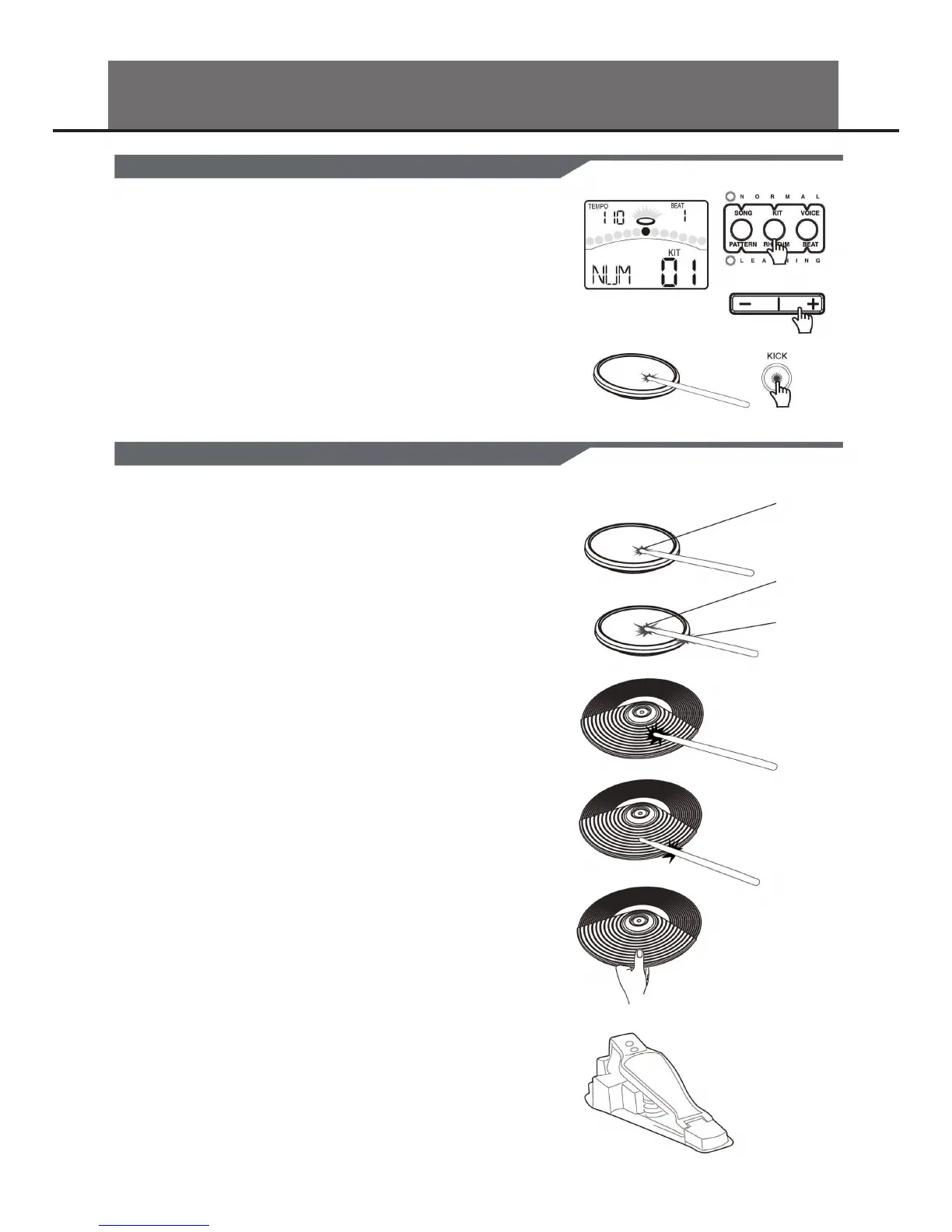
After powering up, the digital drum will be in KIT menu (KIT indicator
ON). The display should look like this:
1. Use the [ - ] and [ + ] buttons to select the active kit. There are 45 kits in the
digital drum:
• 45 preset kits (Kits 01-45)
• 25 user kits (Kits 46-70), the parameter display area will display as
“U46-U70” with an additional letter “U”.
2. Pressing the Pad Select buttons allows you to preview the current kit (xed
velocity).
3. Hit the pads to play the current kit.
Similar to an acoustic drum kit, the digital drum responds dierently to vari-
ous playing techniques and dynamics. All the pads are velocity sensitive. And
some voices change timbre depending on the striking force.
DRUM PAD HEAD OR RIM SHOT
The digital drum pad detects head and rim shots (rim shots trigger the rim
voice).
CYMBAL TRIGGER AREAS
The digital drum crash cymbals detect Bow and Edge triggering. Both crash
cymbals detect cymbal edge choke as well. Choking the crash edge with the
hand immediately after striking the crash will mute the crash sound. The ride
cymbal detects Bow triggering and bell triggering. The edge is not active
and does not have the choke function. The Hi-hat detects bow triggering but
does not have a choke function.
HIHAT: The Hi-Hat sound varies depending on the posi-
tion of the Hi-Hat pedal:
OPEN HIHAT: Strike the Hi-Hat pad without pressing the pedal.
HALFOPEN HIHAT: Strike the Hi-Hat pad with the pedal pressed
halfway down.
CLOSED HIHAT: Strike the Hi-Hat pad with the pedal pressed
completely down.
PEDAL CLOSE: Press the pedal completely down without strik-
ing the pad.
SPLASH: Press the pedal completely down and release it
immediately.
HEAD
HEAD
RIM
8


 To Next Page